
Creating one
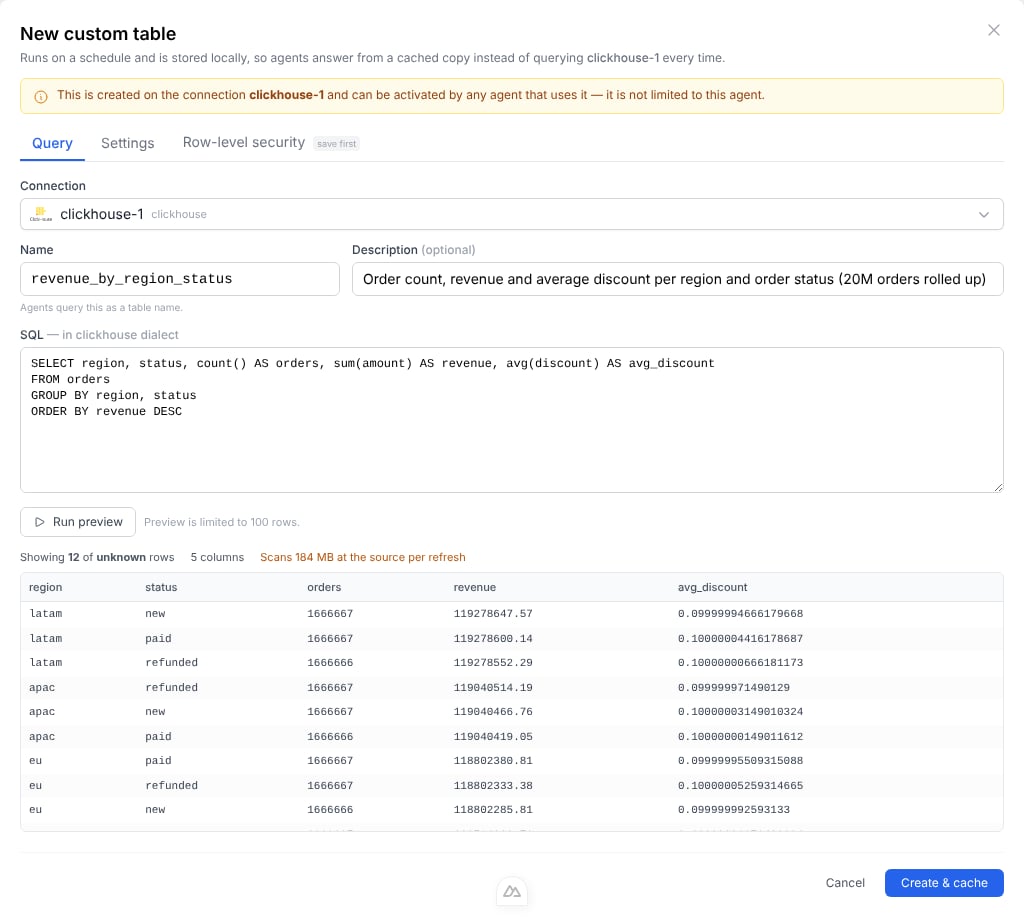
Open an agent’s tables page and choose Custom table. The New custom table dialog has three tabs; Create & cache saves the query and runs its first refresh.Query
Give the relation a name and write the SQL in the source’s own dialect — this is the query BOW runs against your database. The name is what agents will see, sorevenue_by_region beats q1. It must start with a letter or underscore, use only letters, digits and underscores, and stay under 64 characters.
Preview runs the query bounded to 100 rows and shows the columns you will get. Your SQL is executed exactly as written rather than wrapped in a subquery, so a preview of ORDER BY amount DESC shows the rows you actually asked for.
Where the source can say in advance what a query will cost, the preview shows that too — BigQuery reports it exactly and for free, via a dry run — along with a projection of what the schedule you have chosen will scan per day.
On ClickHouse the figure comes from EXPLAIN ESTIMATE, which reports how many rows the query will read without running it. ClickHouse reports rows, not bytes, so BOW prices those rows at the table’s compressed size per row. That counts every column, so treat it as an upper bound: a query reading two columns of a wide table scans less.
Settings
Choose the refresh schedule — either every N minutes, or daily at a fixed time in your organization’s timezone. This tab also holds manual refresh and delete.Row-level security
Available once the query is saved. See Row-level security.Choosing a schedule
The schedule is a cost decision, not a freshness preference. Each fire is a full run of your SQL against the source.
If the answer to “how often will anyone ask this?” is “rarely”, a daily refresh is almost always right.
On ClickHouse Cloud, also count wake-ups: every refresh wakes an idle service and keeps it awake until its idle timeout. Four refreshes a day is four wake-ups; an hourly schedule keeps the service up most of the day whether anyone asks or not. See the break-even.
Activating it for an agent
A custom query belongs to the connection, and one copy is shared by every agent that uses it. Each agent then activates it separately, from its tables page — new agents start with it off.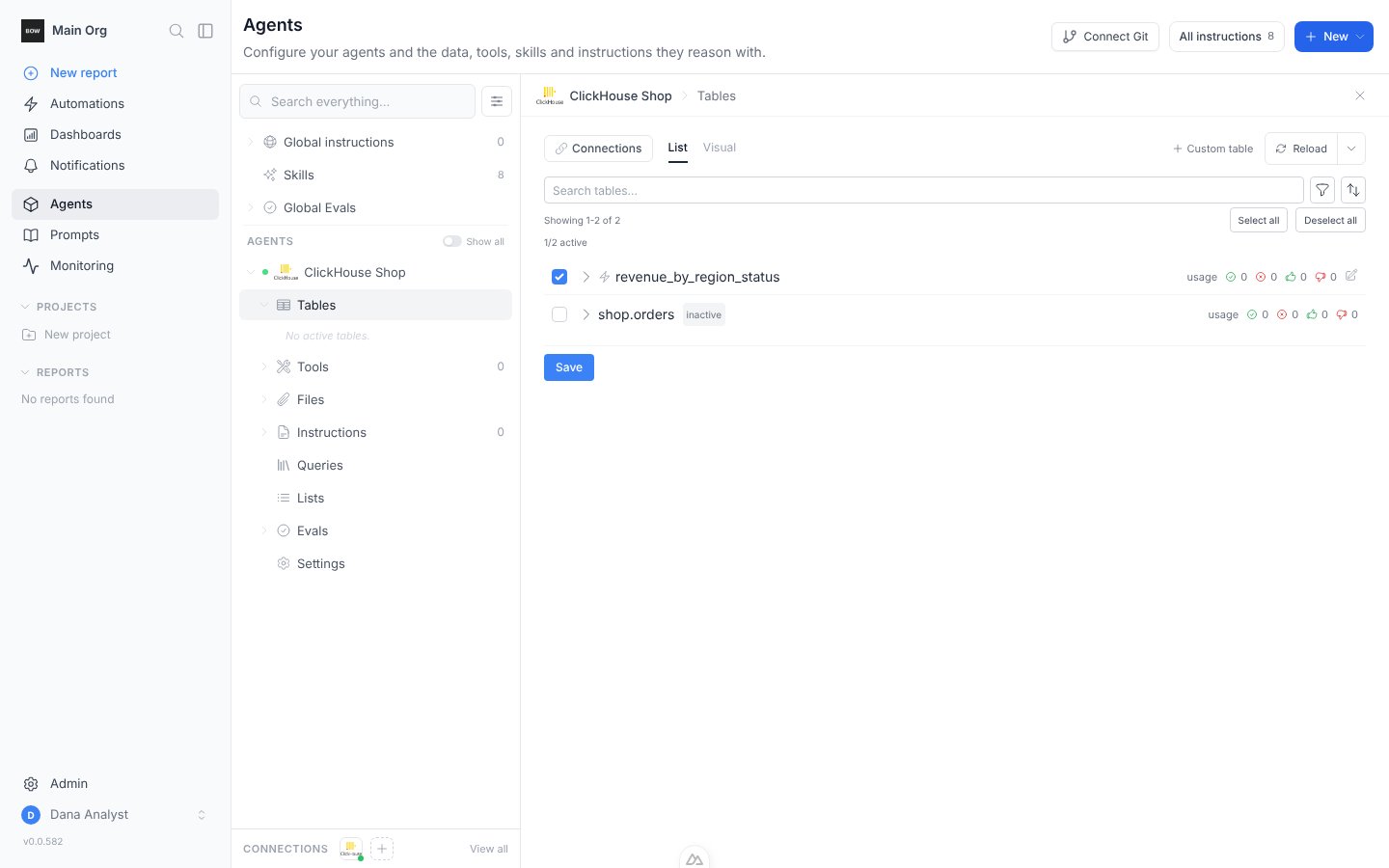
manage_connection on the connection, while switching an existing query on for one agent needs only manage on that agent.
What the agent sees
The cached relation appears on a companion connection named<your connection>::fast, and it speaks DuckDB SQL regardless of what the underlying source supports. Joins, CTEs, and window functions work against a cached rollup exactly as they would against Postgres.
The agent is told the relation is cached, is asked to prefer it over re-deriving the same figures from raw tables, and is given two timestamps:
- as of — when the copy was last refreshed
- next refresh — when it refreshes next
Safeguards
An admin can writeSELECT * FROM orders against a two-billion-row table. Three independent layers stop that taking anything down:
1
Refuse before running
Where the source can estimate a query without executing it, the estimate is checked at save time and before every refresh. A query projected to blow a ceiling is rejected with the reason.
2
Never materialize in memory
Rows stream from the source in batches straight into the copy, so memory use does not grow with result size.
3
Hard ceilings with a clean abort
On a breach the partial copy is discarded and the previous one keeps serving, so a runaway refresh degrades to stale data rather than no data.
The scan ceiling is deliberately far larger than the result ceiling. A rollup that reads 50 GB to produce 5,000 rows is the best kind of custom query, not one to refuse — that ceiling exists to catch a refresh that quietly costs real money every hour.
Only one refresh runs at a time per connection, and a refresh that is aborted or times out asks the source to stop the statement rather than abandoning it to run on unattended.
Refresh status
Each custom query records the outcome of its last refresh — success, failure with the error, or in progress — along with how long it took and how many rows it produced. A failed refresh does not remove the previous copy; agents keep answering from the last good one until a refresh succeeds.Related
Overview
What BOW Fast is for, what it costs, and which connectors support it.
Row-level security
Filter one shared copy per person.