
What to teach
- Start from real questions. Collect 10 to 20 questions people actually ask. Ask each one in Chat, and train on the answers that came back wrong. Training the whole schema up front costs time and teaches rules nobody needs.
- Teach what the schema can’t say. The agent already reads table and column names. Teach the rest: business definitions (“an active customer bought in the last 90 days”), what codes and statuses mean, which table is the source of truth, and known gaps in the data.
- Let the data teach structure, and you teach procedure. Ask the agent to sample rows and find relationships itself. It can’t learn from the data what to check first when something breaks, or which source to trust when two disagree. Write those steps yourself. Root cause analysis across observability tools shows both in one agent.
- Write down the traps. Joins that double-count, test accounts, timezone quirks, deprecated columns. One rule here prevents many wrong answers.
Write rules the agent can follow
- One rule per instruction. “When the user asks about revenue, use
invoice_items.unit_price * quantityand exclude refunds” is easy to test and easy to fix. A page of mixed rules is neither. - Be concrete. Name the table, column, value and formula. “Use the normal revenue” leaves the agent guessing.
- Say why. “Exclude
is_test = true, because QA accounts inflate counts” helps the agent handle cases the rule didn’t spell out. - Keep facts out of rules. “Order 1234 was refunded” is a fact about one row, not a rule. Training won’t save it, and it belongs in the data, a List, or a saved query.
Put each rule in the right place
Every instruction has a few settings at the bottom of the editor. Three of them decide where and when a rule applies.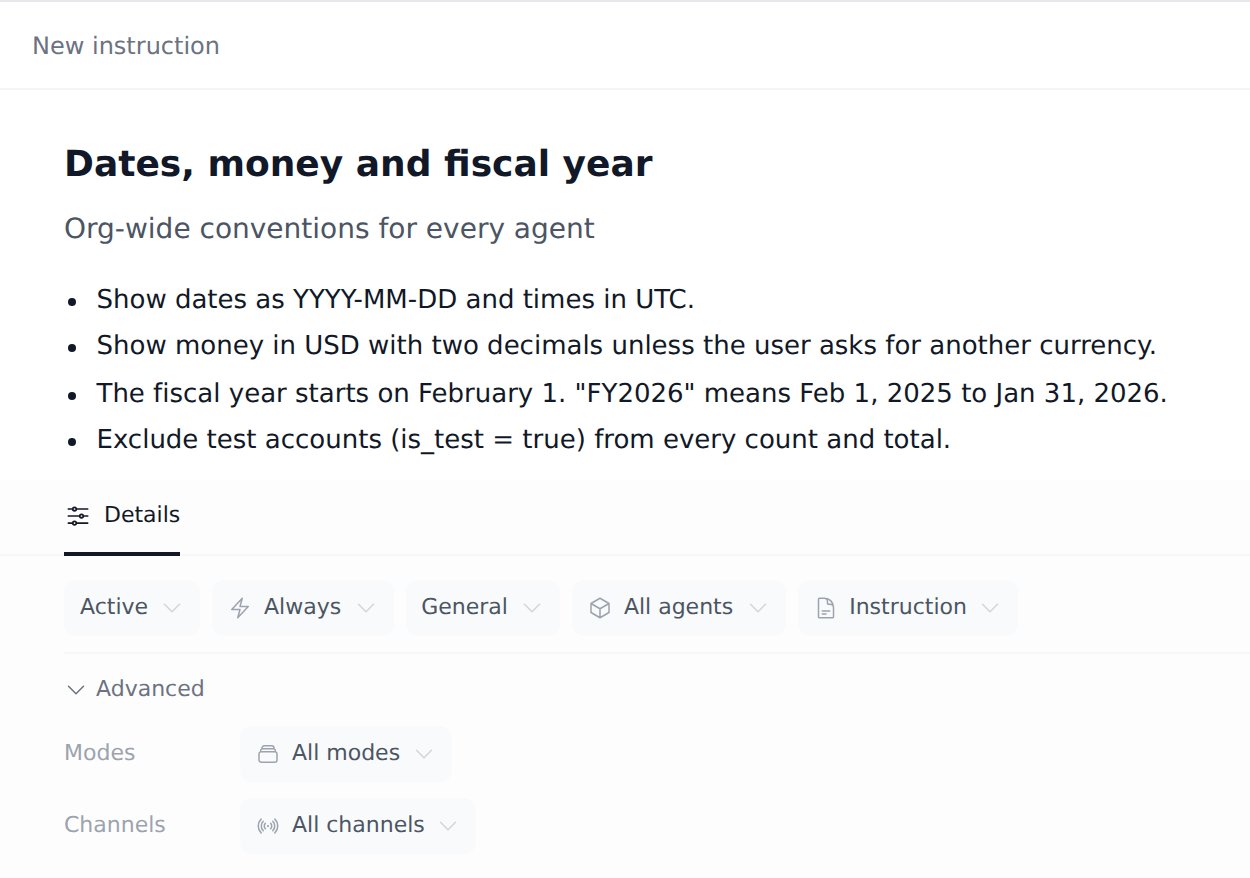
- Agents. Leave it on All agents for conventions every agent should follow, such as date formats, the fiscal year, currency and answer style. These show under Global instructions on the Agents page. Pick specific agents for knowledge about their data. A simple test: if the rule would also be true for another agent’s data, make it global.
- Load mode. Always sends the rule with every request. Use it for rules that must never be missed. Smart loads the rule only when it’s relevant to the question. Use it for reference knowledge that only matters sometimes, so it doesn’t crowd out the rules that matter.
- Instruction or Skill. An Instruction is a rule. A Skill is a longer procedure, such as a step-by-step playbook. The agent sees each skill’s title and description, and reads the full text only when the task calls for it. Give a skill a description that says when to use it (“Use when investigating an alert or incident”).
Keep it working
- Lock rules in with evals. For each rule you care about, add an eval question that only passes when the rule is followed. When a later change breaks it, the eval fails. See Test an agent with evals.
- Train from failures. Once a week, start a training session with Show Negative Feedback Responses or Show Low Confidence Responses, and fix the patterns it finds.
- Retrain when the data changes. New tables, renamed fields and new sources make old rules wrong. A short session that starts with “Inspect what changed in the orders schema since last month” is usually enough.
- Give each agent an owner. One person who reviews proposed changes and decides what goes live keeps the rules consistent.
- Accept changes deliberately. Proposed changes stay drafts until someone accepts them, and every accepted change is kept in the agent’s history. Read each change before you accept it, and roll back if an answer gets worse.
Related
Train an agent
Run a training session from start to finish.
Instructions and knowledge
How instructions are scoped, loaded and reviewed.
Test an agent with evals
Write test questions that catch regressions.
Root cause analysis
Train one agent across Elasticsearch, Prometheus, Kubernetes and Splunk.