
Why Manage Instructions as Code?

Your analytics knowledge—business definitions, calculation formulas, SQL patterns—shouldn’t live in a UI or people’s heads. Treating instructions as code brings the same rigor you use for data pipelines:
  • Version control: Full history of what changed, when, and why
  • Code review: Team members review instruction changes before they go live
  • Automated testing: Run evals on every PR to catch regressions
  • Single source of truth: Documentation stays in sync with your data models
  • Collaboration: Data engineers, analysts, and AI work from the same definitions
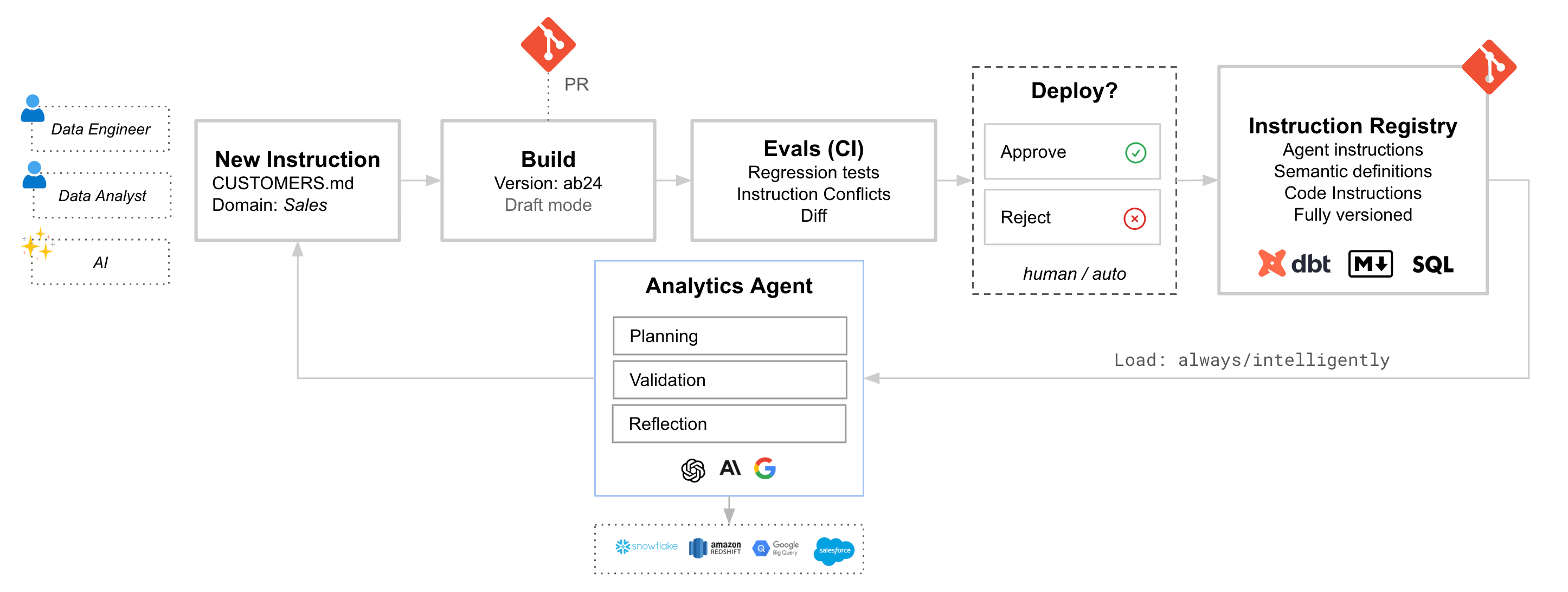
If you already manage dbt models, LookML, or documentation in Git, Bow fits right into that workflow. Your existing docs become instructions automatically. Git Workflow

Connecting a Repository

Connect your Git repository in Data Sources. Bow supports:
SourceDefault Load Mode
Markdown files (.md)Always
dbt models, metrics, sourcesIntelligent
dbt seedsIntelligent
dbt macros, testsDisabled
LookML views, models, exploresIntelligent

Repository Settings

SettingDescription
BranchWhich branch to sync from
Auto PublishAutomatically approve synced instructions
Default Load ModeAuto, Always, Intelligent, or Disabled

Writing Instructions in Markdown

Create .md files in your repository with YAML frontmatter to control how Bow loads them.

Basic Example

---
alwaysApply: true
references:
  - customers
  - orders
---

# Customer Lifetime Value

CLV = SUM(order_total) WHERE customer_id = X AND status = 'completed'
Use 12-month lookback window from analysis date.

Frontmatter Options

FieldTypeDescription
alwaysApplybooleantrue → Load mode = Always, false → Intelligent
referenceslistTables/views this instruction references
statusstringpublished (default), draft, archived
categorystringgeneral, code, data_modeling, visualizations

Git CI/CD Integration

Automate your instruction workflow: create instructions in Git, run evals on PR, and deploy on merge.

Prerequisites

  1. Git Repository connected to Bow with a Personal Access Token (PAT)
  2. API Key from Bow Settings → API Keys
  3. Test Suite with test cases configured in Bow

API Reference

EndpointMethodDescription
/git/{repo_id}/syncPOSTSync a branch → creates DRAFT build
/tests/runs/batchPOSTRun evals against a build
/tests/runs/{run_id}/statusGETGet eval results
/builds/{build_id}/publishPOSTPublish build to main
Base API URL should be with /api suffix. i.e https://app.bagofwords.com/api

GitHub Actions Setup

1. Add Repository Secrets

SecretDescription
BOW_API_KEYYour Bow API key
BOW_REPO_IDGit repository ID from Bow
BOW_SUITE_IDTest suite ID for evals

2. Add Repository Variable

VariableDescription
BOW_API_URLYour Bow instance URL (e.g., https://app.bagofwords.com/api)

3. Create Workflow File

Create .github/workflows/bow.yml:
name: Bow CI/CD

on:
  pull_request:
    paths:
      - '**/*.md'
      - 'bow/**'
  push:
    branches: [main]
    paths:
      - '**/*.md'
      - 'bow/**'

env:
  BOW_API_URL: ${{ vars.BOW_API_URL }}
  BOW_REPO_ID: ${{ secrets.BOW_REPO_ID }}
  BOW_API_KEY: ${{ secrets.BOW_API_KEY }}

jobs:
  # ============================================
  # On Pull Request: Sync + Run Evals
  # ============================================
  test:
    if: github.event_name == 'pull_request'
    runs-on: ubuntu-latest
    steps:
      - name: Sync branch to Bow
        id: sync
        run: |
          echo "Syncing branch '${{ github.head_ref }}' to Bow..."
          RESPONSE=$(curl -sf -X POST "$BOW_API_URL/git/$BOW_REPO_ID/sync" \
            -H "Authorization: Bearer $BOW_API_KEY" \
            -H "Content-Type: application/json" \
            -d '{"branch": "${{ github.head_ref }}"}')
          
          BUILD_ID=$(echo $RESPONSE | jq -r '.build_id')
          BUILD_NUM=$(echo $RESPONSE | jq -r '.build_number')
          echo "build_id=$BUILD_ID" >> $GITHUB_OUTPUT
          echo "✅ Created draft build #$BUILD_NUM"

      - name: Run evals
        id: evals
        run: |
          echo "Starting evals against build ${{ steps.sync.outputs.build_id }}..."
          
          # Start test run
          RUN_RESPONSE=$(curl -sf -X POST "$BOW_API_URL/tests/runs/batch" \
            -H "Authorization: Bearer $BOW_API_KEY" \
            -H "Content-Type: application/json" \
            -d '{
              "suite_id": "${{ secrets.BOW_SUITE_ID }}",
              "build_id": "${{ steps.sync.outputs.build_id }}",
              "trigger_reason": "github_pr"
            }')
          
          RUN_ID=$(echo $RUN_RESPONSE | jq -r '.id')
          echo "run_id=$RUN_ID" >> $GITHUB_OUTPUT
          
          # Poll for completion
          echo "Waiting for evals to complete..."
          while true; do
            STATUS_RESPONSE=$(curl -sf "$BOW_API_URL/tests/runs/$RUN_ID/status" \
              -H "Authorization: Bearer $BOW_API_KEY")
            
            STATUS=$(echo $STATUS_RESPONSE | jq -r '.run.status')
            
            if [[ "$STATUS" == "completed" || "$STATUS" == "failed" ]]; then
              PASSED=$(echo $STATUS_RESPONSE | jq -r '.run.summary_json.passed // 0')
              FAILED=$(echo $STATUS_RESPONSE | jq -r '.run.summary_json.failed // 0')
              echo "passed=$PASSED" >> $GITHUB_OUTPUT
              echo "failed=$FAILED" >> $GITHUB_OUTPUT
              break
            fi
            
            sleep 10
          done

      - name: Post results to PR
        uses: actions/github-script@v7
        with:
          script: |
            const passed = '${{ steps.evals.outputs.passed }}';
            const failed = '${{ steps.evals.outputs.failed }}';
            const buildId = '${{ steps.sync.outputs.build_id }}';
            const status = failed > 0 ? '❌' : '✅';
            
            github.rest.issues.createComment({
              owner: context.repo.owner,
              repo: context.repo.repo,
              issue_number: context.issue.number,
              body: `## ${status} Bow Eval Results\n\n| Passed | Failed |\n|--------|--------|\n| ${passed} | ${failed} |\n\n[View in Bow](${process.env.BOW_API_URL}/evals?build=${buildId})`
            });

      - name: Fail if evals failed
        if: steps.evals.outputs.failed > 0
        run: exit 1

  # ============================================
  # On Merge to Main: Publish Build
  # ============================================
  publish:
    if: github.event_name == 'push' && github.ref == 'refs/heads/main'
    runs-on: ubuntu-latest
    steps:
      - name: Get build for merged branch
        id: get_build
        run: |
          # Get the most recent draft build from git source
          RESPONSE=$(curl -sf "$BOW_API_URL/builds?status=draft&limit=1" \
            -H "Authorization: Bearer $BOW_API_KEY")
          
          BUILD_ID=$(echo $RESPONSE | jq -r '.items[0].id')
          
          if [[ "$BUILD_ID" == "null" || -z "$BUILD_ID" ]]; then
            echo "No draft build found to publish"
            exit 0
          fi
          
          echo "build_id=$BUILD_ID" >> $GITHUB_OUTPUT

      - name: Publish build
        if: steps.get_build.outputs.build_id
        run: |
          echo "Publishing build ${{ steps.get_build.outputs.build_id }}..."
          curl -sf -X POST "$BOW_API_URL/builds/${{ steps.get_build.outputs.build_id }}/publish" \
            -H "Authorization: Bearer $BOW_API_KEY"
          echo "✅ Build published to main"

How It Works

On PR Open/Update

  1. Sync: POST /git/{repo_id}/sync pulls your branch and creates a draft build
  2. Eval: POST /tests/runs/batch runs your test suite against the draft build
  3. Report: Results are posted as a PR comment

On PR Merge

  1. Publish: POST /builds/{build_id}/publish promotes the draft build to main
  2. Your instructions are now live in Bow

Unlinking from Git

If you need to modify a Git-synced instruction directly in Bow:
  1. Edit the instruction in Bow
  2. Save changes
  3. Confirm “Unlink from Git” when prompted
The instruction becomes user-owned and will no longer sync from the repository.