> ## Documentation Index
> Fetch the complete documentation index at: https://docs.bagofwords.com/llms.txt
> Use this file to discover all available pages before exploring further.
# Sub-agents
> The agent delegates independent sub-questions to bounded background sub-agents that investigate on their own and report back as typed records in one turn.
When a question splits into several independent sub-questions, the agent can hand each one to a **sub-agent**: a bounded background run of the same agent, over the same data, with one self-contained goal. The sub-agents work in parallel while you keep chatting. When the last one finishes, the agent gets all their records in a single turn and writes the answer from them.
The first use is root cause analysis. Ask *why paid orders dropped* and the agent confirms the symptom, launches one sub-agent per candidate cause, and comes back with the cause that holds up, the evidence, and the causes it ruled out.
**Sub-agents** is on by default and admins can turn it off or tune it in [AI Settings](/using-bow/settings#sub-agents). A sub-agent is not a separate agent from the **Agents** page: it is the agent you are talking to, running a narrower task in the background.
## When the agent delegates
With the default **proactive** posture, the agent delegates on its own when a request splits into three or more independent sub-questions that each need several steps: one hypothesis per candidate cause in a root cause ask, or the same deep check across many sources. It never delegates a single query or a "how many" question.
With the **explicit** posture, it delegates only when you or an [instruction](/agents/instructions) ask for it, for example *test these causes in parallel*.
The agent launches all the sub-agents of one decision together. That batch is a **wave**; the report shows it as one line above the agent's message.
## What you see
### While sub-agents run
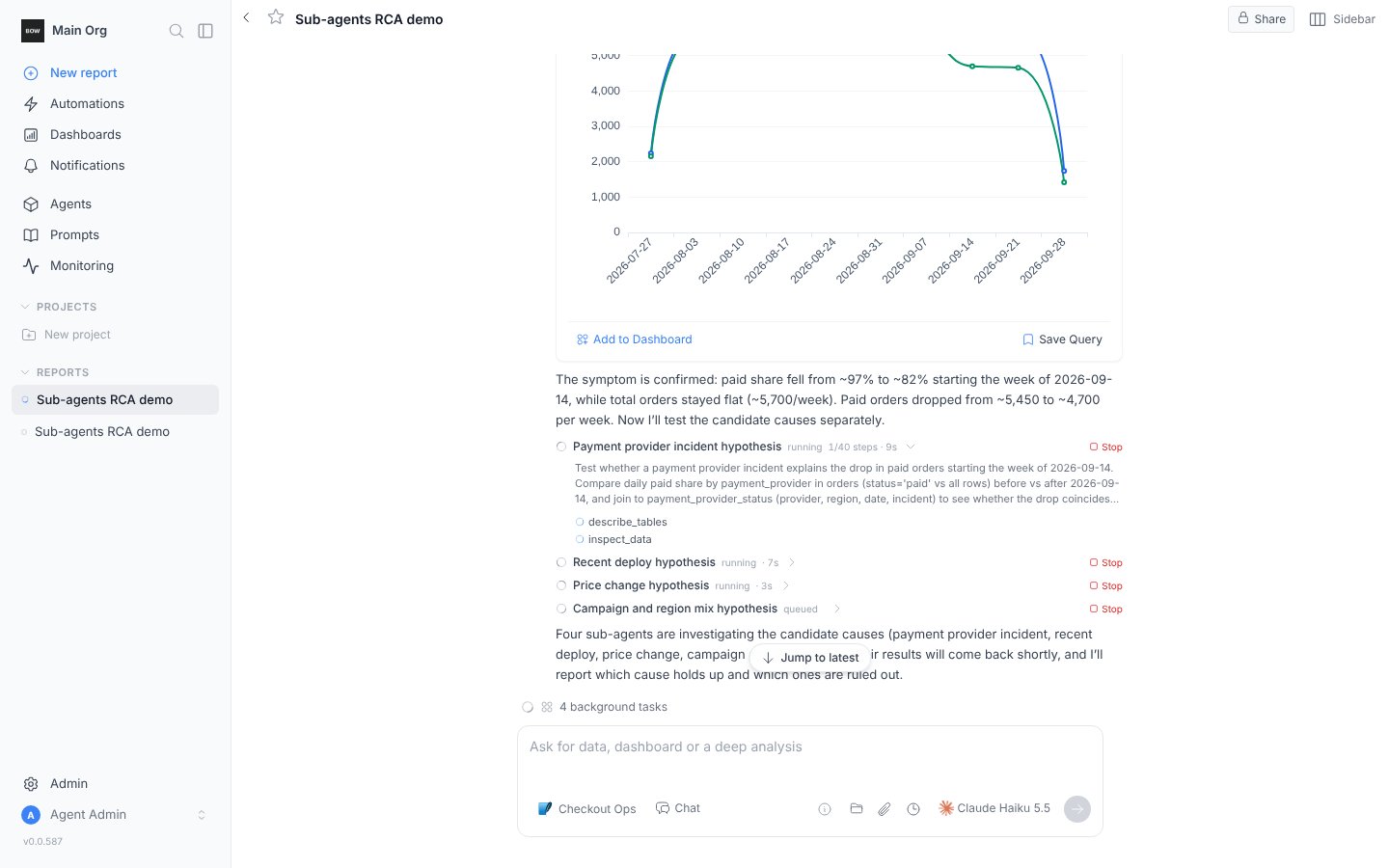
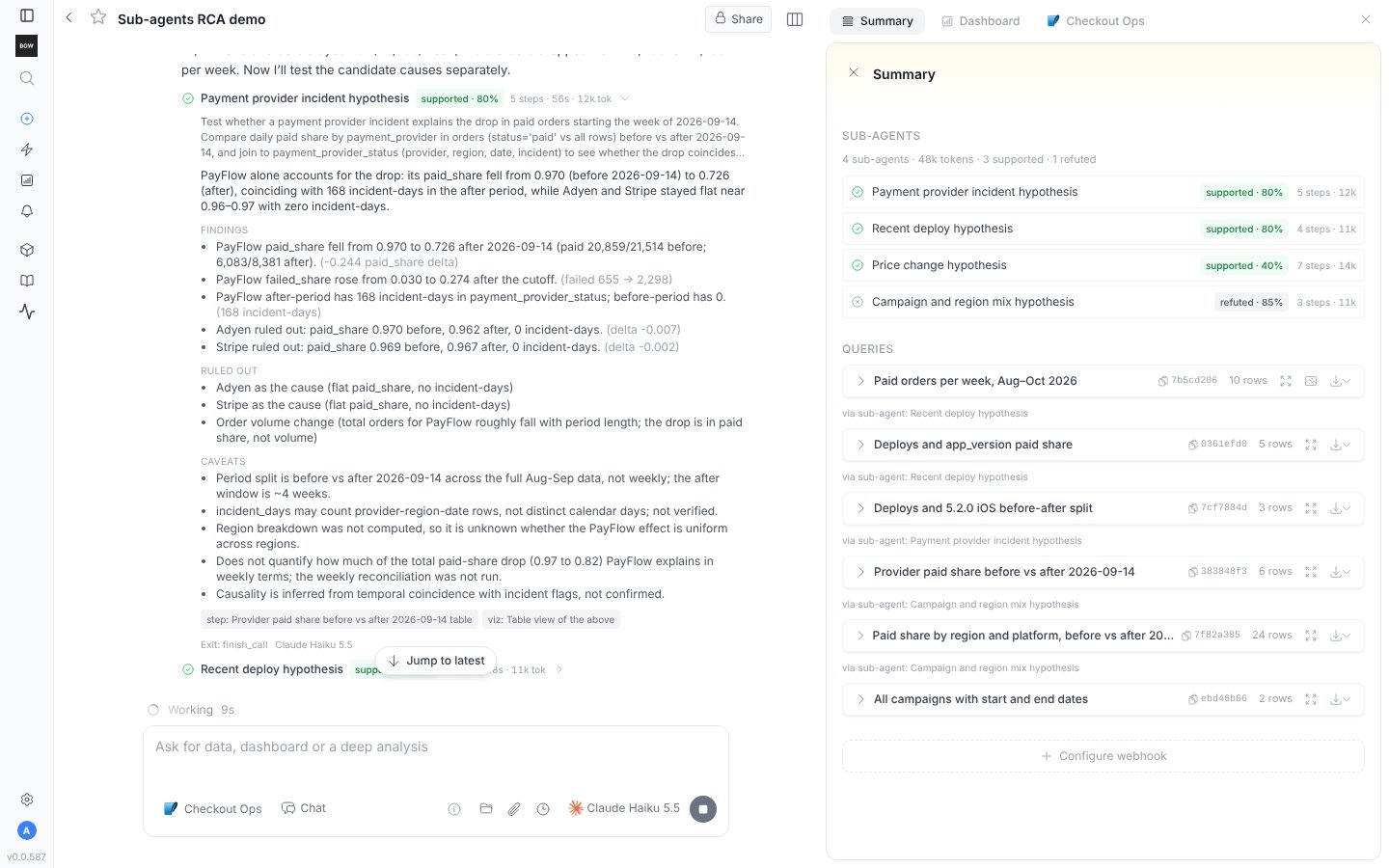
Each sub-agent is a card in the agent's message with its title, its status, how many steps it has taken of its limit, and how long it has been running. Open a card to read the goal the agent gave it and watch its tool calls as they happen. **Stop** on a card ends that sub-agent; **Stop all** on the wave line ends the wave.
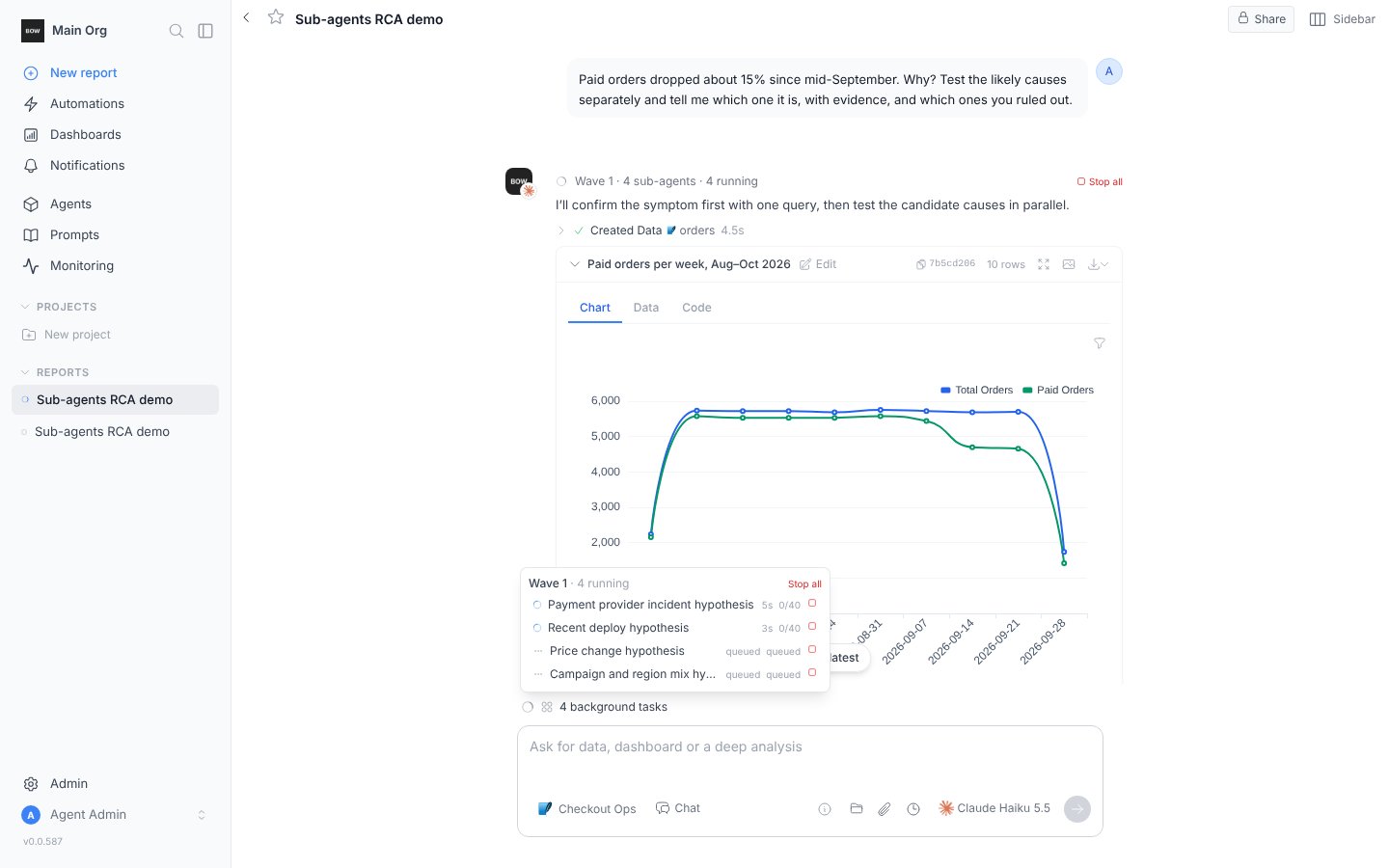
 The status row above the prompt box shows how many **background tasks** are running, whether or not the agent itself is working. Hover it for a popover with every sub-agent, its live duration and step count, a stop button per row and **Stop all**.
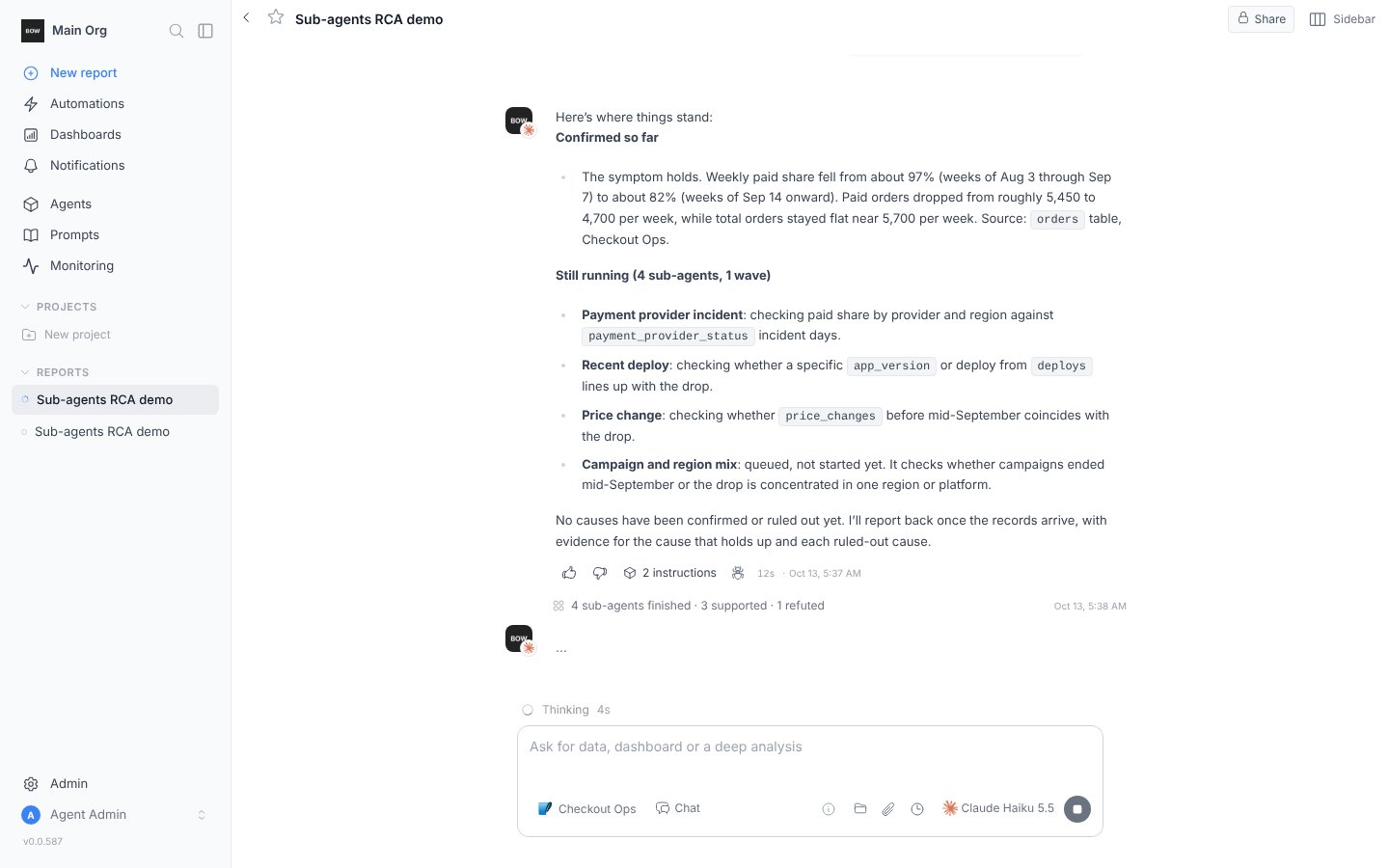
 You can keep chatting. A question asked mid-wave is answered right away from what the sub-agents have reported so far, and the status row shows both the agent working and the background tasks.
### When they finish
An event line reports the wave: how many sub-agents finished and their outcomes. Right after it, the agent's reply synthesizes the records: the answer, the numbers behind it, what was ruled out, and what stayed open. If the wave hit its deadline, the line says so and the reply works from the records that exist.
You can keep chatting. A question asked mid-wave is answered right away from what the sub-agents have reported so far, and the status row shows both the agent working and the background tasks.
### When they finish
An event line reports the wave: how many sub-agents finished and their outcomes. Right after it, the agent's reply synthesizes the records: the answer, the numbers behind it, what was ruled out, and what stayed open. If the wave hit its deadline, the line says so and the reply works from the records that exist.
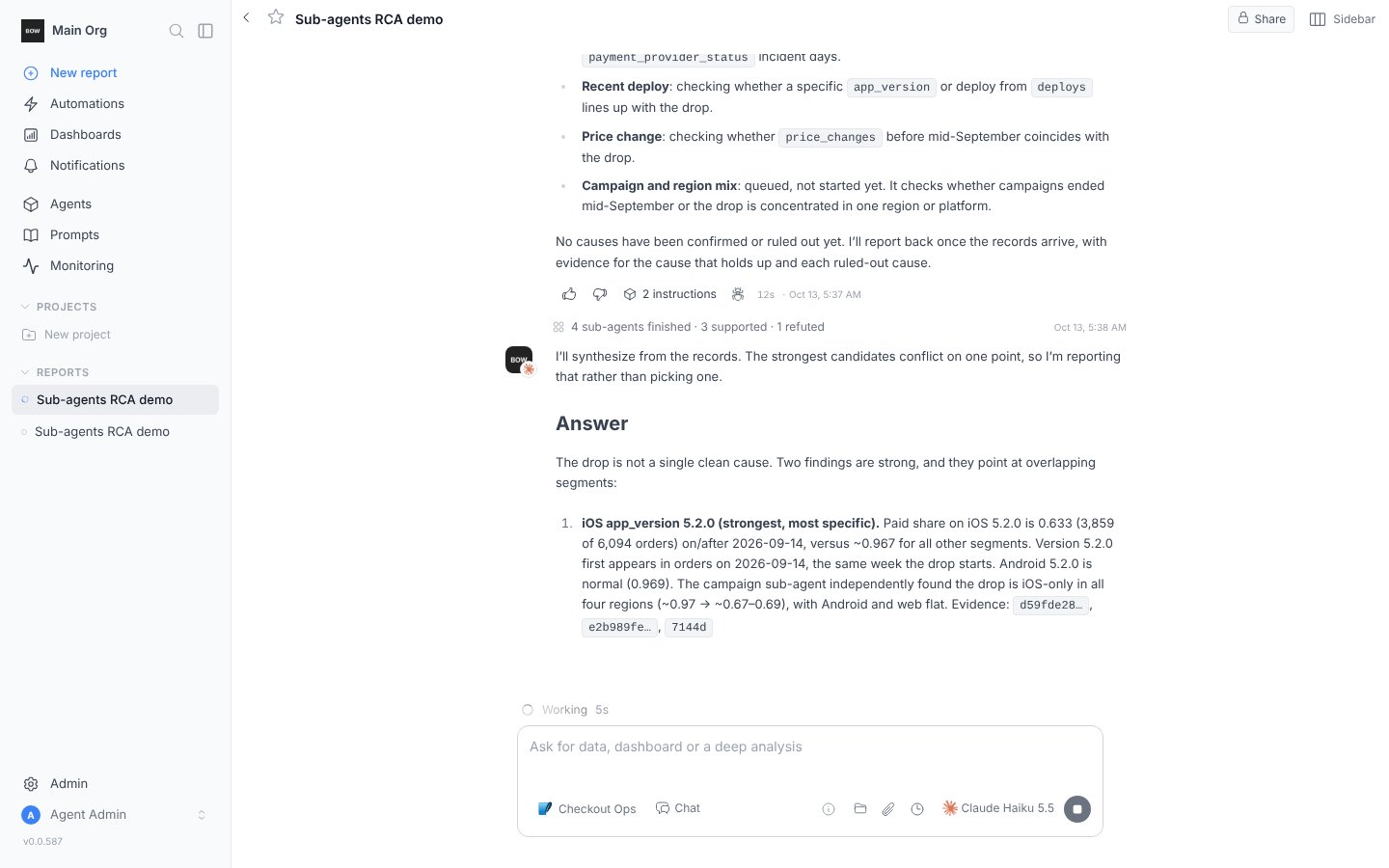 Each finished card shows an outcome badge with the sub-agent's confidence, its steps and tokens, and the full record when opened.
### In the Summary tab
The report's **Summary** tab lists the sub-agents of the conversation with their outcome, steps and tokens, and tags every query a sub-agent created with the sub-agent it came from.
Each finished card shows an outcome badge with the sub-agent's confidence, its steps and tokens, and the full record when opened.
### In the Summary tab
The report's **Summary** tab lists the sub-agents of the conversation with their outcome, steps and tokens, and tags every query a sub-agent created with the sub-agent it came from.
 ## What a sub-agent reports
A sub-agent ends by writing one typed record. It cannot finish any other way; if it runs out of steps or time, the record is written for it and marked partial.
| Field | What it holds |
| - | - |
| **outcome** | `supported`, `refuted`, `inconclusive`, `done`, `partial` or `blocked` |
| **confidence** | 0 to 1 |
| **summary** | The finding in a few sentences |
| **findings** | Up to twelve claims, each with the evidence behind it and its magnitude |
| **ruled out** | What the sub-agent eliminated |
| **evidence** | The queries, steps and notes it relied on, which the agent can open and re-run |
| **caveats** and **unknown** | What it could not settle and what would settle it |
The agent treats a record as the sub-agent's own report, not as fact: it cites the evidence, carries every ruled-out item and caveat into its answer, and turns an inconclusive or blocked record into a follow-up instead of a guess. Sub-agent ids never appear in the conversation.
## What a sub-agent can do
A sub-agent runs with a narrower toolset than the agent. It can describe tables, inspect data, read queries and notes, search instructions and write notes. It cannot ask you a clarifying question, build dashboards or documents, create instructions, or launch sub-agents of its own.
By default a sub-agent does not create tracked queries; its evidence comes from inspections. An admin can turn on **Sub-agents may create queries** so sub-agents create queries the agent can chart and cite. Those queries belong to the report like any other and carry the sub-agent's name in the Summary tab.
Every sub-agent has a step limit and the wave has a wall-clock deadline, both set in [AI Settings](/using-bow/settings#sub-agents). The number that run at the same time is capped too; the rest wait inside their wave and show as **queued**.
## Related
Walk through a planted incident on the Checkout Ops demo.
Turn sub-agents on or off, set the posture, limits and model.
This documentation is built and hosted on [Mintlify](https://mintlify.com), a developer documentation platform.
## What a sub-agent reports
A sub-agent ends by writing one typed record. It cannot finish any other way; if it runs out of steps or time, the record is written for it and marked partial.
| Field | What it holds |
| - | - |
| **outcome** | `supported`, `refuted`, `inconclusive`, `done`, `partial` or `blocked` |
| **confidence** | 0 to 1 |
| **summary** | The finding in a few sentences |
| **findings** | Up to twelve claims, each with the evidence behind it and its magnitude |
| **ruled out** | What the sub-agent eliminated |
| **evidence** | The queries, steps and notes it relied on, which the agent can open and re-run |
| **caveats** and **unknown** | What it could not settle and what would settle it |
The agent treats a record as the sub-agent's own report, not as fact: it cites the evidence, carries every ruled-out item and caveat into its answer, and turns an inconclusive or blocked record into a follow-up instead of a guess. Sub-agent ids never appear in the conversation.
## What a sub-agent can do
A sub-agent runs with a narrower toolset than the agent. It can describe tables, inspect data, read queries and notes, search instructions and write notes. It cannot ask you a clarifying question, build dashboards or documents, create instructions, or launch sub-agents of its own.
By default a sub-agent does not create tracked queries; its evidence comes from inspections. An admin can turn on **Sub-agents may create queries** so sub-agents create queries the agent can chart and cite. Those queries belong to the report like any other and carry the sub-agent's name in the Summary tab.
Every sub-agent has a step limit and the wave has a wall-clock deadline, both set in [AI Settings](/using-bow/settings#sub-agents). The number that run at the same time is capped too; the rest wait inside their wave and show as **queued**.
## Related
Walk through a planted incident on the Checkout Ops demo.
Turn sub-agents on or off, set the posture, limits and model.
This documentation is built and hosted on [Mintlify](https://mintlify.com), a developer documentation platform.