> ## Documentation Index
> Fetch the complete documentation index at: https://docs.bagofwords.com/llms.txt
> Use this file to discover all available pages before exploring further.
# Chat with your data
> Ask questions, create visualizations or run deep analysis
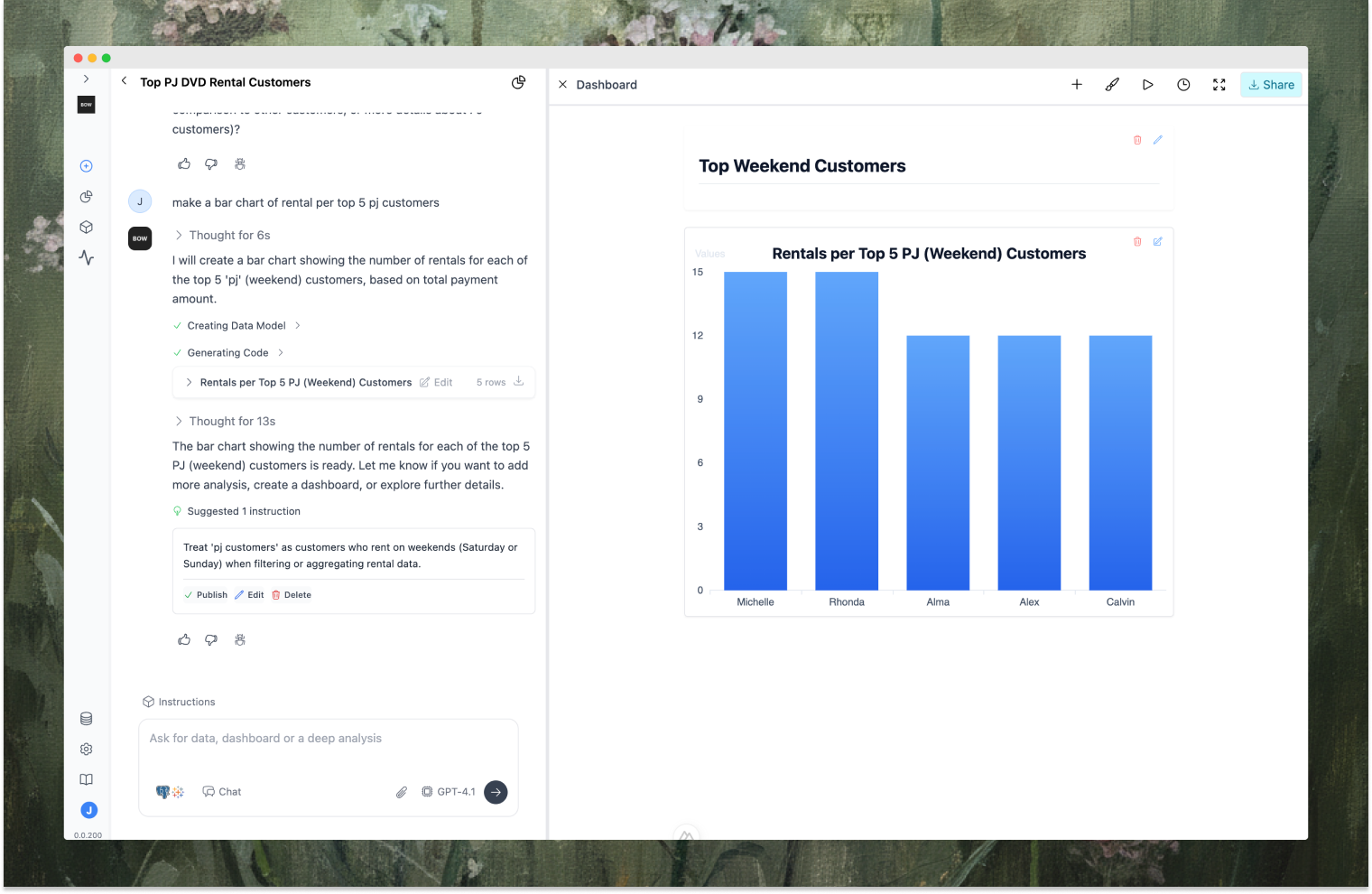
Reports are where you interact with your data through natural language. Ask questions, iterate on results, and build analysis—all in a conversational interface powered by the [Agent](/core/agent).
 ## Asking Questions
Type your question in the prompt box and hit enter. The agent will analyze your request, pull relevant [context](/integrations/context), apply [instructions](/using-bow/instructions), and return results.
There are two main types of prompts:
* **Query-style**: Direct data requests—get specific metrics, aggregations, or breakdowns
* **Analysis-style**: Open-ended investigations—explore trends, find root causes, or run deep analysis
Direct requests for specific data or metrics.
**Examples:**
* "Show me total revenue by month"
* "Who are our top 10 customers by revenue?"
* "What's the average order value for customers in California?"
* "Compare Q4 2024 sales to Q4 2023"
* "Break down revenue by product category and region"
* "List all active subscriptions expiring this month"
Open-ended investigations that require multi-step reasoning.
**Examples:**
* "Why did sales drop in March?"
* "What's driving the increase in customer churn?"
* "Analyze user growth trends over the last 6 months"
* "Calculate customer lifetime value by cohort"
* "Find patterns in our highest-value customers"
* "Investigate why conversion rates are declining"
The agent uses your organization's context—schema, metadata, dbt models, and instructions—to understand your data structure and business logic.
## Viewing Results
The agent returns results in multiple formats:
* **Data tables**: Raw query results with sortable columns
* **Visualizations**: Charts automatically generated based on the data (bar, line, pie, etc.)
* **Code**: View the SQL or Python code that generated the results
* **Explanations**: The agent explains its approach and reasoning
You can:
* **Export data**: Download results as CSV or Excel
* **Edit code**: Modify and re-run the generated code (if enabled in [settings](/using-bow/settings))
* **Add to dashboard**: Save visualizations to a dashboard
* **Share**: Share the report with your team
## Iterating on Results
Reports are conversational. Keep asking follow-up questions to refine your analysis:
**Example iteration flow:**
1. **You**: "Show me revenue by month"
2. **Agent**: Returns monthly revenue chart
3. **You**: "Exclude test accounts"
4. **Agent**: Updates query with filter
5. **You**: "Break it down by product category"
6. **Agent**: Adds category dimension
7. **You**: "Only show top 5 categories"
8. **Agent**: Applies TOP 5 filter
The agent maintains context throughout the conversation, so you don't need to repeat yourself. Each step builds on the previous one.
## How the Agent Works
Behind the scenes, the agent follows a [reasoning loop](/core/agent):
1. **Think**: Plan the approach based on your question
2. **Act**: Search context, generate queries, create visualizations
3. **Observe**: Check results, validate data model, catch errors
4. **Reflect**: Decide if the request is satisfied or needs another iteration
This loop ensures the agent doesn't just guess—it validates, retries, and asks for clarification when needed.
## Tips for Better Results
* **Be specific**: "Active users in Q4" is better than "users"
* **Provide context**: "Revenue from subscriptions" vs just "revenue"
* **Use business terms**: The agent understands your [instructions](/using-bow/instructions) and definitions
* **Iterate freely**: Refine results through conversation rather than crafting the perfect prompt
* **Add instructions**: When you clarify something, save it as an instruction for future use
* **Check the code**: Review generated SQL/Python to understand what's happening
## Selecting Your LLM
Choose your preferred model from the dropdown in the prompt box. Different [LLMs](/using-bow/llm) have different strengths:
* **GPT-4.1**: Best for complex reasoning and multi-step analysis
* **Claude 4 Sonnet**: Strong at code generation and following instructions
* **Gemini 2.5 Pro**: Fast with good balance of quality and speed
* **GPT-4.1 Mini**: Lightweight for simple queries
## Asking Questions
Type your question in the prompt box and hit enter. The agent will analyze your request, pull relevant [context](/integrations/context), apply [instructions](/using-bow/instructions), and return results.
There are two main types of prompts:
* **Query-style**: Direct data requests—get specific metrics, aggregations, or breakdowns
* **Analysis-style**: Open-ended investigations—explore trends, find root causes, or run deep analysis
Direct requests for specific data or metrics.
**Examples:**
* "Show me total revenue by month"
* "Who are our top 10 customers by revenue?"
* "What's the average order value for customers in California?"
* "Compare Q4 2024 sales to Q4 2023"
* "Break down revenue by product category and region"
* "List all active subscriptions expiring this month"
Open-ended investigations that require multi-step reasoning.
**Examples:**
* "Why did sales drop in March?"
* "What's driving the increase in customer churn?"
* "Analyze user growth trends over the last 6 months"
* "Calculate customer lifetime value by cohort"
* "Find patterns in our highest-value customers"
* "Investigate why conversion rates are declining"
The agent uses your organization's context—schema, metadata, dbt models, and instructions—to understand your data structure and business logic.
## Viewing Results
The agent returns results in multiple formats:
* **Data tables**: Raw query results with sortable columns
* **Visualizations**: Charts automatically generated based on the data (bar, line, pie, etc.)
* **Code**: View the SQL or Python code that generated the results
* **Explanations**: The agent explains its approach and reasoning
You can:
* **Export data**: Download results as CSV or Excel
* **Edit code**: Modify and re-run the generated code (if enabled in [settings](/using-bow/settings))
* **Add to dashboard**: Save visualizations to a dashboard
* **Share**: Share the report with your team
## Iterating on Results
Reports are conversational. Keep asking follow-up questions to refine your analysis:
**Example iteration flow:**
1. **You**: "Show me revenue by month"
2. **Agent**: Returns monthly revenue chart
3. **You**: "Exclude test accounts"
4. **Agent**: Updates query with filter
5. **You**: "Break it down by product category"
6. **Agent**: Adds category dimension
7. **You**: "Only show top 5 categories"
8. **Agent**: Applies TOP 5 filter
The agent maintains context throughout the conversation, so you don't need to repeat yourself. Each step builds on the previous one.
## How the Agent Works
Behind the scenes, the agent follows a [reasoning loop](/core/agent):
1. **Think**: Plan the approach based on your question
2. **Act**: Search context, generate queries, create visualizations
3. **Observe**: Check results, validate data model, catch errors
4. **Reflect**: Decide if the request is satisfied or needs another iteration
This loop ensures the agent doesn't just guess—it validates, retries, and asks for clarification when needed.
## Tips for Better Results
* **Be specific**: "Active users in Q4" is better than "users"
* **Provide context**: "Revenue from subscriptions" vs just "revenue"
* **Use business terms**: The agent understands your [instructions](/using-bow/instructions) and definitions
* **Iterate freely**: Refine results through conversation rather than crafting the perfect prompt
* **Add instructions**: When you clarify something, save it as an instruction for future use
* **Check the code**: Review generated SQL/Python to understand what's happening
## Selecting Your LLM
Choose your preferred model from the dropdown in the prompt box. Different [LLMs](/using-bow/llm) have different strengths:
* **GPT-4.1**: Best for complex reasoning and multi-step analysis
* **Claude 4 Sonnet**: Strong at code generation and following instructions
* **Gemini 2.5 Pro**: Fast with good balance of quality and speed
* **GPT-4.1 Mini**: Lightweight for simple queries