> ## Documentation Index
> Fetch the complete documentation index at: https://docs.bagofwords.com/llms.txt
> Use this file to discover all available pages before exploring further.
# Instructions
> Guide your AI agent with custom instructions for better, more accurate results
## Contents
* [What is an Instruction](#what-is-an-instruction)
* [Examples](#examples)
* [Analyzing Instructions](#analyzing-instructions)
* [Approval Workflow](#approval-workflow)
* [AI-Generated Instructions](#ai-generated-instructions)
* [Git Integration](#git-integration)
* [Versioning](#versioning)
Instructions turn the agent into a domain expert for your data. They capture business definitions, calculation formulas, SQL patterns, and coding standards that aren't in your schema.
* **Semantic definitions** - what terms mean in your org
* **Calculation logic** - formulas, filters, table preferences
* **SQL patterns** - joins, type casting, naming conventions
* **Agent behavior** - what to check first, when to ask for clarification
* **Visualization** - chart types, dashboard layouts
This knowledge typically lives in people's heads or scattered documentation. Instructions make it available to everyone through the agent.
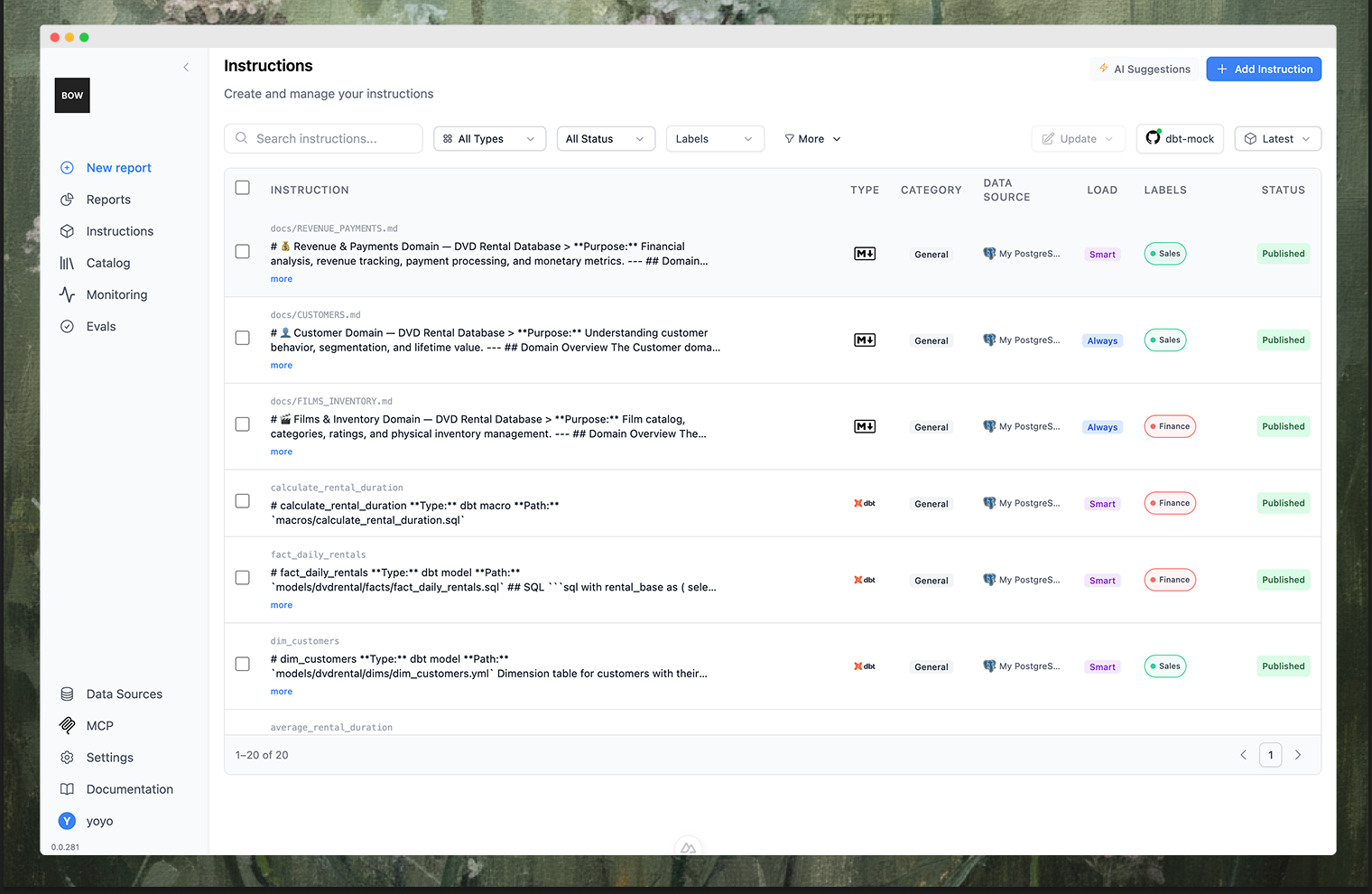 Create instructions manually, let the AI suggest them during conversations, or load from Git (dbt, markdown, LookML). All changes are versioned with rollback. Users and AI can suggest; admins approve before they take effect.
Use System category instructions to control agent workflow, e.g., "Search dbt metadata before selecting tables" or "Ask for clarification on financial queries."
## What is an Instruction
An instruction has text (the actual content), and configuration that controls when and how it's applied:
Create instructions manually, let the AI suggest them during conversations, or load from Git (dbt, markdown, LookML). All changes are versioned with rollback. Users and AI can suggest; admins approve before they take effect.
Use System category instructions to control agent workflow, e.g., "Search dbt metadata before selecting tables" or "Ask for clarification on financial queries."
## What is an Instruction
An instruction has text (the actual content), and configuration that controls when and how it's applied:
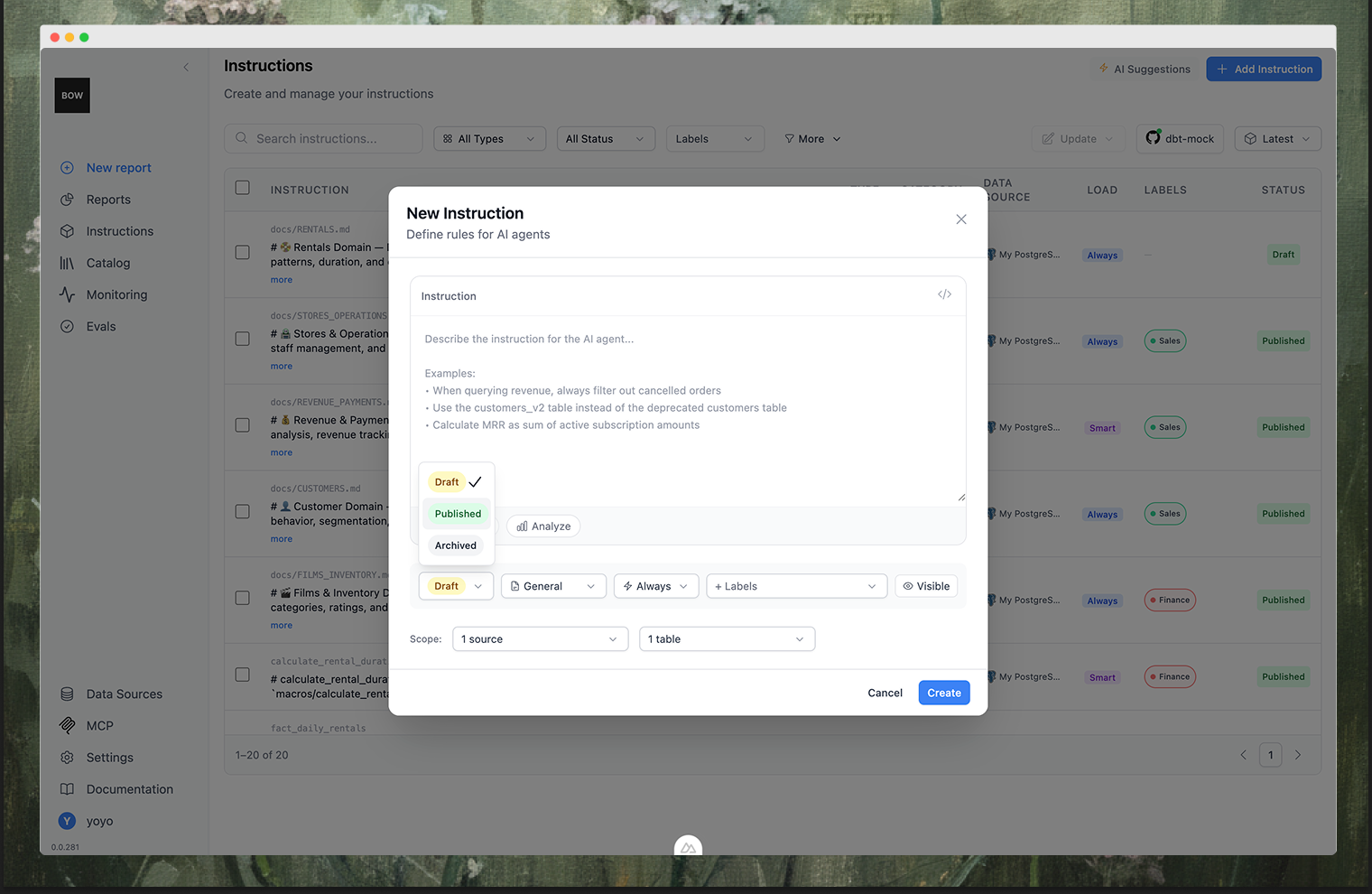 | Property | Options |
| :------------ | :---------------------------------------------------------------------------------------------------- |
| **Category** | General (business rules) · Code Gen (SQL patterns) · Visualization · Dashboard · System (AI behavior) |
| **Load Mode** | Always (every request, limit 5-10) · Intelligent (semantic search) · Disabled |
| **Scope** | All data sources, specific source, or table/column references |
| **Status** | Draft · Suggested · Approved · Rejected |
Optional: **Labels** for organization.
## Examples
```
An "active user" is defined as a user with at least one session
in the last 30 days. Use this definition for all activity-based metrics.
```
**Category**: General · **Load Mode**: Always
```
When analyzing customer data, always use the `customers_prod` table
instead of `customers_staging`. The staging table contains test data.
```
**Category**: Code Gen · **Load Mode**: Always
```
The `status_code` column in the orders table uses these values:
- 1: Pending, 2: Processing, 3: Shipped, 4: Delivered, 5: Cancelled, 6: Refunded
```
**Category**: Code Gen · **Load Mode**: Intelligent
```
MRR = SUM(subscription_amount) WHERE billing_frequency = 'monthly'
+ SUM(subscription_amount / 12) WHERE billing_frequency = 'annual'
+ SUM(subscription_amount / 3) WHERE billing_frequency = 'quarterly'
```
**Category**: General · **Load Mode**: Intelligent
```
When joining tables on *_id fields, always cast integer IDs to strings
or vice versa to avoid type mismatch errors. Example:
JOIN table2 ON table1.user_id::text = table2.user_id
```
**Category**: Code Gen · **Load Mode**: Always
```
Always search data source metadata resources (dbt, markdown)
before selecting tables.
```
```
If user asks about financial tables, be extra cautious
and ask for clarifications.
```
**Category**: System · **Load Mode**: Always
```
For Sales metrics, default to bar chart by category or time
unless user requests otherwise.
```
**Category**: Visualization · **Load Mode**: Intelligent
```
Place key KPIs at the top. Prefer bar/area charts for trends.
Avoid raw tables unless specifically requested.
```
**Category**: Dashboard · **Load Mode**: Always
Sync documentation with YAML frontmatter to control behavior:
```markdown theme={null}
---
alwaysApply: true
references:
- customers
- orders
---
# Customer Lifetime Value
CLV = SUM(order_total) WHERE customer_id = X AND status = 'completed'
Use 12-month lookback window from analysis date.
```
**Source**: Git · **Load Mode**: Always (via frontmatter)
Large reference docs work best with Intelligent mode:
```markdown theme={null}
---
alwaysApply: false
references:
- transactions
- accounts
---
# Financial Data Dictionary
## Transaction Types
- CREDIT: Money coming in
- DEBIT: Money leaving
- TRANSFER: Movement between accounts
```
**Source**: Git · **Load Mode**: Intelligent (via frontmatter)
## Analyzing Instructions
Click **Analyze** on any instruction to identify overlaps, conflicts, and estimate impact on past prompts.
| Property | Options |
| :------------ | :---------------------------------------------------------------------------------------------------- |
| **Category** | General (business rules) · Code Gen (SQL patterns) · Visualization · Dashboard · System (AI behavior) |
| **Load Mode** | Always (every request, limit 5-10) · Intelligent (semantic search) · Disabled |
| **Scope** | All data sources, specific source, or table/column references |
| **Status** | Draft · Suggested · Approved · Rejected |
Optional: **Labels** for organization.
## Examples
```
An "active user" is defined as a user with at least one session
in the last 30 days. Use this definition for all activity-based metrics.
```
**Category**: General · **Load Mode**: Always
```
When analyzing customer data, always use the `customers_prod` table
instead of `customers_staging`. The staging table contains test data.
```
**Category**: Code Gen · **Load Mode**: Always
```
The `status_code` column in the orders table uses these values:
- 1: Pending, 2: Processing, 3: Shipped, 4: Delivered, 5: Cancelled, 6: Refunded
```
**Category**: Code Gen · **Load Mode**: Intelligent
```
MRR = SUM(subscription_amount) WHERE billing_frequency = 'monthly'
+ SUM(subscription_amount / 12) WHERE billing_frequency = 'annual'
+ SUM(subscription_amount / 3) WHERE billing_frequency = 'quarterly'
```
**Category**: General · **Load Mode**: Intelligent
```
When joining tables on *_id fields, always cast integer IDs to strings
or vice versa to avoid type mismatch errors. Example:
JOIN table2 ON table1.user_id::text = table2.user_id
```
**Category**: Code Gen · **Load Mode**: Always
```
Always search data source metadata resources (dbt, markdown)
before selecting tables.
```
```
If user asks about financial tables, be extra cautious
and ask for clarifications.
```
**Category**: System · **Load Mode**: Always
```
For Sales metrics, default to bar chart by category or time
unless user requests otherwise.
```
**Category**: Visualization · **Load Mode**: Intelligent
```
Place key KPIs at the top. Prefer bar/area charts for trends.
Avoid raw tables unless specifically requested.
```
**Category**: Dashboard · **Load Mode**: Always
Sync documentation with YAML frontmatter to control behavior:
```markdown theme={null}
---
alwaysApply: true
references:
- customers
- orders
---
# Customer Lifetime Value
CLV = SUM(order_total) WHERE customer_id = X AND status = 'completed'
Use 12-month lookback window from analysis date.
```
**Source**: Git · **Load Mode**: Always (via frontmatter)
Large reference docs work best with Intelligent mode:
```markdown theme={null}
---
alwaysApply: false
references:
- transactions
- accounts
---
# Financial Data Dictionary
## Transaction Types
- CREDIT: Money coming in
- DEBIT: Money leaving
- TRANSFER: Movement between accounts
```
**Source**: Git · **Load Mode**: Intelligent (via frontmatter)
## Analyzing Instructions
Click **Analyze** on any instruction to identify overlaps, conflicts, and estimate impact on past prompts.
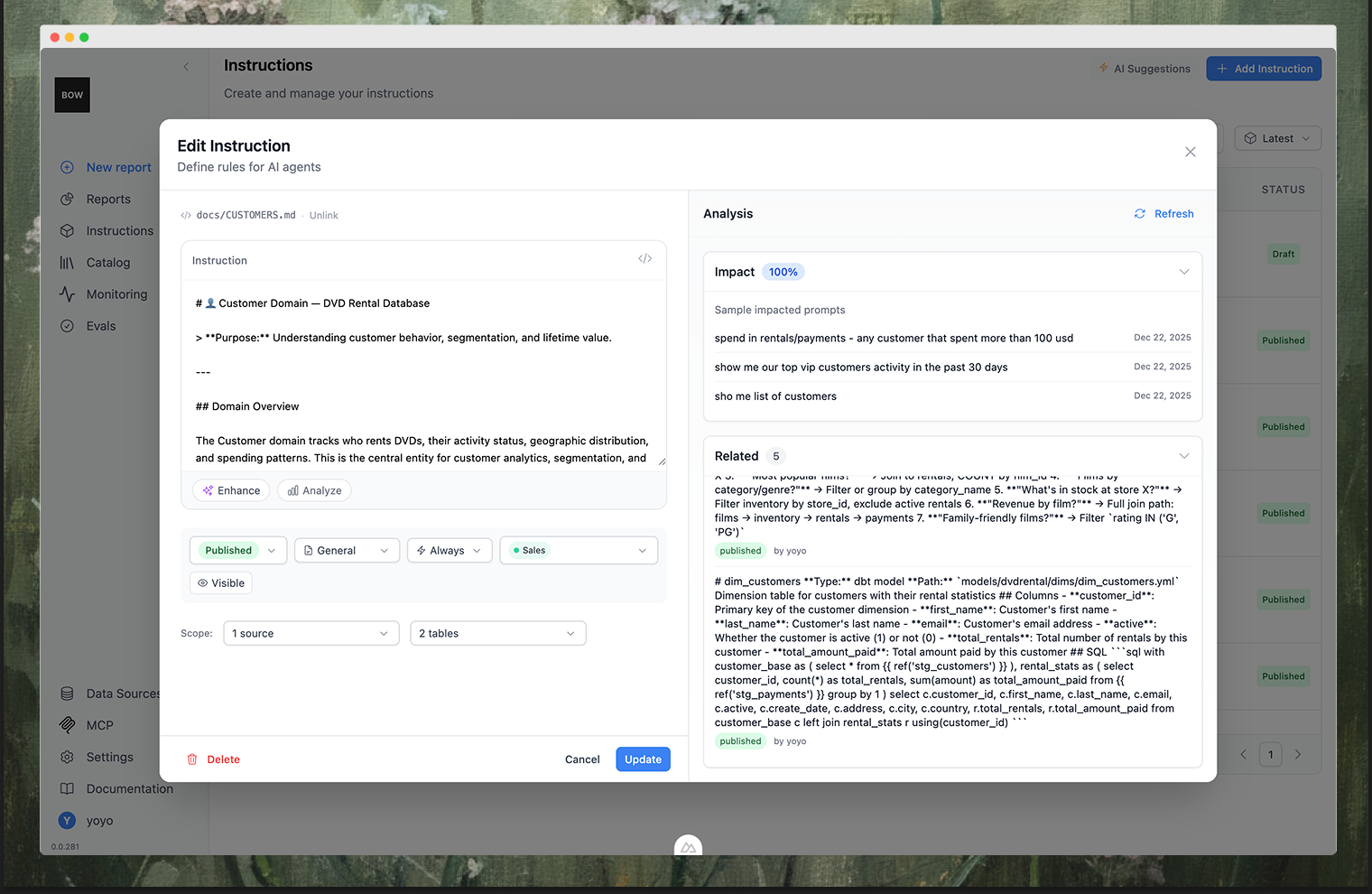 The analysis shows:
* **Impact** - percentage of past prompts affected by this instruction
* **Sample impacted prompts** - examples of queries that would use this instruction
* **Related** - other instructions that overlap or conflict with this one
Use this to refine instructions and avoid redundancy.
## Approval Workflow
Instructions require admin approval before affecting AI behavior.
| Status | Description |
| :------------ | :----------------------------------- |
| **Draft** | Work in progress - not visible to AI |
| **Suggested** | Awaiting admin review |
| **Approved** | Active and affecting AI |
| **Rejected** | Declined |
**Flow**: User/AI suggests → Admin reviews → Approves or Rejects → Approved instructions go live.
Admins: Go to **Suggested** tab → Review instruction → Change status → **Update Instruction**.
## AI-Generated Instructions
During conversations, Bag of words detects clarifications you provide and offers to save them as instructions.
Example: You clarify "active user means at least one session in 30 days" → System offers to save this for future use.
Auto-suggesting can be toggled in AI settings.
## Git Integration
Load instructions from existing documentation in Git repositories. Connect repos in [Data Sources](/using-bow/data_source).
### Supported Sources
| Source | Default Load Mode |
| :----------------------------- | :---------------- |
| Markdown files (.md) | Always |
| dbt models, metrics, sources | Intelligent |
| dbt seeds | Intelligent |
| dbt macros, tests | Disabled |
| LookML views, models, explores | Intelligent |
### Settings
| Setting | Description |
| :-------------------- | :---------------------------------------- |
| **Branch** | Which branch to sync from |
| **Auto Publish** | Automatically approve synced instructions |
| **Default Load Mode** | Auto, Always, Intelligent, or Disabled |
### Frontmatter
Control behavior in Markdown files:
```yaml theme={null}
---
alwaysApply: true
references:
- customers
- orders
---
```
* `alwaysApply: true` → Load mode = Always
* `alwaysApply: false` → Load mode = Intelligent
* `references` → Auto-link to tables
### Unlinking from Git
Edit a Git-synced instruction → Save → Confirm "Unlink from Git". The instruction becomes user-owned.
## Versioning
Every change creates a new **build** - an immutable snapshot of all instructions.
* One active build at any time (marked "main")
* Full audit trail of who changed what and when
* Agent runs are linked to specific builds for traceability
### Build Sources
| Source | Trigger |
| :----------- | :---------------------------- |
| **User** | Manual edits |
| **Git** | Repository sync |
| **AI** | AI-generated suggestions |
| **Rollback** | Reverting to previous version |
### Version Explorer
Access: Instructions page → Version selector → **Version Explorer**
The analysis shows:
* **Impact** - percentage of past prompts affected by this instruction
* **Sample impacted prompts** - examples of queries that would use this instruction
* **Related** - other instructions that overlap or conflict with this one
Use this to refine instructions and avoid redundancy.
## Approval Workflow
Instructions require admin approval before affecting AI behavior.
| Status | Description |
| :------------ | :----------------------------------- |
| **Draft** | Work in progress - not visible to AI |
| **Suggested** | Awaiting admin review |
| **Approved** | Active and affecting AI |
| **Rejected** | Declined |
**Flow**: User/AI suggests → Admin reviews → Approves or Rejects → Approved instructions go live.
Admins: Go to **Suggested** tab → Review instruction → Change status → **Update Instruction**.
## AI-Generated Instructions
During conversations, Bag of words detects clarifications you provide and offers to save them as instructions.
Example: You clarify "active user means at least one session in 30 days" → System offers to save this for future use.
Auto-suggesting can be toggled in AI settings.
## Git Integration
Load instructions from existing documentation in Git repositories. Connect repos in [Data Sources](/using-bow/data_source).
### Supported Sources
| Source | Default Load Mode |
| :----------------------------- | :---------------- |
| Markdown files (.md) | Always |
| dbt models, metrics, sources | Intelligent |
| dbt seeds | Intelligent |
| dbt macros, tests | Disabled |
| LookML views, models, explores | Intelligent |
### Settings
| Setting | Description |
| :-------------------- | :---------------------------------------- |
| **Branch** | Which branch to sync from |
| **Auto Publish** | Automatically approve synced instructions |
| **Default Load Mode** | Auto, Always, Intelligent, or Disabled |
### Frontmatter
Control behavior in Markdown files:
```yaml theme={null}
---
alwaysApply: true
references:
- customers
- orders
---
```
* `alwaysApply: true` → Load mode = Always
* `alwaysApply: false` → Load mode = Intelligent
* `references` → Auto-link to tables
### Unlinking from Git
Edit a Git-synced instruction → Save → Confirm "Unlink from Git". The instruction becomes user-owned.
## Versioning
Every change creates a new **build** - an immutable snapshot of all instructions.
* One active build at any time (marked "main")
* Full audit trail of who changed what and when
* Agent runs are linked to specific builds for traceability
### Build Sources
| Source | Trigger |
| :----------- | :---------------------------- |
| **User** | Manual edits |
| **Git** | Repository sync |
| **AI** | AI-generated suggestions |
| **Rollback** | Reverting to previous version |
### Version Explorer
Access: Instructions page → Version selector → **Version Explorer**
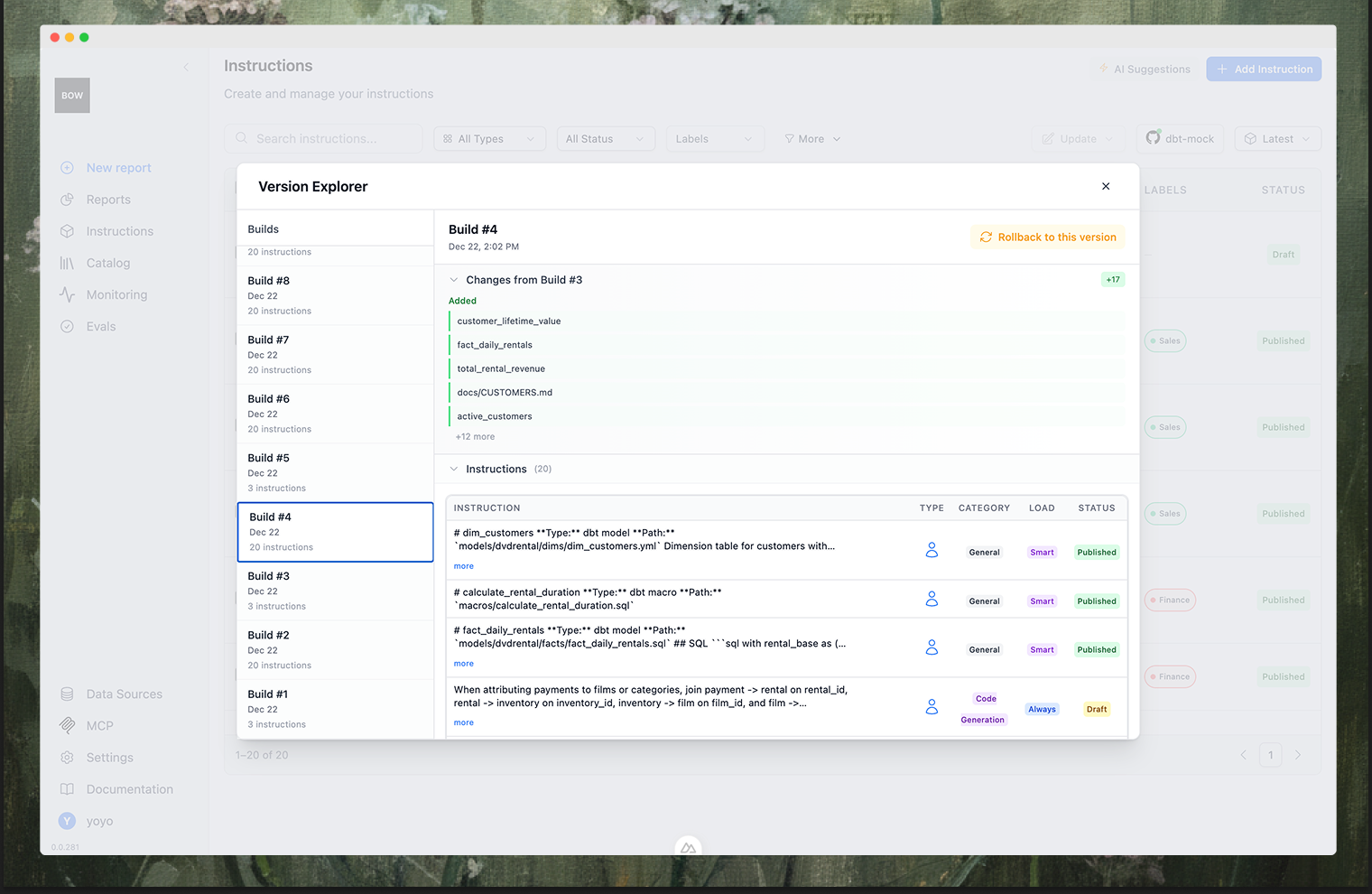 | Feature | Description |
| :---------------- | :-------------------------------- |
| **Build History** | Browse all builds with timestamps |
| **Diff View** | See changes between versions |
| **Rollback** | Restore previous version |
**Diff indicators**: +N (added) · \~N (modified) · −N (removed)
**Rollback**: Select build → Click "Rollback to this version" → New build becomes active.
| Feature | Description |
| :---------------- | :-------------------------------- |
| **Build History** | Browse all builds with timestamps |
| **Diff View** | See changes between versions |
| **Rollback** | Restore previous version |
**Diff indicators**: +N (added) · \~N (modified) · −N (removed)
**Rollback**: Select build → Click "Rollback to this version" → New build becomes active.