> ## Documentation Index
> Fetch the complete documentation index at: https://docs.bagofwords.com/llms.txt
> Use this file to discover all available pages before exploring further.
# Build apps with artifacts
> Create apps with saved records, private uploads and streamed AI responses through conversation.
An artifact can be a working app: a task board, a blog, a form or a document helper. Describe what people should do, what should be saved and who should have access. The agent builds the interface and configures its resources in the report.
You do not need to name tools or design a database first. Start with a simple request and refine it in chat.
## Enable app resources
An organization administrator enables **Artifact resources** under **Settings → AI Settings**, in **Agent capabilities**. It is off by default.
This setting allows persistent records, private files and approved AI operations. Turning it off blocks resource access; it does not delete the saved records or files. Existing dashboard artifacts can still display their analytical content.
The **Data apps** skill helps the agent build these apps. In **Agents → Skills → Catalog**, check whether it is enabled and whether an update is available. A deployment updates the catalog, but does not automatically replace a skill already installed in your organization. See [updating installed skills](/agents/instructions#install-and-update-skills).
## Create a task board
Start a report and ask:
> Build a kanban board where each person can add and manage their own tasks. Save the tasks so they are still there when I reopen it.
The agent can create the app and its task collection together. Open the artifact, add a task, then reload to check that it was saved.
Continue in the same conversation:
> Add a priority and a due date.
> Let members of the Operations group see all tasks, while everyone else sees only their own.
The first request changes the fields and interface. The second changes resource permissions. You can keep refining the existing artifact rather than starting another app.
## What an app can use
| Resource | What it does |
| - | - |
| **Records** | Saves typed fields such as a title, status, amount or file reference. The app can create, read, update and delete records within its permissions. |
| **Files** | Stores private uploads that the app can retrieve when access is allowed. |
| **AI operations** | Runs a configured prompt and streams the response into the app when a user starts the action. |
| **Analytical data** | Uses existing query results, charts and parameterized queries alongside the app's resources. |
Records and files belong to the artifact across interface versions. Updating the layout does not create a fresh collection.
### Blog with drafts and cover images
> Build a blog with saved drafts and cover images. Only I can edit posts. Visitors should see published posts, never drafts.
Then ask:
> Let the Editors group manage posts too.
Use the existing report sharing controls to make the page accessible to the intended readers. The collection's permissions decide which posts those readers can see. Publishing a blog post is a change to that record's status; it is not a separate artifact publishing step.
### File summarizer with a streamed answer
> Build an app where I upload a PDF, ask a question about it and see the answer stream in. Save the finished answer so I can return to it.
Ask the agent to provide upload progress, a cancel action and an error state that preserves your input. Saving the finished response requires a record collection; streaming an answer alone does not save it.
AI operations run through the configured backend and model access. Users do not paste provider API keys into the app. A disconnected stream does not become a background job or resume after a page reload.
## Share and control access
There are two separate decisions:
* **Who can open the artifact?** Use the report's existing sharing controls.
* **What can they do with its data?** Ask the agent to configure permissions on each resource.
Resources are private by default. Policies can allow the owner, signed-in viewers or selected organization groups, and can limit access to a person's own records, matching rows or specific fields. The backend enforces these rules.
Public resource access is read-only. Anonymous visitors cannot create or edit records, upload files or start AI operations.
Sharing a link does not automatically make all app data public. Likewise, hiding an edit button does not secure a resource. Configure its permissions and test the shared page with the intended viewer.
**View as** is useful for inspecting the interface, but a read-only verification preview is not proof that real writes are permitted. Check record creation, uploads and AI actions in the normal viewer with the appropriate account.
## Inspect Resources and Analytics
Open the artifact's **⋯** menu.
### Resources
Choose **Resources** to inspect stored records without editing them:
1. Select a collection.
2. Choose newest or oldest first.
3. Open **Filter**, choose an indexed field, select or enter a value, then **Apply**.
4. Clear the condition to return to the unfiltered collection.
5. Use the schema icon to inspect field names and types, or select a record to inspect its values.
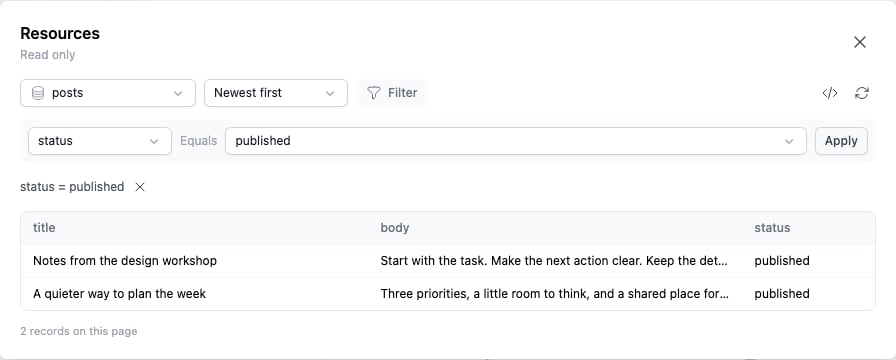 The explorer is read-only. Use the app's own controls to edit records, and chat to change resource definitions or permissions. Only indexed fields are available for filtering.
### Analytics
Choose **Analytics** and select a time range to see views, authenticated unique viewers and daily activity. Anonymous visits contribute to views, but are not counted as unique people.
The explorer is read-only. Use the app's own controls to edit records, and chat to change resource definitions or permissions. Only indexed fields are available for filtering.
### Analytics
Choose **Analytics** and select a time range to see views, authenticated unique viewers and daily activity. Anonymous visits contribute to views, but are not counted as unique people.
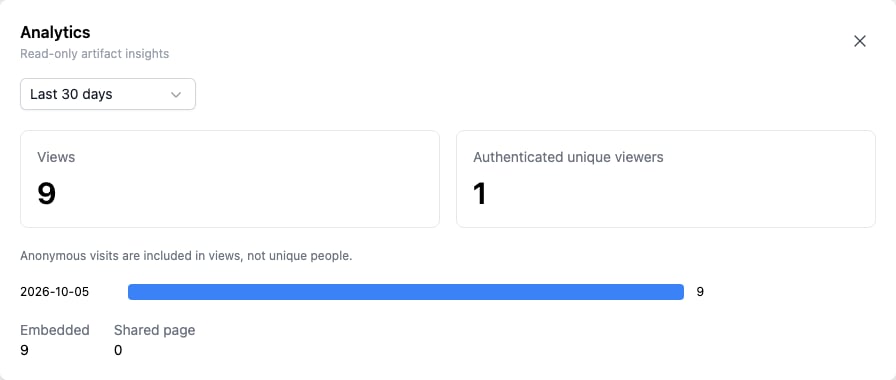 These are artifact-view metrics, separate from organization-wide model usage and cost.
## Choose the right kind of data
* **App records:** information entered or managed through an artifact, such as tasks and blog posts.
* **[Agent Lists](/agents/lists):** structured information an agent extracts from sources, with evidence and review history.
* **[Parameterized queries](/using-bow/parameterized-queries):** inputs that rerun an analytical query against a connected source.
An app can combine saved records with analytical results. Saving a task does not write back to your connected warehouse.
## Troubleshooting
| What you see | What to check |
| - | - |
| Artifact resources are disabled | Ask an organization administrator to enable **Artifact resources** in AI settings. |
| The agent uses older app-building guidance | Check the installed **Data apps** skill for an available catalog update. |
| The app opens, but a record or action is denied | Check both report sharing and the resource's read, create, update or delete permissions. |
| A field is missing from Filter | Ask the agent to make that collection field indexed. |
| A preview works, but normal use fails | Verification can use temporary records, files and synthetic AI responses. Test the actual viewer and account. |
| An exported HTML page cannot load saved data | Offline exports cannot access live artifact resources. Use the hosted shared page. |
| An AI response stops on reload | Streams do not resume after reload. Ask the app to save completed output to records. |
For dashboards focused on source data, see [Dashboard artifacts](/using-bow/dashboards).
This documentation is built and hosted on [Mintlify](https://mintlify.com), a developer documentation platform.
These are artifact-view metrics, separate from organization-wide model usage and cost.
## Choose the right kind of data
* **App records:** information entered or managed through an artifact, such as tasks and blog posts.
* **[Agent Lists](/agents/lists):** structured information an agent extracts from sources, with evidence and review history.
* **[Parameterized queries](/using-bow/parameterized-queries):** inputs that rerun an analytical query against a connected source.
An app can combine saved records with analytical results. Saving a task does not write back to your connected warehouse.
## Troubleshooting
| What you see | What to check |
| - | - |
| Artifact resources are disabled | Ask an organization administrator to enable **Artifact resources** in AI settings. |
| The agent uses older app-building guidance | Check the installed **Data apps** skill for an available catalog update. |
| The app opens, but a record or action is denied | Check both report sharing and the resource's read, create, update or delete permissions. |
| A field is missing from Filter | Ask the agent to make that collection field indexed. |
| A preview works, but normal use fails | Verification can use temporary records, files and synthetic AI responses. Test the actual viewer and account. |
| An exported HTML page cannot load saved data | Offline exports cannot access live artifact resources. Use the hosted shared page. |
| An AI response stops on reload | Streams do not resume after reload. Ask the app to save completed output to records. |
For dashboards focused on source data, see [Dashboard artifacts](/using-bow/dashboards).
This documentation is built and hosted on [Mintlify](https://mintlify.com), a developer documentation platform.