> ## Documentation Index
> Fetch the complete documentation index at: https://docs.bagofwords.com/llms.txt
> Use this file to discover all available pages before exploring further.
# Audit logs
> See who did what in your workspace, export it, and stream every event to your SIEM or storage bucket.
The activity view and export are included in the Team and Enterprise licenses. Log streams need an Enterprise license.
Bag of Words records every security-relevant action in your organization: sign-ins, member and role changes, API keys, data sources, reports, settings, and every tool call an agent makes. You can browse and filter the log in the app, download it as JSON or CSV, and stream it continuously to Datadog, Splunk, Microsoft Sentinel, Amazon S3, Google Cloud Storage, an HTTPS endpoint or a syslog collector.
Open it from **Settings → Audit Logs**. The page has two tabs: **Activity** and **Streams**.
## What is recorded
Each event has an action such as `api_key.created`, `member.role_changed` or `tool.data_queried`, the actor, the resource it touched, the time, the IP address and user agent, and action-specific details.
The actor is one of:
| Actor | When |
| - | - |
| **User** | A person did it in the app or through the API. |
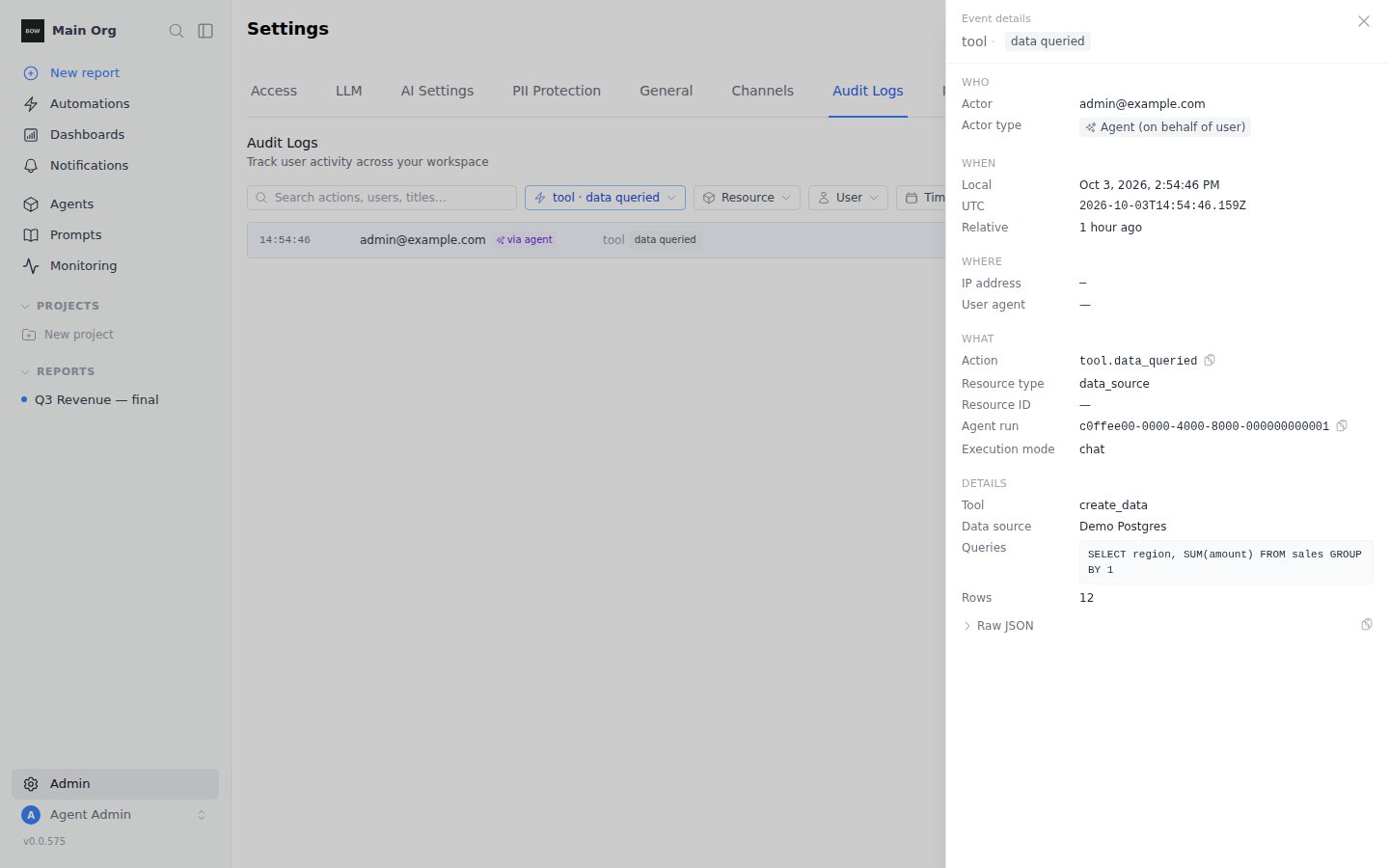
| **Agent** | An agent did it while answering a user, for example running a query. The row shows the user it ran for, marked *via agent*. |
| **System** | Bag of Words did it on its own, for example a log stream changing state after its credentials were rejected. |
Agent tool events are written durably: under heavy load or a short database outage they are queued, retried and, if needed, kept on disk until they can be written. They are not dropped.
## Activity
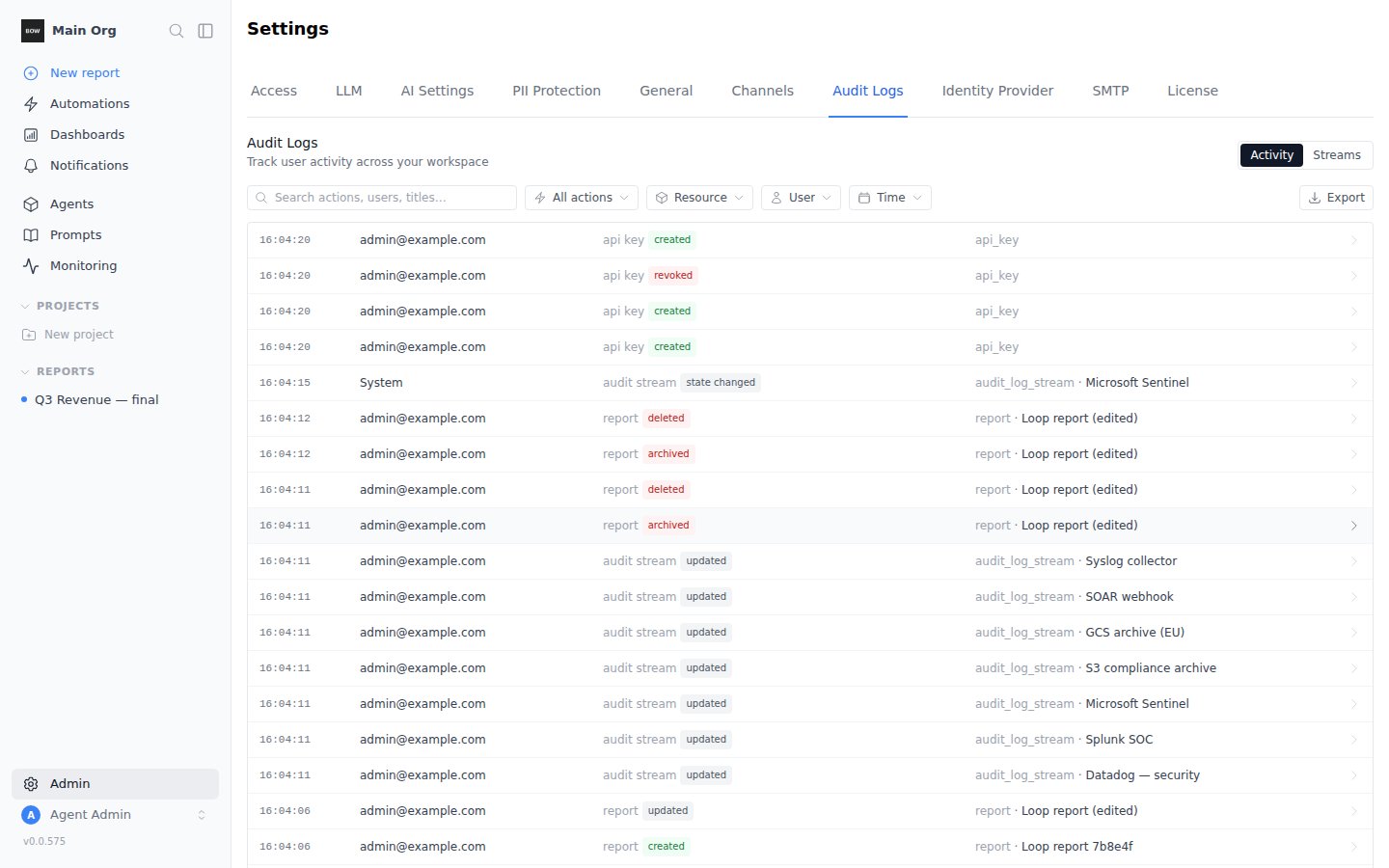 Each row shows the exact time, who acted, the action (resource and verb) and the target. Click a row to open its details: who, when (in your time zone, in UTC and relative), where from, and the parsed details, such as the SQL an agent ran or the fields that changed. The raw event JSON is there too, with a copy button.
 ### Filter and search
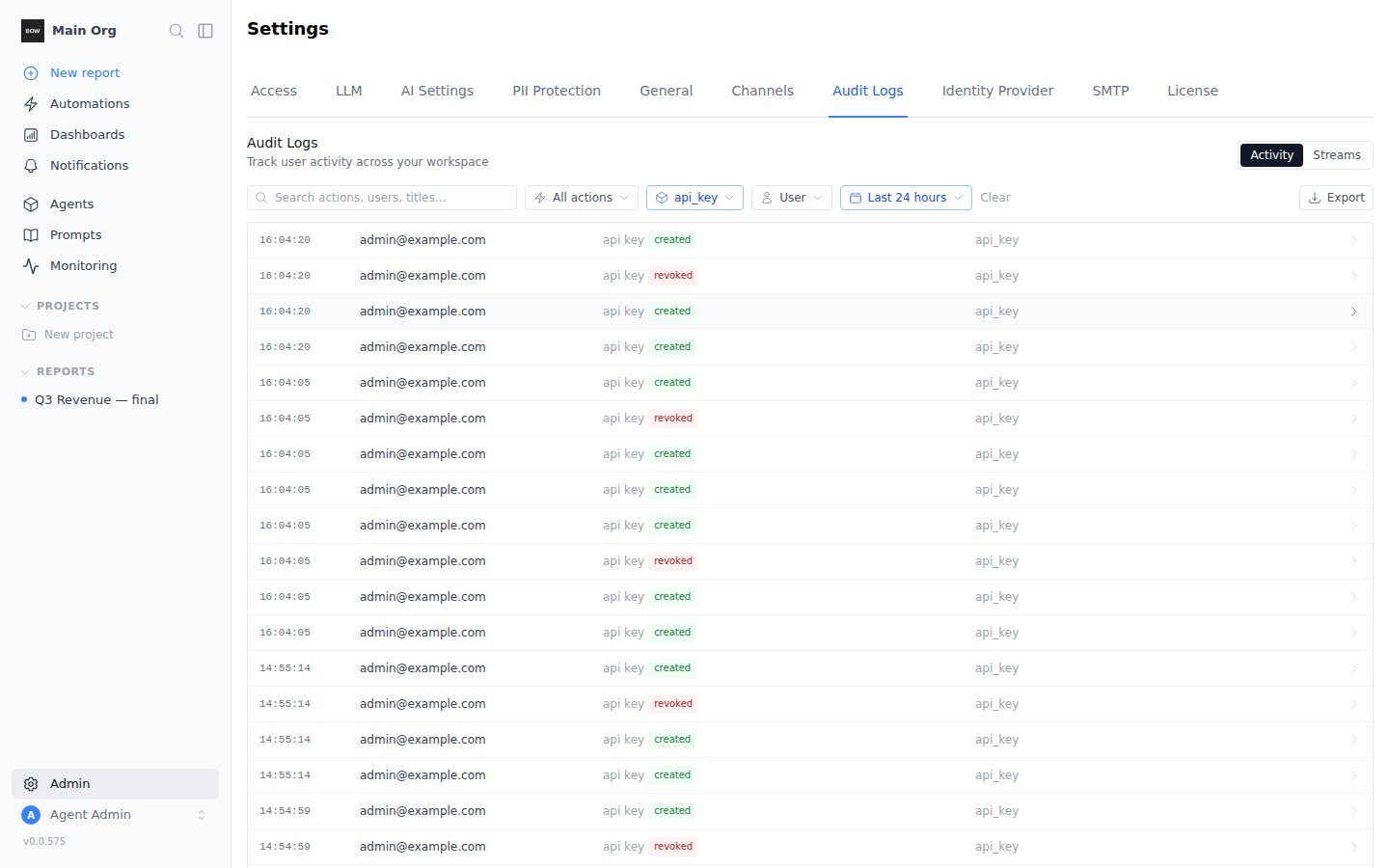
* **Search** matches actions, user emails and resource titles.
* **All actions** narrows to one action.
* **Resource** narrows to one or more resource types.
* **User** narrows to one member.
* **Time** narrows to a preset range or custom dates.
Filters combine, and they are kept in the page URL, so you can share a filtered view with another admin.
### Filter and search
* **Search** matches actions, user emails and resource titles.
* **All actions** narrows to one action.
* **Resource** narrows to one or more resource types.
* **User** narrows to one member.
* **Time** narrows to a preset range or custom dates.
Filters combine, and they are kept in the page URL, so you can share a filtered view with another admin.
 ### Export
Click **Export** and choose **JSON** or **CSV**. The file holds every event that matches the current filters, oldest first, as of the moment you clicked.
* **JSON** is newline-delimited: one event per line, in the same [event format](#event-format) that log streams send.
* **CSV** has one row per event, with the details as a JSON column. Cells that a spreadsheet would treat as a formula are escaped.
An export can hold up to 100,000 events. For more, narrow the time range, or use a log stream. Each export is itself recorded as an `audit_log.exported` event, with the format and filters used.
## Log streams
A log stream delivers every audit event to an external system, continuously, within about 15 seconds of it happening.
### Export
Click **Export** and choose **JSON** or **CSV**. The file holds every event that matches the current filters, oldest first, as of the moment you clicked.
* **JSON** is newline-delimited: one event per line, in the same [event format](#event-format) that log streams send.
* **CSV** has one row per event, with the details as a JSON column. Cells that a spreadsheet would treat as a formula are escaped.
An export can hold up to 100,000 events. For more, narrow the time range, or use a log stream. Each export is itself recorded as an `audit_log.exported` event, with the format and filters used.
## Log streams
A log stream delivers every audit event to an external system, continuously, within about 15 seconds of it happening.
 ### Add a stream
In **Streams**, click **Add stream** and pick where events should go.
### Add a stream
In **Streams**, click **Add stream** and pick where events should go.
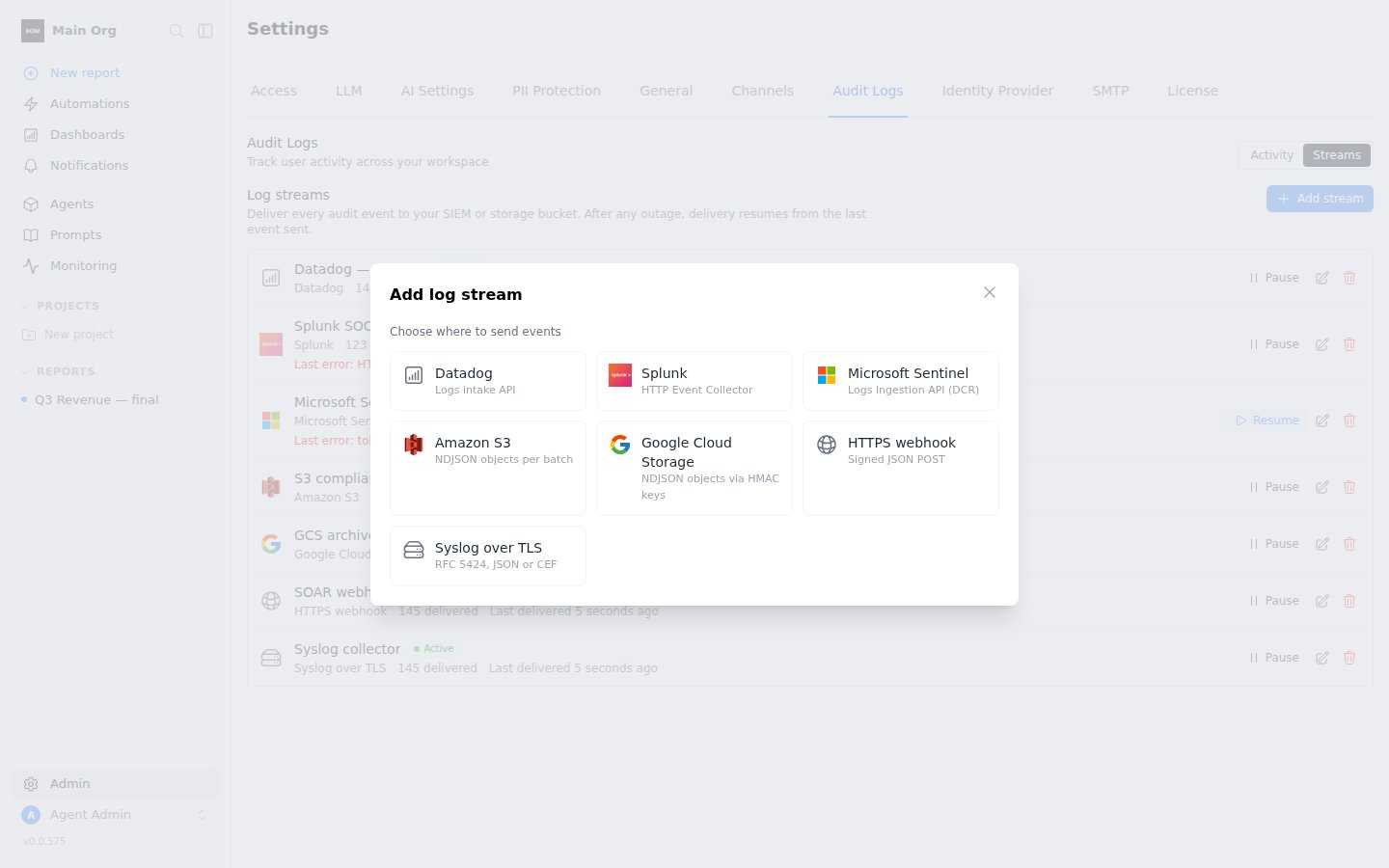 Each destination asks for its own settings (see the table below). Secrets are encrypted and never shown again; when you edit a stream, leave a secret field as is to keep it.
Under **Start from**, pick **New events only** or **Include all history**. To send only some events, list action prefixes in **Only actions starting with**, for example `tool., member.`. Leave it empty to send everything.
Click **Send test event**. Bag of Words sends one `audit_stream.test` event with your settings and shows the destination's answer. Fix any error before saving.
Click **Save stream**. Delivery starts on the next cycle.
### Destinations
| Destination | What you need | How events arrive |
| - | - | - |
| **Datadog** | Site and API key | Logs API, one log per event, `service:bagofwords` by default |
| **Splunk** | HTTP Event Collector URL and token; optional index | HEC events, sourcetype `bagofwords:audit` |
| **Microsoft Sentinel** | Tenant ID, client ID and secret of an app registration; data collection endpoint URL; data collection rule immutable ID; stream name | Logs Ingestion API into your custom table |
| **Amazon S3** | Bucket and region; an IAM role ARN or access keys | Newline-delimited JSON files under `prefix/YYYY-MM-DD/`, optionally gzipped |
| **Google Cloud Storage** | Bucket and HMAC keys | Same file layout as S3 |
| **HTTPS webhook** | Endpoint URL; optional auth header and signing secret | `POST` of a JSON array of events |
| **Syslog** | Host and port; TLS on by default | RFC 5424 over TCP or TLS, JSON or CEF message |
Enter the **Role ARN** instead of access keys. When you save, Bag of Words generates an **External ID** and shows it in the stream form. Add it to the role's trust policy as the `sts:ExternalId` condition. The role needs `s3:PutObject` on the bucket and prefix.
If you set a signing secret, each request carries two headers:
* `X-BOW-Timestamp`: Unix time in seconds.
* `X-BOW-Signature`: `v1=` followed by the hex HMAC-SHA256 of `timestamp + "." + body`, keyed with your secret.
```python theme={null}
import hashlib, hmac, time
def verify(secret: bytes, timestamp: str, body: bytes, signature: str) -> bool:
if abs(time.time() - int(timestamp)) > 300:
return False
expected = hmac.new(secret, timestamp.encode() + b"." + body, hashlib.sha256).hexdigest()
return hmac.compare_digest("v1=" + expected, signature)
```
Respond with any `2xx` to acknowledge the batch.
Under **Advanced settings**, paste your CA certificate to trust a private collector, and a client certificate and key for mutual TLS.
### Delivery guarantees
* **Every event, in order, at least once.** A stream remembers the last event it delivered and resumes from there after any outage, pause, edit or restart. No event is skipped.
* **Deduplicate on `id`.** In rare cases, such as a restart in the middle of a send, an event can be delivered twice. It has the same `id` both times. S3 and Cloud Storage files from a retried batch overwrite the same object.
* **Pause and edit are safe.** Pausing stops delivery after the current batch. Editing a stream's settings resends anything that was not yet confirmed to the new settings.
### Status and retries
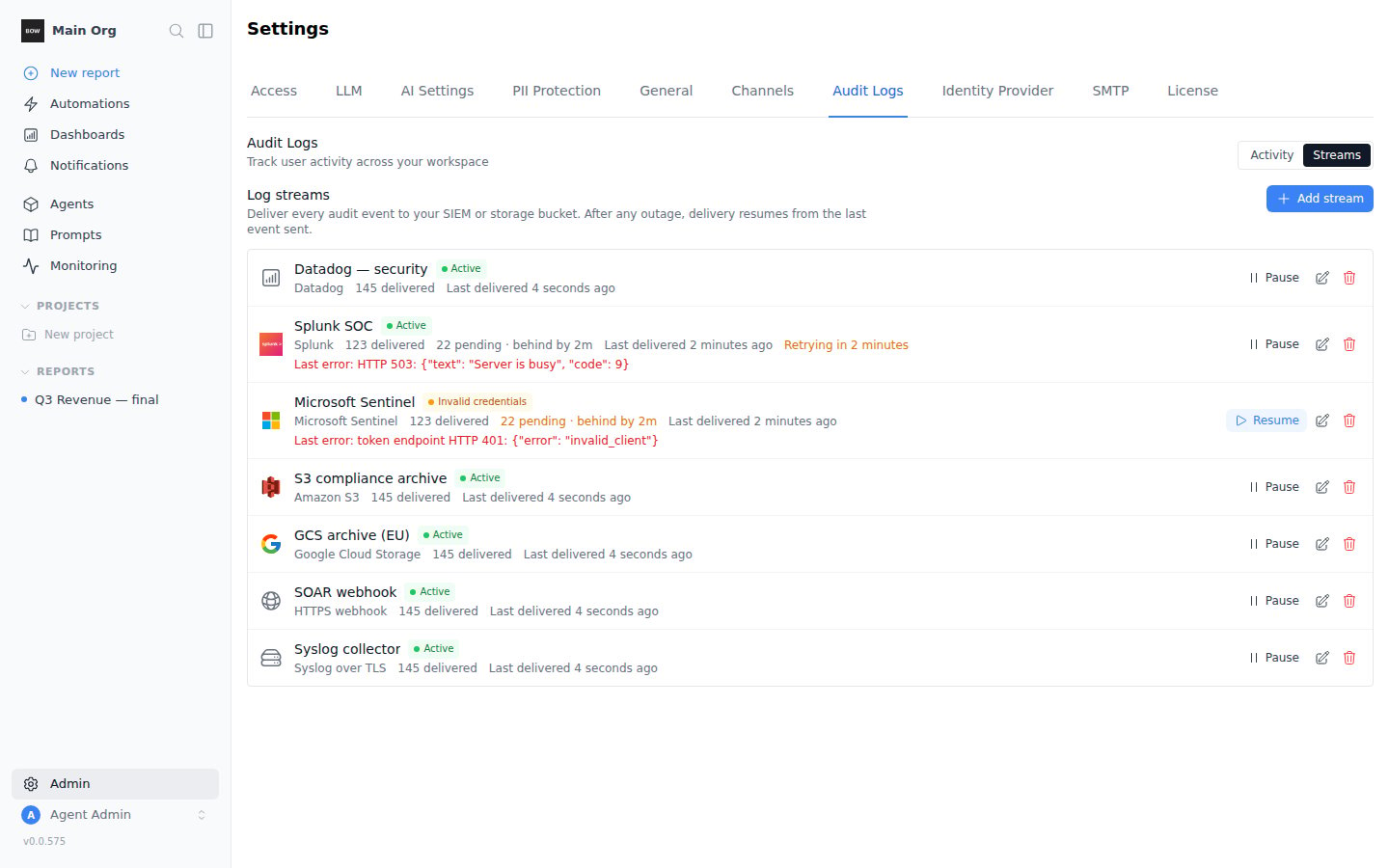
Each stream shows its state, how many events it has delivered, how many are pending and how far behind it is, and the last error.
| State | Meaning | What happens |
| - | - | - |
| **Active** | Delivering. | If the destination is busy or unreachable, the stream shows **Retrying** and tries again with growing waits, up to 15 minutes apart. |
| **Paused** | Stopped by an admin. | Events wait. **Resume** delivers them. |
| **Invalid credentials** | The destination rejected the credentials or certificate. | Delivery stops. Fix the settings, then save or **Resume**. |
| **Error** | The destination rejected the events for another reason, for example a missing bucket. | Delivery stops until the settings are fixed. |
When a stream moves to **Invalid credentials** or **Error**, the organization's admins get an email, and the change is recorded as an `audit_stream.state_changed` event. No events are lost while a stream is stopped.
## Event format
Log streams and JSON export use the same versioned format:
```json theme={null}
{
"id": "6f1c…",
"version": 1,
"action": "api_key.created",
"occurred_at": "2026-10-03T12:00:00.123Z",
"organization": { "id": "…", "name": "Acme" },
"actor": { "type": "user", "id": "…", "email": "admin@example.com" },
"targets": [{ "type": "api_key", "id": "…", "name": "CI key" }],
"context": { "ip_address": "203.0.113.10", "user_agent": "Mozilla/5.0 …" },
"metadata": { }
}
```
| Field | Description |
| - | - |
| `id` | Unique event ID. Use it to deduplicate. |
| `version` | Format version, currently `1`. |
| `action` | What happened, as `resource.verb`. |
| `occurred_at` | When it happened, UTC, ISO 8601. |
| `actor.type` | `user`, `agent` or `system`. |
| `targets` | The resources the action touched. |
| `context` | IP address and user agent of the request, when there was one. |
| `metadata` | Action-specific details, such as the changed fields or the query an agent ran. |
## Permissions
| Task | Permission |
| - | - |
| View the activity, export it, view streams | `view_audit_logs` |
| Add, edit, pause, resume or delete a stream; send a test event | `manage_settings` |
Creating, changing, pausing, resuming and deleting a stream are recorded as `audit_stream.*` events.
## Self-hosted notes
* **Encryption key.** Stream secrets are encrypted with `BOW_ENCRYPTION_KEY`, like data source credentials. Keep it stable. If it changes, streams with secrets move to **Invalid credentials** until you re-enter their secrets; no events are lost.
* **Network access.** The server must reach the destination. On restricted networks, allow the destination's endpoint, or stream to an internal syslog collector or HTTPS endpoint.
* **Delivery interval.** Streams are checked every 15 seconds by default. Set `BOW_AUDIT_STREAM_INTERVAL_SECONDS` to change it.
This documentation is built and hosted on [Mintlify](https://mintlify.com), a developer documentation platform.
Each destination asks for its own settings (see the table below). Secrets are encrypted and never shown again; when you edit a stream, leave a secret field as is to keep it.
Under **Start from**, pick **New events only** or **Include all history**. To send only some events, list action prefixes in **Only actions starting with**, for example `tool., member.`. Leave it empty to send everything.
Click **Send test event**. Bag of Words sends one `audit_stream.test` event with your settings and shows the destination's answer. Fix any error before saving.
Click **Save stream**. Delivery starts on the next cycle.
### Destinations
| Destination | What you need | How events arrive |
| - | - | - |
| **Datadog** | Site and API key | Logs API, one log per event, `service:bagofwords` by default |
| **Splunk** | HTTP Event Collector URL and token; optional index | HEC events, sourcetype `bagofwords:audit` |
| **Microsoft Sentinel** | Tenant ID, client ID and secret of an app registration; data collection endpoint URL; data collection rule immutable ID; stream name | Logs Ingestion API into your custom table |
| **Amazon S3** | Bucket and region; an IAM role ARN or access keys | Newline-delimited JSON files under `prefix/YYYY-MM-DD/`, optionally gzipped |
| **Google Cloud Storage** | Bucket and HMAC keys | Same file layout as S3 |
| **HTTPS webhook** | Endpoint URL; optional auth header and signing secret | `POST` of a JSON array of events |
| **Syslog** | Host and port; TLS on by default | RFC 5424 over TCP or TLS, JSON or CEF message |
Enter the **Role ARN** instead of access keys. When you save, Bag of Words generates an **External ID** and shows it in the stream form. Add it to the role's trust policy as the `sts:ExternalId` condition. The role needs `s3:PutObject` on the bucket and prefix.
If you set a signing secret, each request carries two headers:
* `X-BOW-Timestamp`: Unix time in seconds.
* `X-BOW-Signature`: `v1=` followed by the hex HMAC-SHA256 of `timestamp + "." + body`, keyed with your secret.
```python theme={null}
import hashlib, hmac, time
def verify(secret: bytes, timestamp: str, body: bytes, signature: str) -> bool:
if abs(time.time() - int(timestamp)) > 300:
return False
expected = hmac.new(secret, timestamp.encode() + b"." + body, hashlib.sha256).hexdigest()
return hmac.compare_digest("v1=" + expected, signature)
```
Respond with any `2xx` to acknowledge the batch.
Under **Advanced settings**, paste your CA certificate to trust a private collector, and a client certificate and key for mutual TLS.
### Delivery guarantees
* **Every event, in order, at least once.** A stream remembers the last event it delivered and resumes from there after any outage, pause, edit or restart. No event is skipped.
* **Deduplicate on `id`.** In rare cases, such as a restart in the middle of a send, an event can be delivered twice. It has the same `id` both times. S3 and Cloud Storage files from a retried batch overwrite the same object.
* **Pause and edit are safe.** Pausing stops delivery after the current batch. Editing a stream's settings resends anything that was not yet confirmed to the new settings.
### Status and retries
Each stream shows its state, how many events it has delivered, how many are pending and how far behind it is, and the last error.
| State | Meaning | What happens |
| - | - | - |
| **Active** | Delivering. | If the destination is busy or unreachable, the stream shows **Retrying** and tries again with growing waits, up to 15 minutes apart. |
| **Paused** | Stopped by an admin. | Events wait. **Resume** delivers them. |
| **Invalid credentials** | The destination rejected the credentials or certificate. | Delivery stops. Fix the settings, then save or **Resume**. |
| **Error** | The destination rejected the events for another reason, for example a missing bucket. | Delivery stops until the settings are fixed. |
When a stream moves to **Invalid credentials** or **Error**, the organization's admins get an email, and the change is recorded as an `audit_stream.state_changed` event. No events are lost while a stream is stopped.
## Event format
Log streams and JSON export use the same versioned format:
```json theme={null}
{
"id": "6f1c…",
"version": 1,
"action": "api_key.created",
"occurred_at": "2026-10-03T12:00:00.123Z",
"organization": { "id": "…", "name": "Acme" },
"actor": { "type": "user", "id": "…", "email": "admin@example.com" },
"targets": [{ "type": "api_key", "id": "…", "name": "CI key" }],
"context": { "ip_address": "203.0.113.10", "user_agent": "Mozilla/5.0 …" },
"metadata": { }
}
```
| Field | Description |
| - | - |
| `id` | Unique event ID. Use it to deduplicate. |
| `version` | Format version, currently `1`. |
| `action` | What happened, as `resource.verb`. |
| `occurred_at` | When it happened, UTC, ISO 8601. |
| `actor.type` | `user`, `agent` or `system`. |
| `targets` | The resources the action touched. |
| `context` | IP address and user agent of the request, when there was one. |
| `metadata` | Action-specific details, such as the changed fields or the query an agent ran. |
## Permissions
| Task | Permission |
| - | - |
| View the activity, export it, view streams | `view_audit_logs` |
| Add, edit, pause, resume or delete a stream; send a test event | `manage_settings` |
Creating, changing, pausing, resuming and deleting a stream are recorded as `audit_stream.*` events.
## Self-hosted notes
* **Encryption key.** Stream secrets are encrypted with `BOW_ENCRYPTION_KEY`, like data source credentials. Keep it stable. If it changes, streams with secrets move to **Invalid credentials** until you re-enter their secrets; no events are lost.
* **Network access.** The server must reach the destination. On restricted networks, allow the destination's endpoint, or stream to an internal syslog collector or HTTPS endpoint.
* **Delivery interval.** Streams are checked every 15 seconds by default. Set `BOW_AUDIT_STREAM_INTERVAL_SECONDS` to change it.
This documentation is built and hosted on [Mintlify](https://mintlify.com), a developer documentation platform.