> ## Documentation Index
> Fetch the complete documentation index at: https://docs.bagofwords.com/llms.txt
> Use this file to discover all available pages before exploring further.
# Analyze your agents' usage in chat
> Ask a training session about your agents' run history — runs, failures, feedback, cost — and get charts, tables and instruction fixes back.
In a training session, the agent can query your organization's own run history. Ask in plain language how your agents are used, what fails, what users disliked and what it costs. The agent answers with charts and tables, and can turn what it finds into proposed instruction fixes.
 ## Before you start
* **Training Mode is on.** An admin can check this in **Settings → AI Settings → Agent capabilities → Training Mode**.
* **You can see the history.** Org admins see runs for every agent. If you manage an agent, you see runs for the agents you manage only. Other users can't query run history.
* **There is some history to look at.** Runs, feedback and tool calls are recorded as people use your agents. Thumbs-down ratings with a comment make the feedback questions below much more useful.
## Step 1: Start a training session
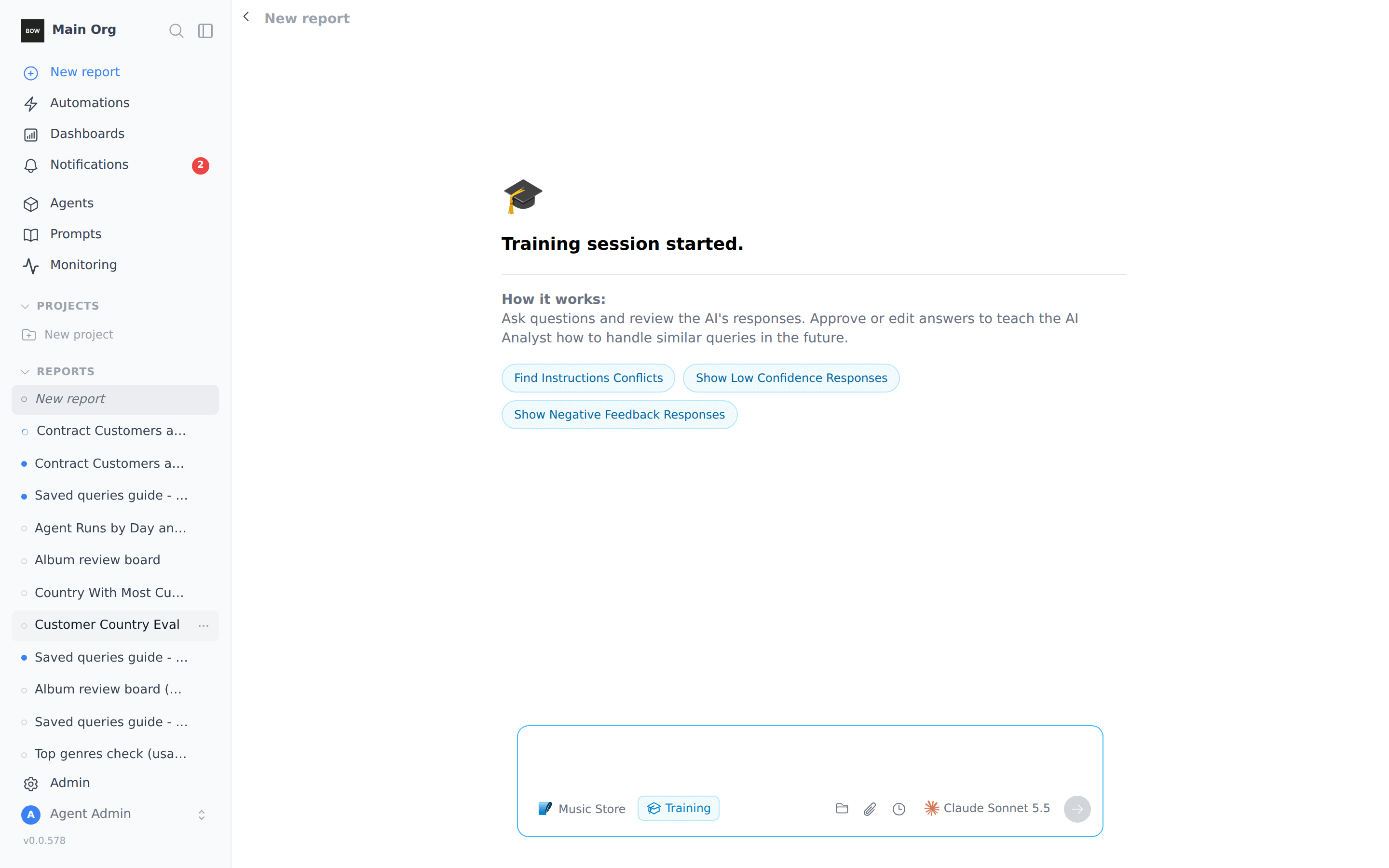
Open **Agents**, select the agent, click **⋯** at the top right, and choose **Start a training session**. You can also switch the prompt box on the home page to **Training**.
The session opens with three starters: **Find Instructions Conflicts**, **Show Low Confidence Responses** and **Show Negative Feedback Responses**. Click one, or type your own question.
## Before you start
* **Training Mode is on.** An admin can check this in **Settings → AI Settings → Agent capabilities → Training Mode**.
* **You can see the history.** Org admins see runs for every agent. If you manage an agent, you see runs for the agents you manage only. Other users can't query run history.
* **There is some history to look at.** Runs, feedback and tool calls are recorded as people use your agents. Thumbs-down ratings with a comment make the feedback questions below much more useful.
## Step 1: Start a training session
Open **Agents**, select the agent, click **⋯** at the top right, and choose **Start a training session**. You can also switch the prompt box on the home page to **Training**.
The session opens with three starters: **Find Instructions Conflicts**, **Show Low Confidence Responses** and **Show Negative Feedback Responses**. Click one, or type your own question.
 ## Step 2: Ask how your agents are used
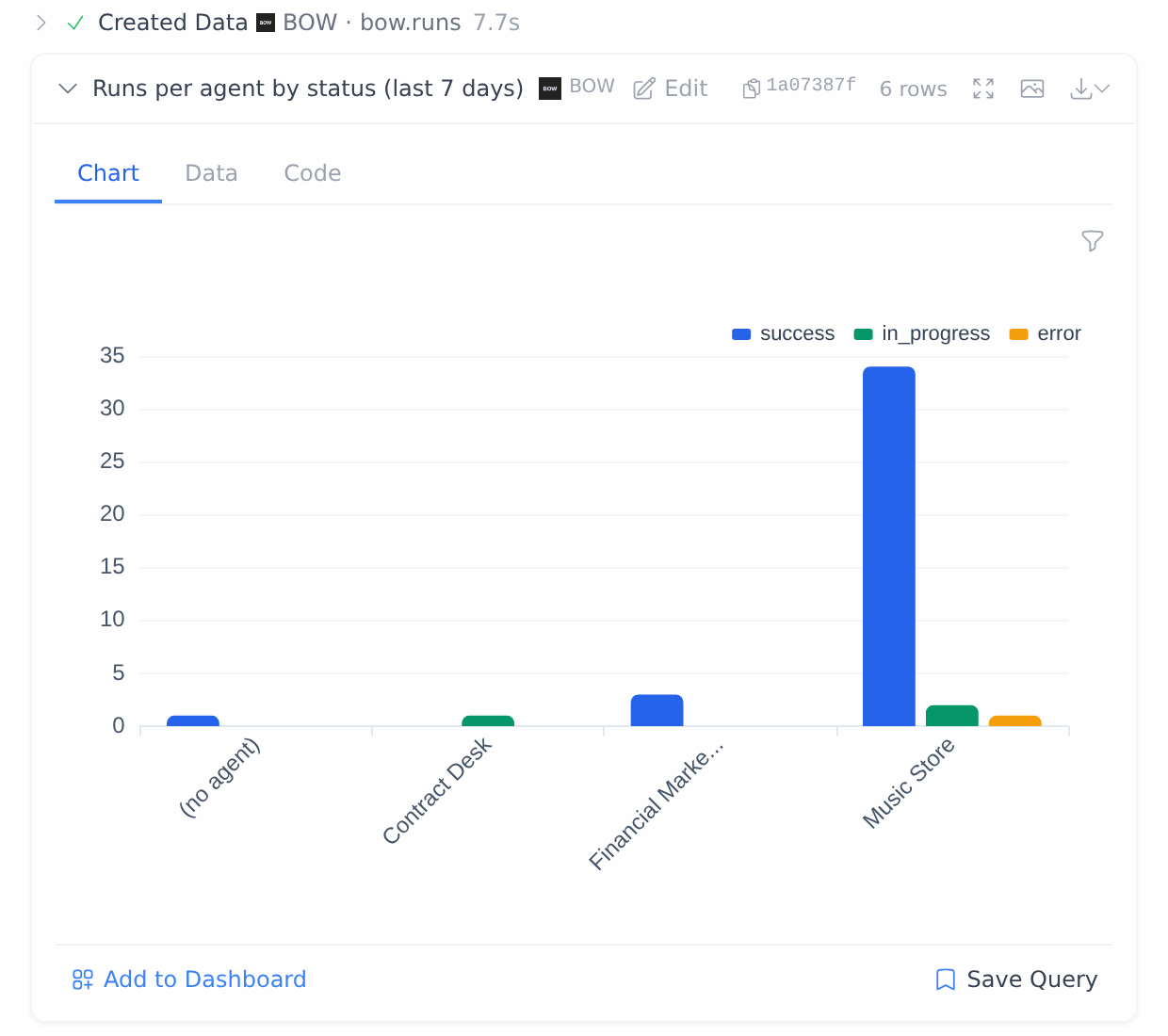
> *How many runs did each agent have in the last 7 days, by day and status? Show a chart.*
The agent queries a built-in, read-only source called **BOW**. Its step reads **Created Data · BOW · bow\.runs**, and the result card is tagged **BOW**. Open the **Data** tab to see the rows and **Code** to see the exact query.
If the first chart isn't the view you want, ask for a different one:
> *Make that a bar chart with one group per agent, colored by status.*
The agent states the time window in its answer. When there is less history than the window you asked for, it says so (for example, "the data only goes back to 2026-10-05").
## Step 3: Find failing tools
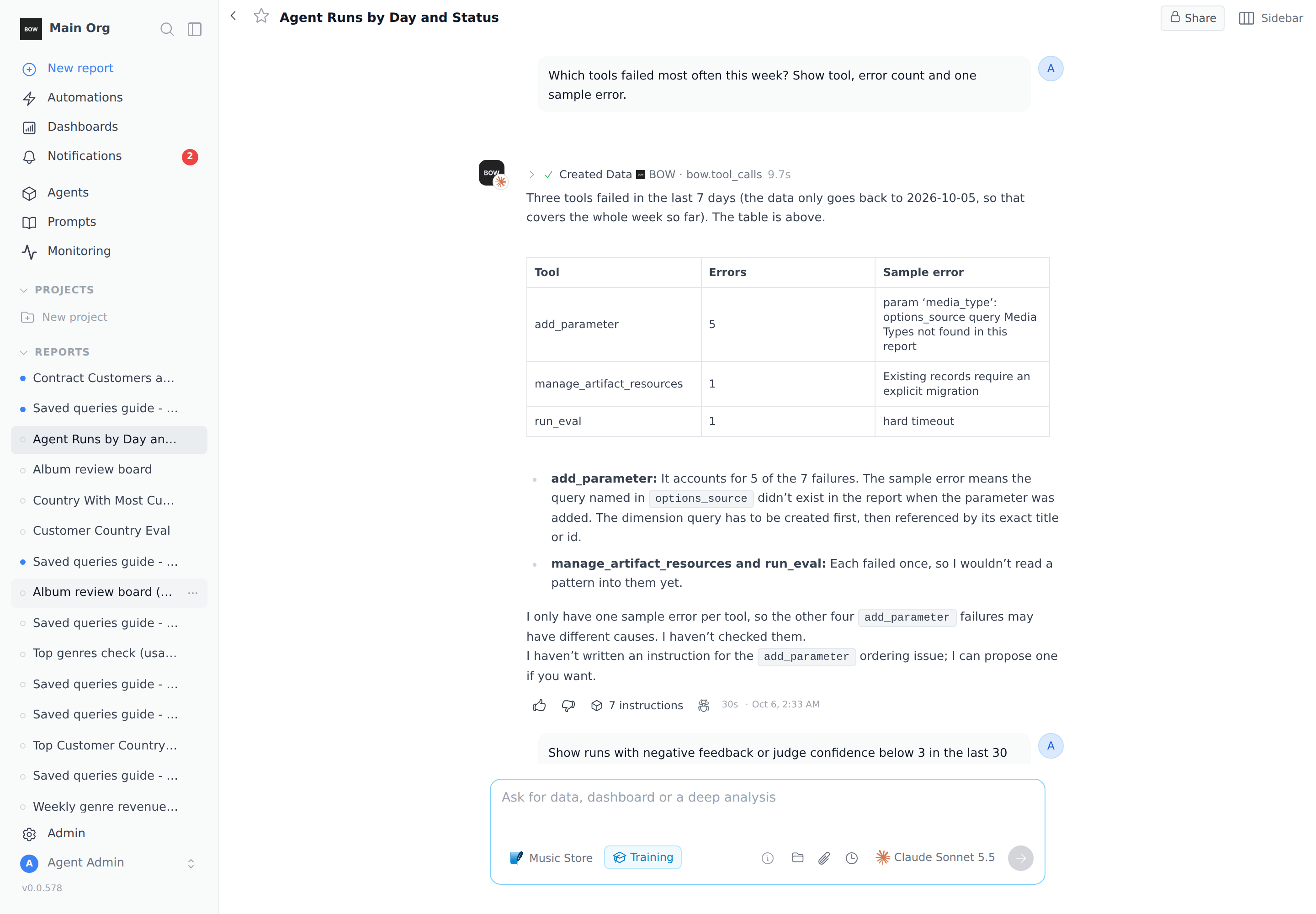
> *Which tools failed most often this week? Show tool, error count and one sample error.*
Tool-level questions use the second table, **bow\.tool\_calls** (one row per tool call). The agent counts errors per tool and quotes a real error message for each.
## Step 2: Ask how your agents are used
> *How many runs did each agent have in the last 7 days, by day and status? Show a chart.*
The agent queries a built-in, read-only source called **BOW**. Its step reads **Created Data · BOW · bow\.runs**, and the result card is tagged **BOW**. Open the **Data** tab to see the rows and **Code** to see the exact query.
If the first chart isn't the view you want, ask for a different one:
> *Make that a bar chart with one group per agent, colored by status.*
The agent states the time window in its answer. When there is less history than the window you asked for, it says so (for example, "the data only goes back to 2026-10-05").
## Step 3: Find failing tools
> *Which tools failed most often this week? Show tool, error count and one sample error.*
Tool-level questions use the second table, **bow\.tool\_calls** (one row per tool call). The agent counts errors per tool and quotes a real error message for each.
 ## Step 4: Read negative feedback and low-confidence answers
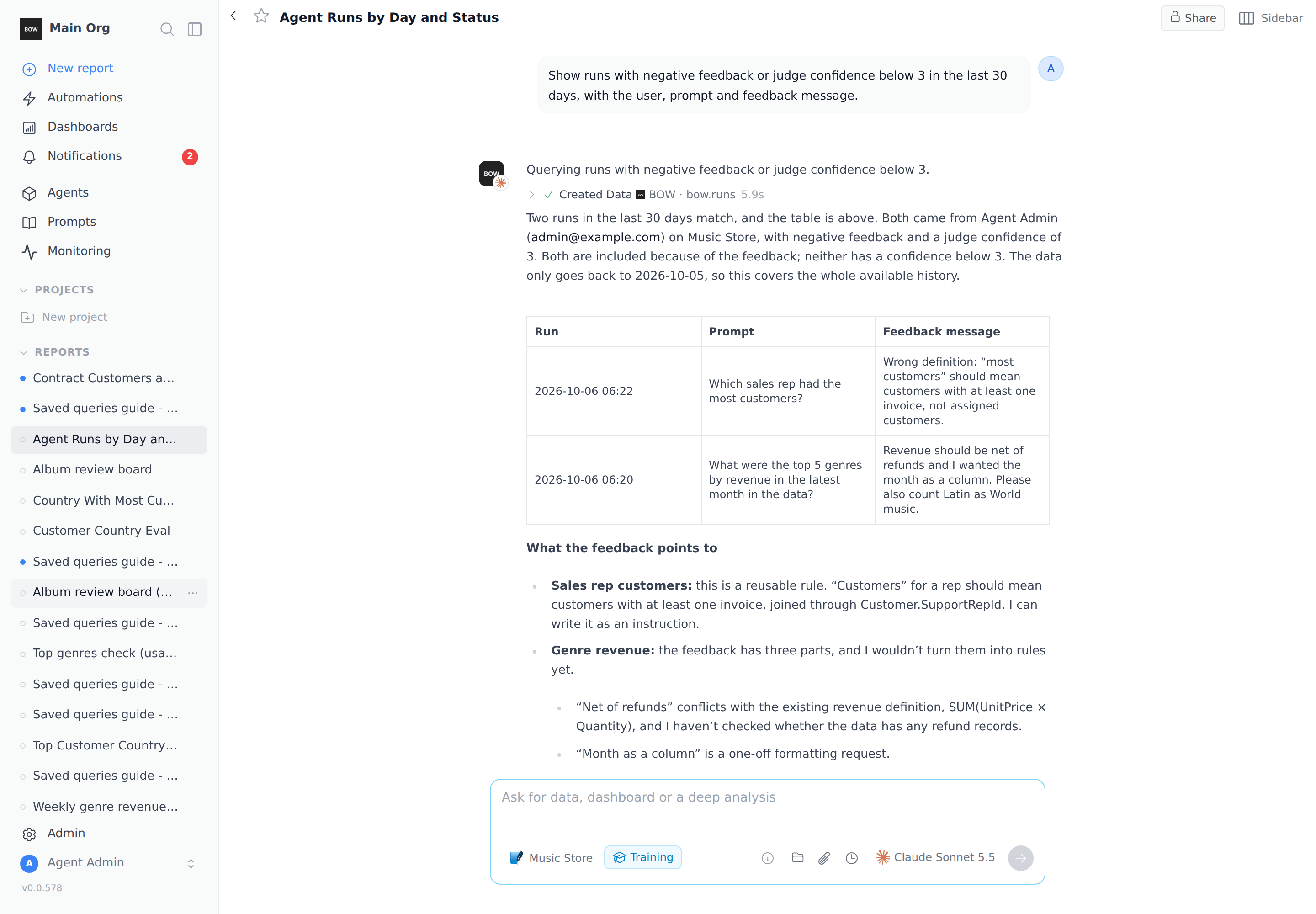
> *Show runs with negative feedback or judge confidence below 3 in the last 30 days, with the user, prompt and feedback message.*
You get the run time, user, prompt and the comment the user left with their thumbs-down. The agent also explains which runs matched and why. **Judge confidence** is a 1–5 score the quality judge gives each answer.
## Step 4: Read negative feedback and low-confidence answers
> *Show runs with negative feedback or judge confidence below 3 in the last 30 days, with the user, prompt and feedback message.*
You get the run time, user, prompt and the comment the user left with their thumbs-down. The agent also explains which runs matched and why. **Judge confidence** is a 1–5 score the quality judge gives each answer.
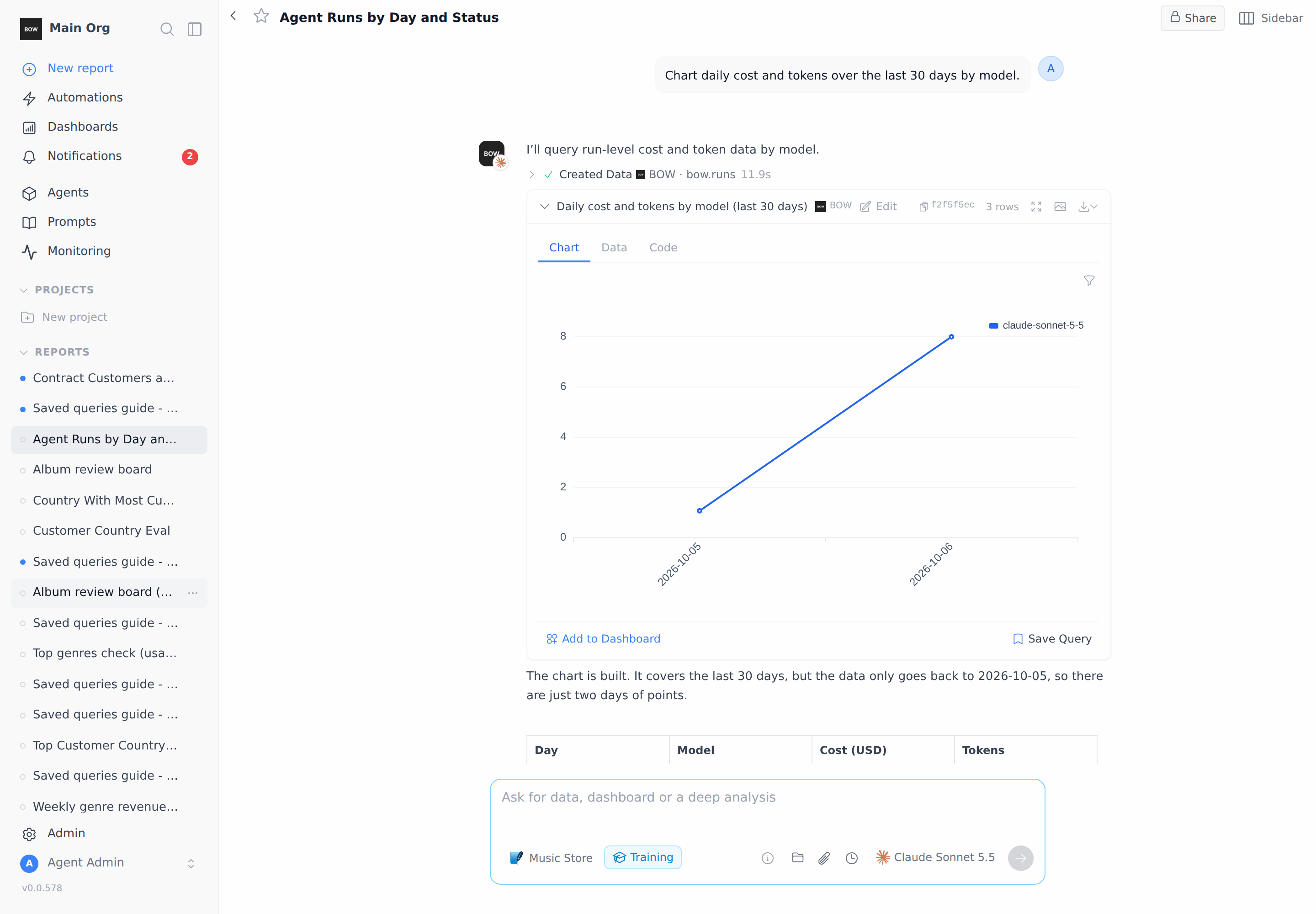
 ## Step 5: Chart cost and tokens
> *Chart daily cost and tokens over the last 30 days by model.*
The agent sums `cost_usd` and `tokens` per day and model and charts them. Runs with no recorded model or cost show up as blank or **none**: unknown cost is not counted as zero.
## Step 5: Chart cost and tokens
> *Chart daily cost and tokens over the last 30 days by model.*
The agent sums `cost_usd` and `tokens` per day and model and charts them. Runs with no recorded model or cost show up as blank or **none**: unknown cost is not counted as zero.
 ## Step 6: Review usage and get instruction fixes
> *Review recent usage of the Music Store agent and propose the top 3 instruction fixes.*
Training sessions include a built-in skill, **Review recent agent usage**. The agent pulls the agent's runs and tool errors, checks the existing instructions for coverage, and returns a ranked list: the evidence, the proposed fix, and whether it needs your decision. It tells you what is already covered.
## Step 6: Review usage and get instruction fixes
> *Review recent usage of the Music Store agent and propose the top 3 instruction fixes.*
Training sessions include a built-in skill, **Review recent agent usage**. The agent pulls the agent's runs and tool errors, checks the existing instructions for coverage, and returns a ranked list: the evidence, the proposed fix, and whether it needs your decision. It tells you what is already covered.
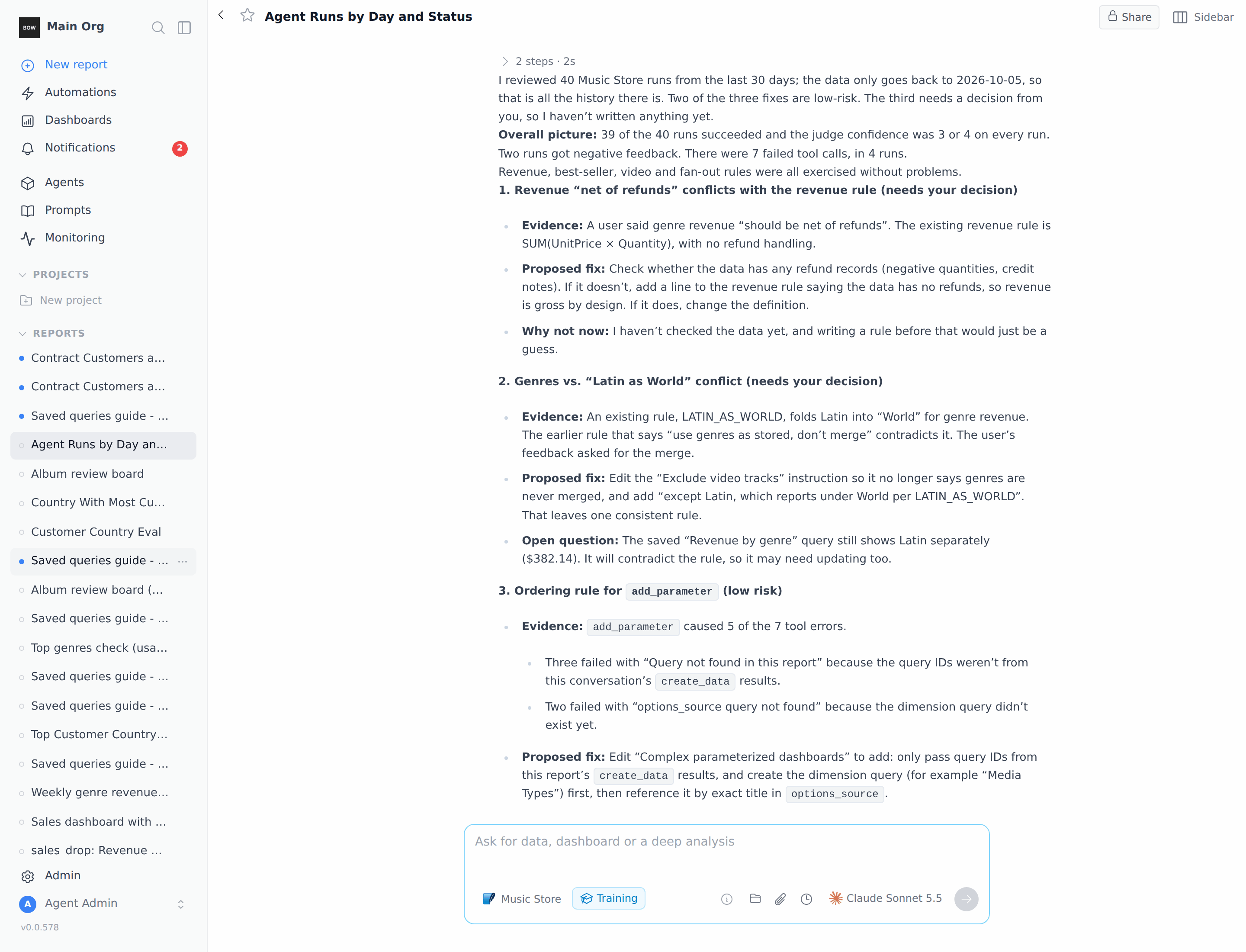 Nothing changes until you say so. If you ask the agent to apply a fix, it writes a draft instruction that you **Accept** or **Reject**, as in any training session.
## What you can ask about
Each run is one row in **bow\.runs**. Each tool call is one row in **bow\.tool\_calls**. You don't need the field names; they help you be precise.
| Field | Table | What it holds |
| - | - | - |
| `created_at`, `day`, `week`, `hour` | both | When the run or call happened |
| `prompt`, `report_title` | runs | What the user asked, and in which report |
| `status`, `error` | both | `success`, `error`, `in_progress`, and the error text |
| `user_name`, `user_email` | runs | Who asked |
| `agent_names` | runs | The agents the run used |
| `platform` | runs | Where the run came from |
| `model`, `provider` | runs | The LLM that answered |
| `cost_usd`, `tokens`, `duration_ms` | runs | Spend, token count and time |
| `feedback_direction`, `feedback_message` | runs | Thumbs up/down and the user's comment |
| `judge_confidence`, `judge_instructions`, `judge_context` | runs | Quality-judge scores (1–5) |
| `tool_count`, `failed_tool_count` | runs | How many tool calls the run made and how many failed |
| `tool`, `action`, `duration_ms`, `error` | tool\_calls | Which tool ran, how long, and why it failed |
| `args_preview`, `output_preview` | tool\_calls | The first 500 characters of the tool's input and output |
## More prompts to try
| Goal | Prompt |
| - | - |
| Slowest questions | *Show the 10 slowest runs this week with prompt, agent and duration.* |
| Most expensive users | *Which users drove the most cost in the last 30 days?* |
| Repeated questions | *Group this month's prompts by what they ask and show the most frequent ones.* |
| One agent's errors | *List every failed run for the Music Store agent in the last 7 days with the error.* |
| Where runs come from | *Count runs by platform for the last 30 days.* |
## Things to know
* **Time window.** Questions cover the last 30 days unless you say otherwise. The longest window is 366 days; if you ask for "all history", the agent uses 366 days and says so.
* **Size limits.** A query returns at most 10,000 rows or 1,000 groups. For bigger questions, the agent aggregates or narrows the window.
* **What's left out.** Runs from evals are hidden unless you ask about evals. The current training session is never included in its own results.
* **Unknown cost.** Some runs have no recorded cost. The agent leaves them blank instead of counting them as zero.
* **Who sees what.** Access is checked on every query. Org admins see all agents; agent managers see only the agents they manage.
* **Sharing.** A report that holds run-history data can't be shared publicly or published. Share it with people in your organization instead.
## Monitoring or chat?
The **Monitoring** page shows the same history without a conversation. **Explore** gives the overview, **Cost** breaks down spend, and **Diagnosis** lists runs with **Quick filters** such as **Errors**, **Failed queries**, **Negative feedback**, **Low confidence**, **Slow** and **Expensive**.
Nothing changes until you say so. If you ask the agent to apply a fix, it writes a draft instruction that you **Accept** or **Reject**, as in any training session.
## What you can ask about
Each run is one row in **bow\.runs**. Each tool call is one row in **bow\.tool\_calls**. You don't need the field names; they help you be precise.
| Field | Table | What it holds |
| - | - | - |
| `created_at`, `day`, `week`, `hour` | both | When the run or call happened |
| `prompt`, `report_title` | runs | What the user asked, and in which report |
| `status`, `error` | both | `success`, `error`, `in_progress`, and the error text |
| `user_name`, `user_email` | runs | Who asked |
| `agent_names` | runs | The agents the run used |
| `platform` | runs | Where the run came from |
| `model`, `provider` | runs | The LLM that answered |
| `cost_usd`, `tokens`, `duration_ms` | runs | Spend, token count and time |
| `feedback_direction`, `feedback_message` | runs | Thumbs up/down and the user's comment |
| `judge_confidence`, `judge_instructions`, `judge_context` | runs | Quality-judge scores (1–5) |
| `tool_count`, `failed_tool_count` | runs | How many tool calls the run made and how many failed |
| `tool`, `action`, `duration_ms`, `error` | tool\_calls | Which tool ran, how long, and why it failed |
| `args_preview`, `output_preview` | tool\_calls | The first 500 characters of the tool's input and output |
## More prompts to try
| Goal | Prompt |
| - | - |
| Slowest questions | *Show the 10 slowest runs this week with prompt, agent and duration.* |
| Most expensive users | *Which users drove the most cost in the last 30 days?* |
| Repeated questions | *Group this month's prompts by what they ask and show the most frequent ones.* |
| One agent's errors | *List every failed run for the Music Store agent in the last 7 days with the error.* |
| Where runs come from | *Count runs by platform for the last 30 days.* |
## Things to know
* **Time window.** Questions cover the last 30 days unless you say otherwise. The longest window is 366 days; if you ask for "all history", the agent uses 366 days and says so.
* **Size limits.** A query returns at most 10,000 rows or 1,000 groups. For bigger questions, the agent aggregates or narrows the window.
* **What's left out.** Runs from evals are hidden unless you ask about evals. The current training session is never included in its own results.
* **Unknown cost.** Some runs have no recorded cost. The agent leaves them blank instead of counting them as zero.
* **Who sees what.** Access is checked on every query. Org admins see all agents; agent managers see only the agents they manage.
* **Sharing.** A report that holds run-history data can't be shared publicly or published. Share it with people in your organization instead.
## Monitoring or chat?
The **Monitoring** page shows the same history without a conversation. **Explore** gives the overview, **Cost** breaks down spend, and **Diagnosis** lists runs with **Quick filters** such as **Errors**, **Failed queries**, **Negative feedback**, **Low confidence**, **Slow** and **Expensive**.
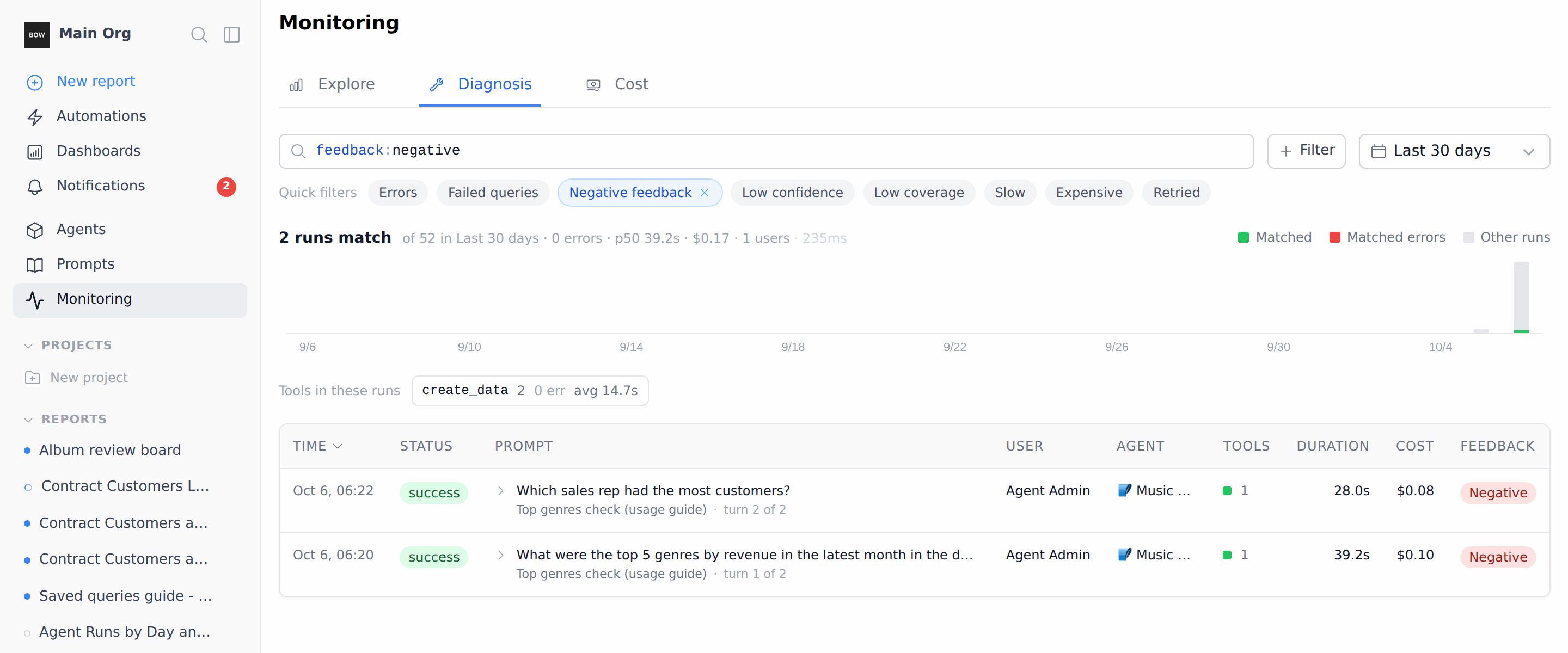 Use **Monitoring** to scan and filter runs and open a single conversation. Use a training session when you want a custom breakdown, a chart you can save, or a review that ends in instruction fixes.
## Tips
* **Name the window.** "Last 7 days" or "since September 1" gives a precise answer. The agent always states the window it used.
* **Name the agent.** "for the Music Store agent" keeps a review focused on one agent.
* **Ask for the evidence.** "show one sample error" or "include the feedback message" turns a count into something you can act on.
* **Save what you reuse.** Click **Save Query** on a result card, or **Add to Dashboard** to keep a chart.
## Related
* [Train an agent](/agents/train-an-agent)
* [Instructions and knowledge](/agents/instructions)
* [Runs and traces](/observe-and-govern/runs-and-traces)
* [Usage, cost and quality](/observe-and-govern/usage-cost-quality)
* [Evals](/agents/evals)
This documentation is built and hosted on [Mintlify](https://mintlify.com), a developer documentation platform.
Use **Monitoring** to scan and filter runs and open a single conversation. Use a training session when you want a custom breakdown, a chart you can save, or a review that ends in instruction fixes.
## Tips
* **Name the window.** "Last 7 days" or "since September 1" gives a precise answer. The agent always states the window it used.
* **Name the agent.** "for the Music Store agent" keeps a review focused on one agent.
* **Ask for the evidence.** "show one sample error" or "include the feedback message" turns a count into something you can act on.
* **Save what you reuse.** Click **Save Query** on a result card, or **Add to Dashboard** to keep a chart.
## Related
* [Train an agent](/agents/train-an-agent)
* [Instructions and knowledge](/agents/instructions)
* [Runs and traces](/observe-and-govern/runs-and-traces)
* [Usage, cost and quality](/observe-and-govern/usage-cost-quality)
* [Evals](/agents/evals)
This documentation is built and hosted on [Mintlify](https://mintlify.com), a developer documentation platform.