> ## Documentation Index
> Fetch the complete documentation index at: https://docs.bagofwords.com/llms.txt
> Use this file to discover all available pages before exploring further.
# Root cause analysis with sub-agents
> Ask why a metric dropped on the Checkout Ops demo and watch the agent test each candidate cause with a sub-agent, then name the cause and rule out the rest.
A "why did it drop" question has several plausible answers, and a good analyst tests each one separately before picking. This guide runs that investigation on the **Checkout Ops** demo, where one cause is planted in the data and several decoys are planted next to it, so you can check the agent's answer against the truth.
The agent uses [sub-agents](/using-bow/sub-agents) for the parallel part: one per candidate cause, each with its own goal, reporting back as a record.
## Before you start
* **Sub-agents is on.** It is on by default. An admin can check it in **Settings → AI Settings → Sub-agents**, with the posture set to **proactive**.
* **The Checkout Ops demo is installed.** It is one of the demo data sources offered when a workspace is set up. It holds daily orders, sessions, deploys, payment-provider status, price changes and campaigns for August and September 2026.
* Optionally, **Sub-agents may create queries** is on, so the sub-agents' evidence appears as queries in the report. Off, they work from inspections and the result is the same.
## What is planted
From 2026-09-14, checkout-service release 5.2.0 breaks payments for iOS customers paying through PayFlow: their failure rate jumps from a few percent to well over half, and paid orders per day fall by about fifteen percent. Nothing else changes for Android, web or the other providers.
Four decoys sit in the same window: a premium price increase on 2026-09-10, an APAC campaign that lifts sessions but not paid orders, a one-day PayFlow incident flag in us-east on 2026-09-15, and ordinary weekly seasonality. A good answer names the release and rules the decoys out with numbers.
## Step 1: Ask why
Open a report on Checkout Ops and ask:
> *Paid orders dropped about 15% since mid-September. Why? Test the likely causes separately and tell me which one it is, with evidence, and which ones you ruled out.*
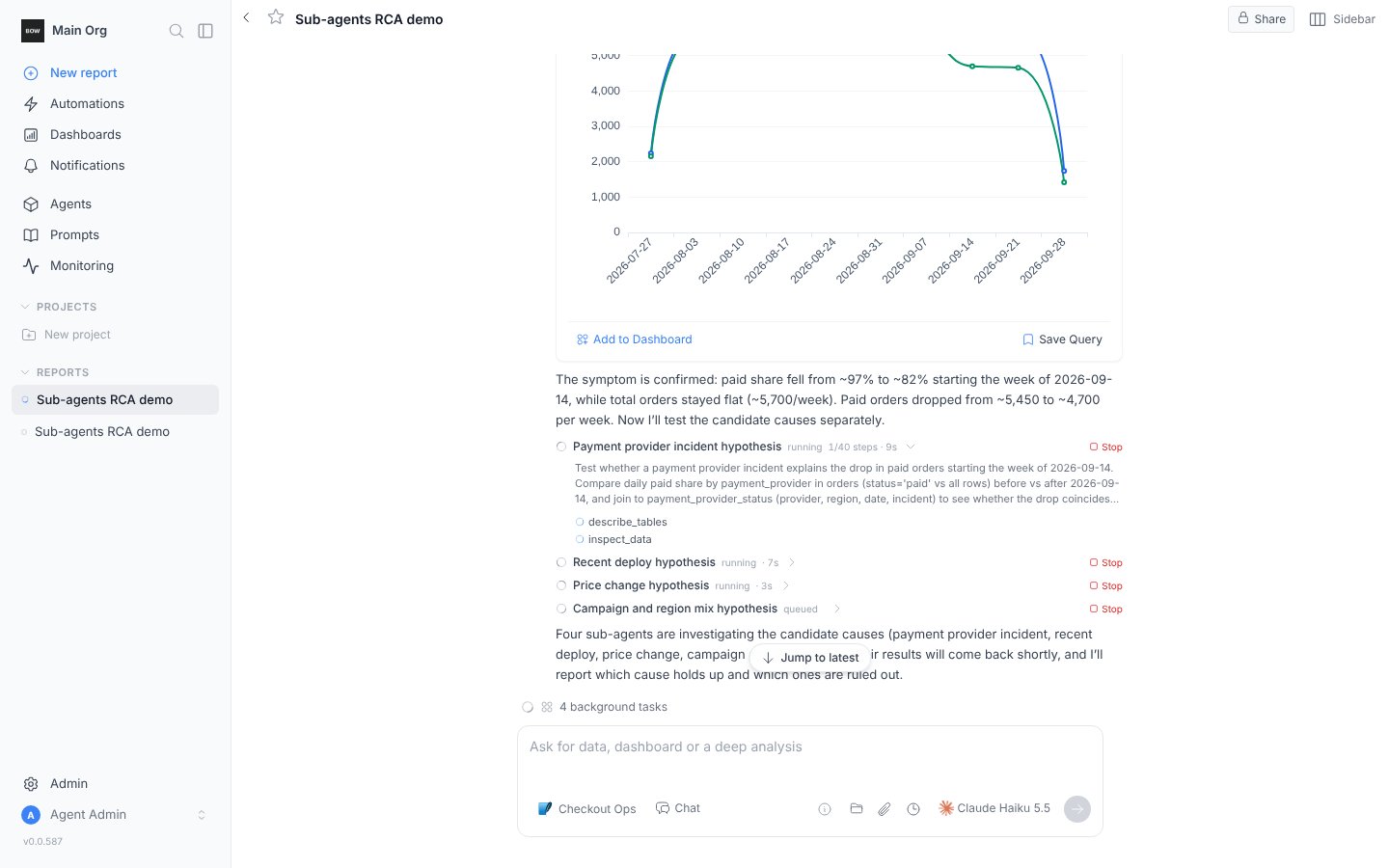
The agent first confirms the symptom with one query, then lists the candidate causes and launches a sub-agent for each: payment-provider incident, recent deploy, price change, traffic and campaign mix. Its message ends with one line saying what it launched; the cards below it are the sub-agents.
 ## Step 2: Watch, or keep going
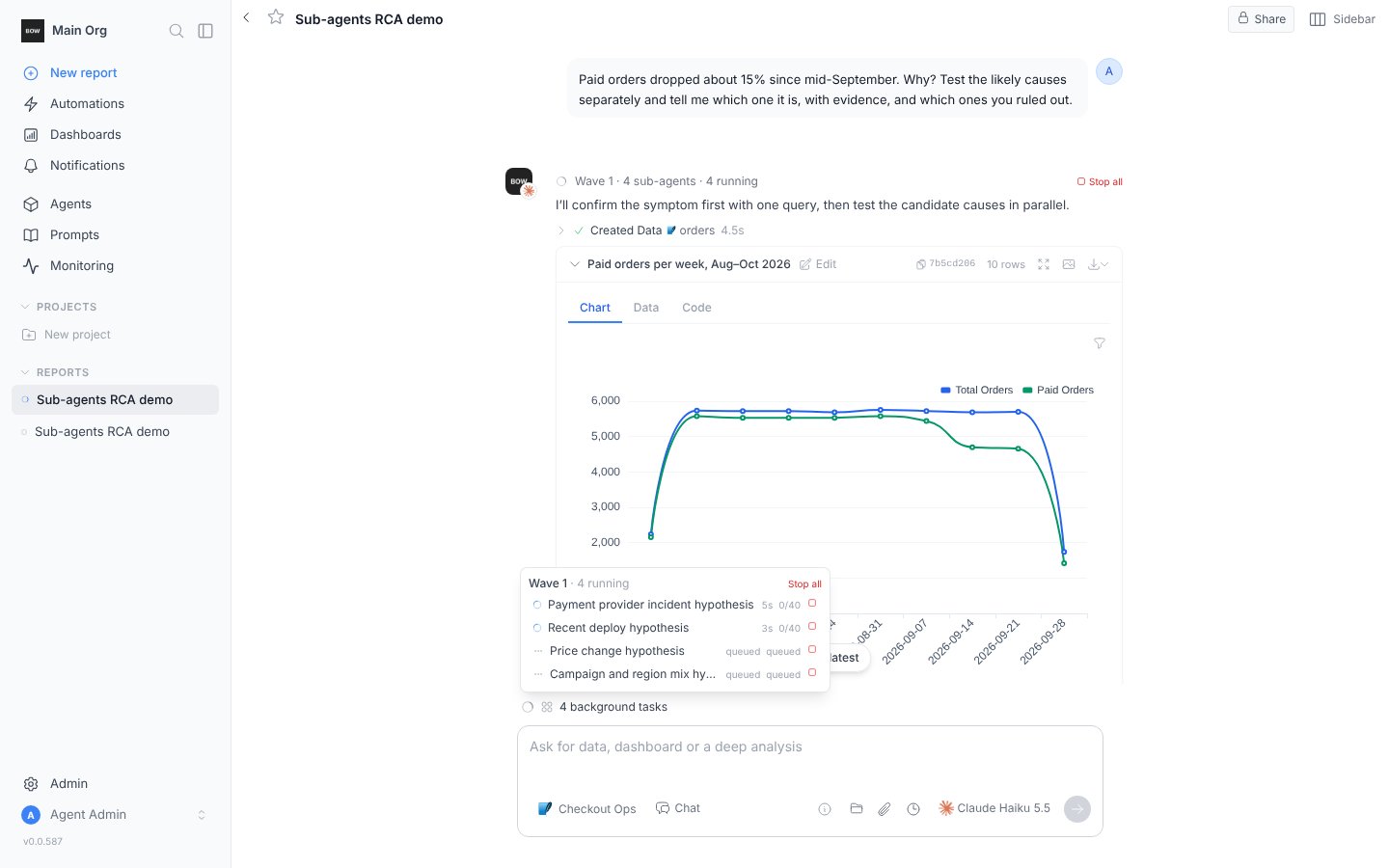
The status row shows **4 background tasks**; hover it to see each sub-agent's duration and steps, or open a card to follow its tool calls. You do not have to wait. Ask *how is the investigation going?* and the agent answers from the sub-agents' progress so far.
## Step 2: Watch, or keep going
The status row shows **4 background tasks**; hover it to see each sub-agent's duration and steps, or open a card to follow its tool calls. You do not have to wait. Ask *how is the investigation going?* and the agent answers from the sub-agents' progress so far.
 ## Step 3: Read the answer
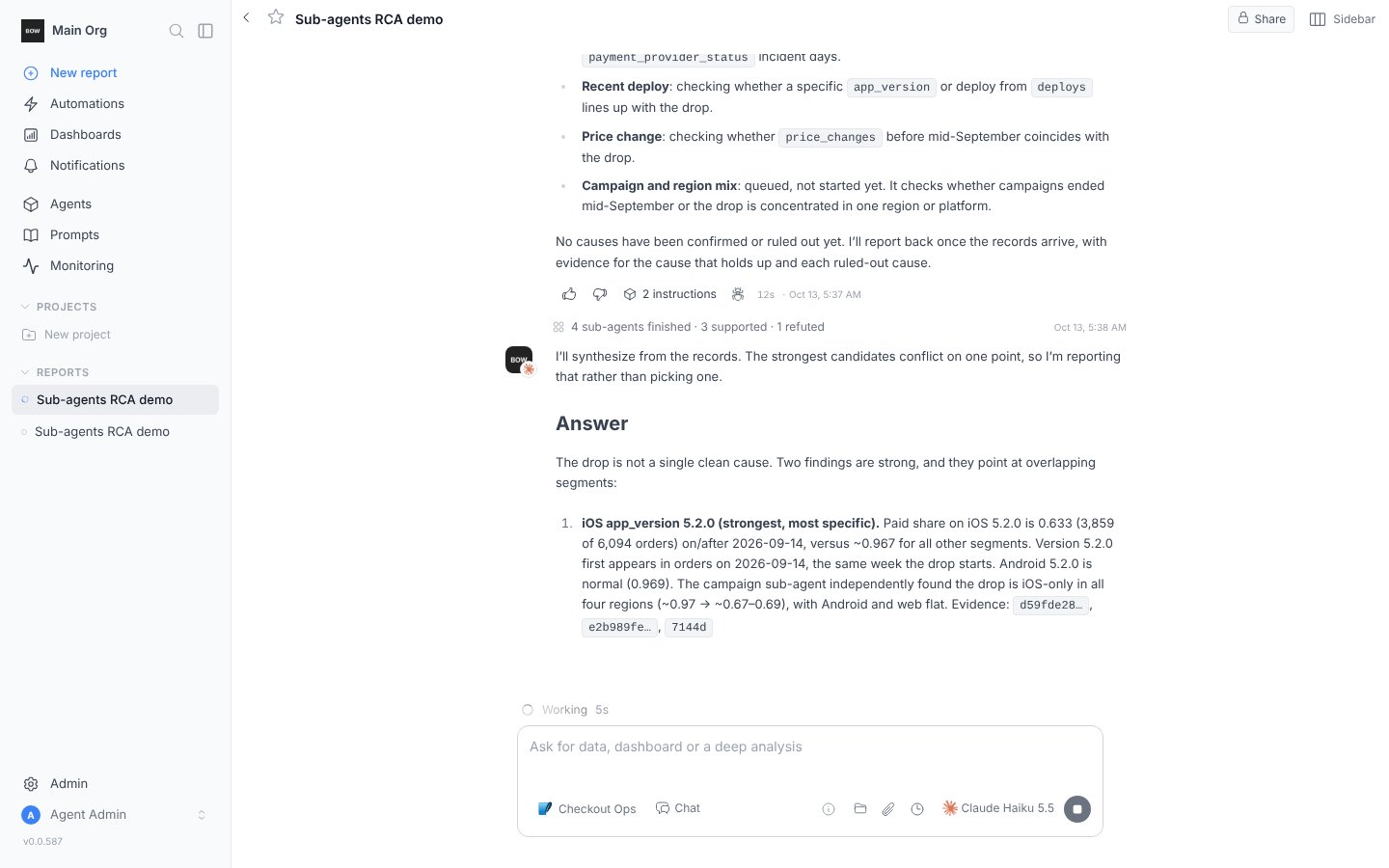
When the last sub-agent reports, a line records the wave and the agent writes the synthesis. On the planted data it names the iOS 5.2.0 release on PayFlow from 2026-09-14, gives the failure rate and the paid-share drop that support it, and rules out the other causes with the numbers each sub-agent found: the provider flag covers one day in one region, the price change predates the drop and hits every platform, the campaign moved sessions and not paid orders.
## Step 3: Read the answer
When the last sub-agent reports, a line records the wave and the agent writes the synthesis. On the planted data it names the iOS 5.2.0 release on PayFlow from 2026-09-14, gives the failure rate and the paid-share drop that support it, and rules out the other causes with the numbers each sub-agent found: the provider flag covers one day in one region, the price change predates the drop and hits every platform, the campaign moved sessions and not paid orders.
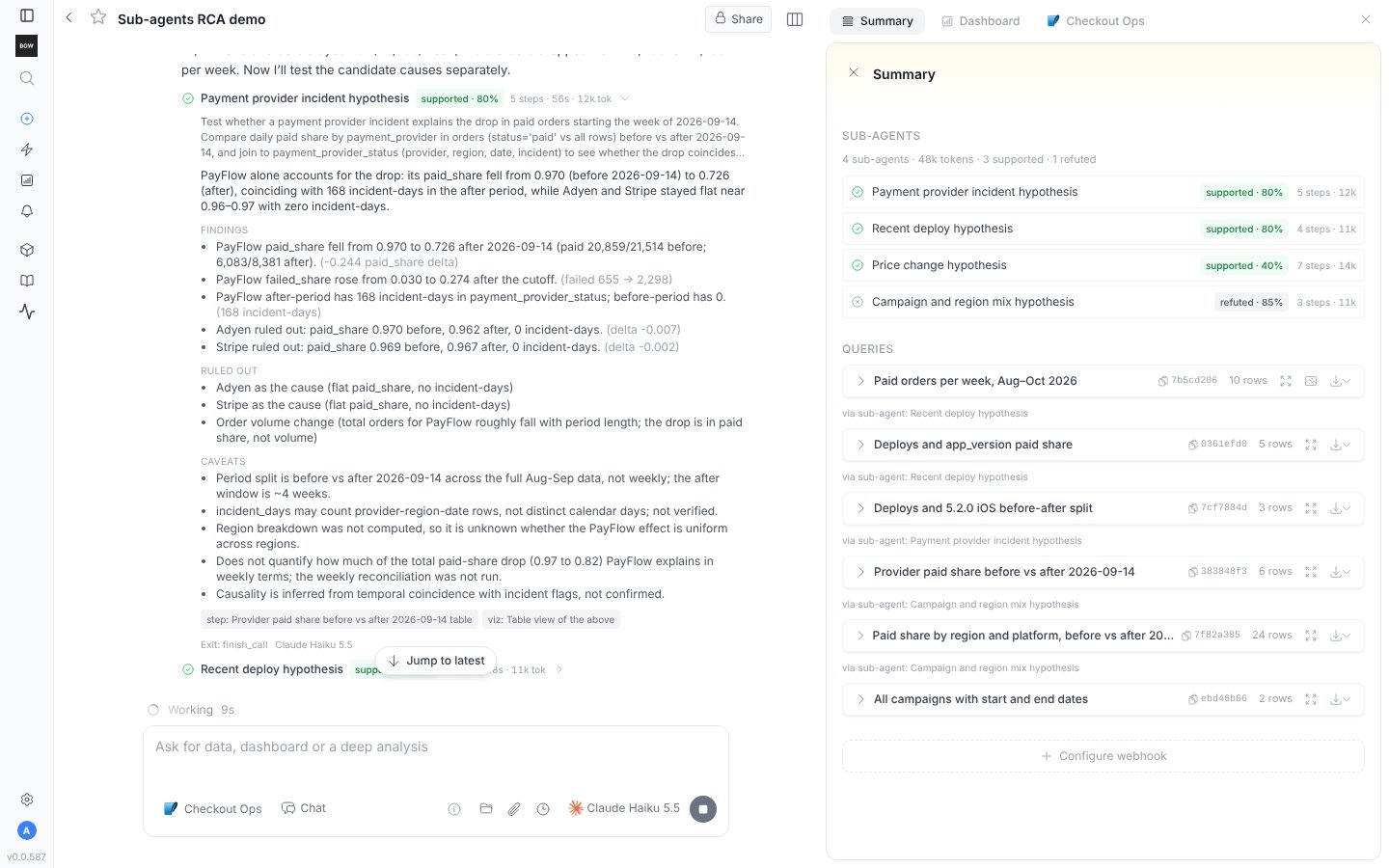
 Open a finished card for the sub-agent's full record: its findings, what it ruled out, its caveats and what it left unknown, with the evidence it used. The **Summary** tab lists all four with their outcomes and tokens.
 ## Step 4: Follow up
A record marked inconclusive or blocked names what would settle it. Ask for that directly, or ask the agent to *test the remaining causes* and it launches a second wave for the open ones only; it never relaunches a cause that already has a record.
Definitions matter more here than anywhere: the demo ships two instructions that define paid orders, failure rate and conversion. When you run this on your own data, teach the agent those definitions first; see [Tips for training an agent](/guides/training-tips).
## On your own data
The same ask works on any source with the agent's usual tools. What changes is the shape of the candidate causes: deploys from an observability source, incidents from a status table, campaigns from marketing data. [Root cause analysis across observability tools](/guides/root-cause-analysis) shows the single-agent playbook across Elasticsearch, Prometheus, Kubernetes and Splunk; with sub-agents on, the agent fans that playbook out one cause at a time.
## Related
* [Sub-agents](/using-bow/sub-agents)
* [AI Settings](/using-bow/settings#sub-agents)
* [Root cause analysis across observability tools](/guides/root-cause-analysis)
* [Test an agent with evals](/guides/evals)
This documentation is built and hosted on [Mintlify](https://mintlify.com), a developer documentation platform.
## Step 4: Follow up
A record marked inconclusive or blocked names what would settle it. Ask for that directly, or ask the agent to *test the remaining causes* and it launches a second wave for the open ones only; it never relaunches a cause that already has a record.
Definitions matter more here than anywhere: the demo ships two instructions that define paid orders, failure rate and conversion. When you run this on your own data, teach the agent those definitions first; see [Tips for training an agent](/guides/training-tips).
## On your own data
The same ask works on any source with the agent's usual tools. What changes is the shape of the candidate causes: deploys from an observability source, incidents from a status table, campaigns from marketing data. [Root cause analysis across observability tools](/guides/root-cause-analysis) shows the single-agent playbook across Elasticsearch, Prometheus, Kubernetes and Splunk; with sub-agents on, the agent fans that playbook out one cause at a time.
## Related
* [Sub-agents](/using-bow/sub-agents)
* [AI Settings](/using-bow/settings#sub-agents)
* [Root cause analysis across observability tools](/guides/root-cause-analysis)
* [Test an agent with evals](/guides/evals)
This documentation is built and hosted on [Mintlify](https://mintlify.com), a developer documentation platform.