> ## Documentation Index
> Fetch the complete documentation index at: https://docs.bagofwords.com/llms.txt
> Use this file to discover all available pages before exploring further.
# Test an agent with evals
> Write test questions with expected answers, run them against an agent, and read why each one passed or failed.
An eval is a test question for an agent with a rule for what a good answer looks like. Group evals into a suite, run the suite whenever you change the agent's instructions, and you see right away whether an answer broke.
 ## Before you start
* **You manage the agent.** The **Evals** row only shows in the agent tree for people who can manage the agent's evals.
* **You know the right answers.** An eval is only as good as its expected answer. Check each number or name once, for example by asking the agent and reading the SQL it ran, before you write it into a test.
## Step 1: Open the agent's evals
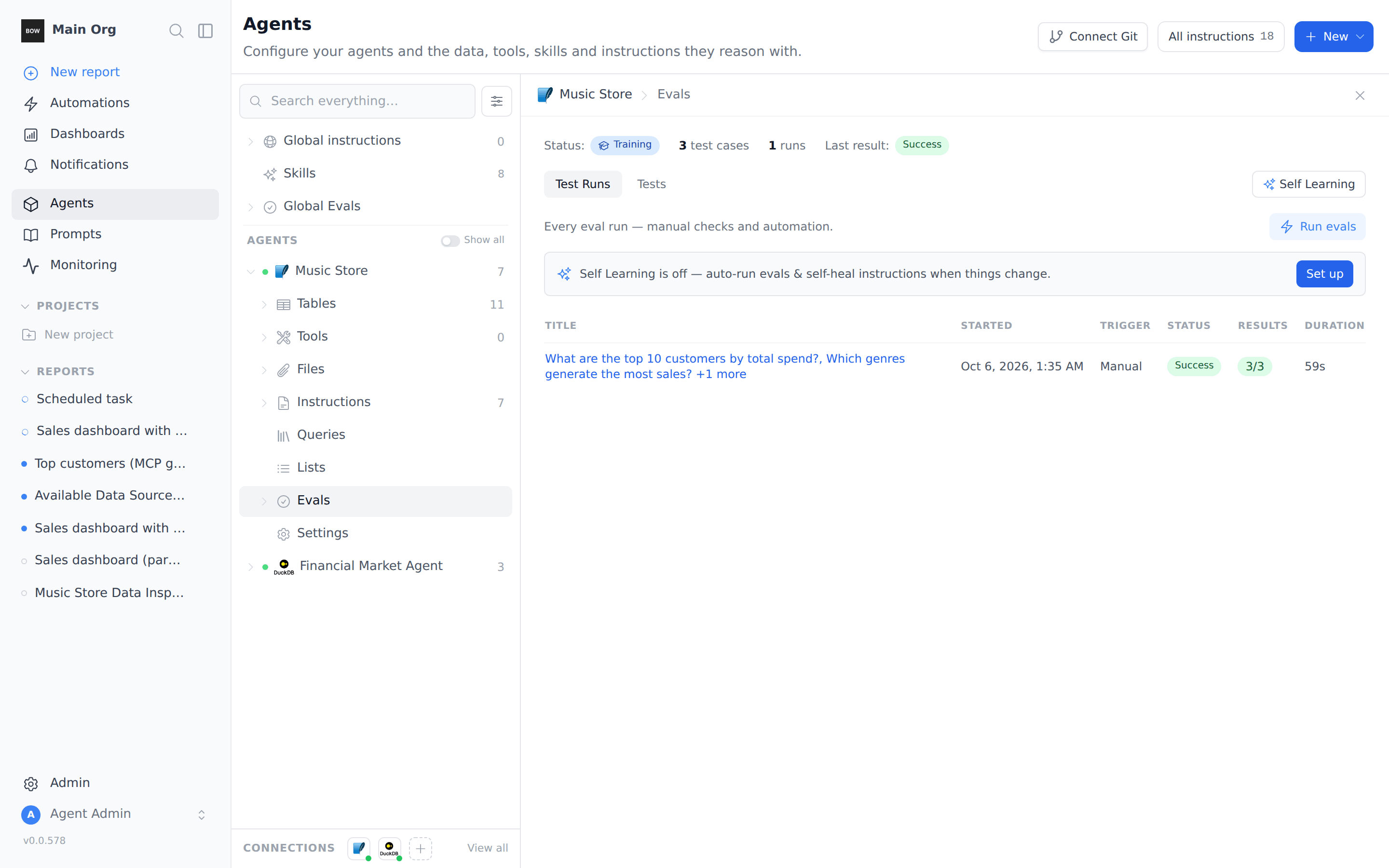
Open **Agents**, expand the agent, and click **Evals**.
The panel shows the agent's **Status** (its current stage, for example **Training**), how many **test cases** and **runs** it has, and the **Last result**. Two tabs sit below: **Test Runs** lists every run, and **Tests** lists every test case.
**Self Learning** runs evals for you when instructions change. This guide runs them by hand. See [Evals](/agents/evals) to set up Self Learning.
## Step 2: Create a suite
A suite is a folder of test cases that you run together.
Hover the **Evals** row in the tree and click the folder icon (**New folder**). Name the suite, for example *Music Store basics*, and click **Create**.
## Before you start
* **You manage the agent.** The **Evals** row only shows in the agent tree for people who can manage the agent's evals.
* **You know the right answers.** An eval is only as good as its expected answer. Check each number or name once, for example by asking the agent and reading the SQL it ran, before you write it into a test.
## Step 1: Open the agent's evals
Open **Agents**, expand the agent, and click **Evals**.
The panel shows the agent's **Status** (its current stage, for example **Training**), how many **test cases** and **runs** it has, and the **Last result**. Two tabs sit below: **Test Runs** lists every run, and **Tests** lists every test case.
**Self Learning** runs evals for you when instructions change. This guide runs them by hand. See [Evals](/agents/evals) to set up Self Learning.
## Step 2: Create a suite
A suite is a folder of test cases that you run together.
Hover the **Evals** row in the tree and click the folder icon (**New folder**). Name the suite, for example *Music Store basics*, and click **Create**.
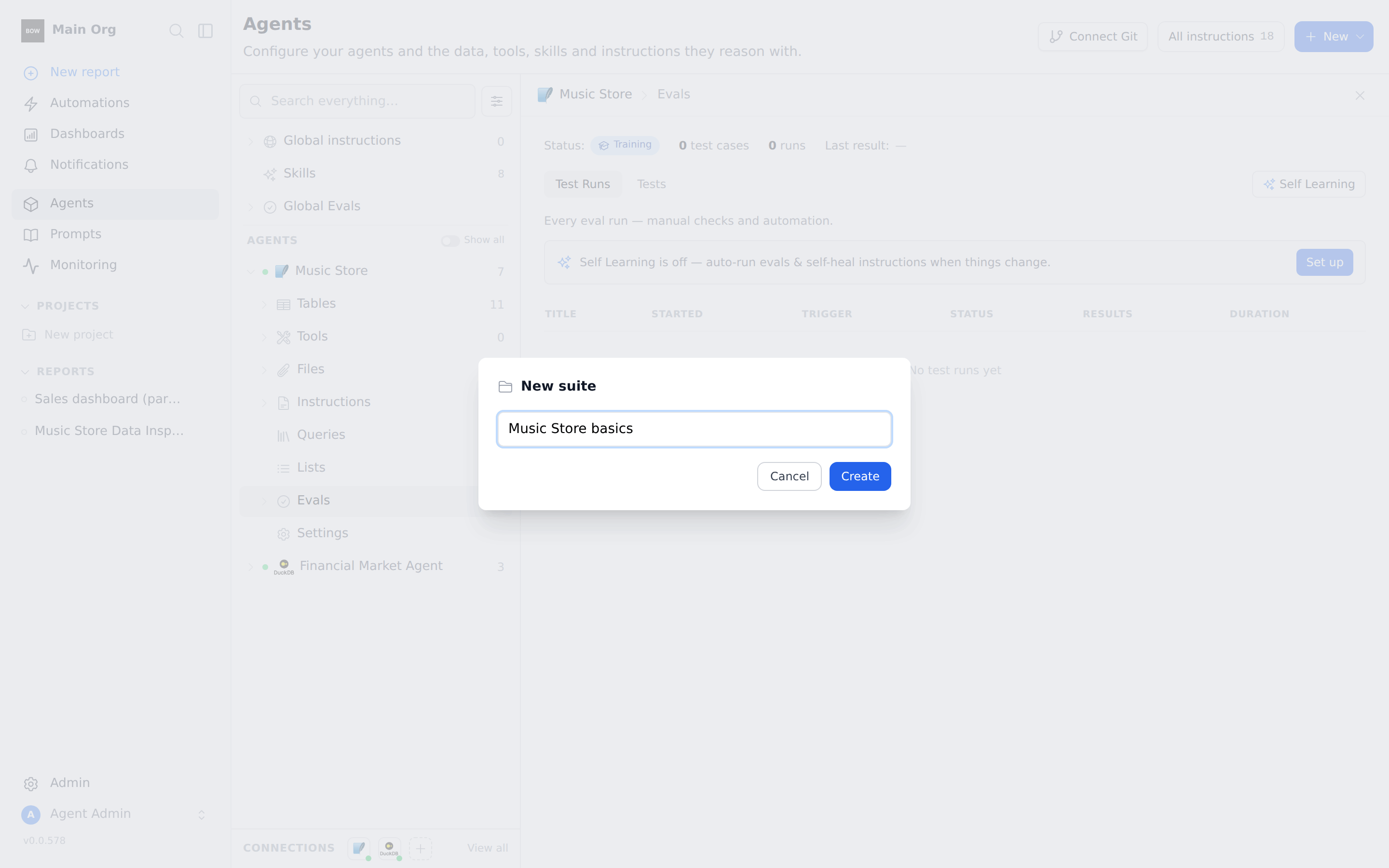 The suite shows under **Evals** in the tree.
## Step 3: Add a test case
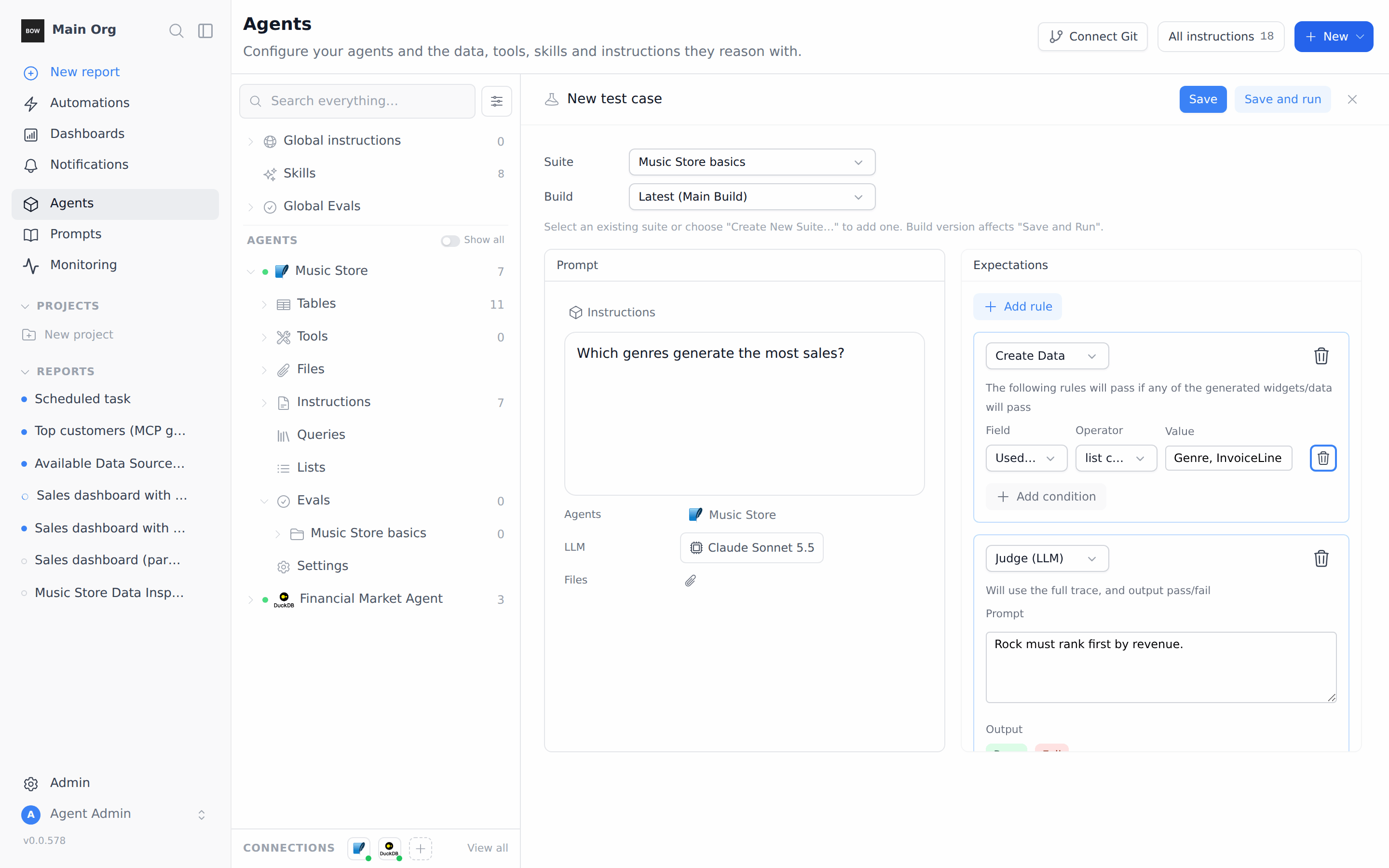
Hover the suite and click **+** (**Add**). A **New test case** editor opens on the right, with the suite already picked.
1. In **Prompt**, type the question a user would ask:
> *Which genres generate the most sales?*
The agent is already selected under **Agents**.
2. Under **Expectations**, a **Judge (LLM)** rule is already there. In its **Prompt** box, write what a correct answer must say:
> *Rock must rank first by revenue.*
The judge reads the agent's full answer and its steps, and returns **Pass** or **Fail** with its reasoning.
3. To also check how the agent got there, click **Add rule**, then change the new rule's type from **Judge (LLM)** to **Create Data**. Set **Field** to **Used tables**, **Operator** to **list contains all**, and **Value** to `Genre, InvoiceLine`.
4. Click **Save**. To run the case right away, click **Save and run** instead.
The suite shows under **Evals** in the tree.
## Step 3: Add a test case
Hover the suite and click **+** (**Add**). A **New test case** editor opens on the right, with the suite already picked.
1. In **Prompt**, type the question a user would ask:
> *Which genres generate the most sales?*
The agent is already selected under **Agents**.
2. Under **Expectations**, a **Judge (LLM)** rule is already there. In its **Prompt** box, write what a correct answer must say:
> *Rock must rank first by revenue.*
The judge reads the agent's full answer and its steps, and returns **Pass** or **Fail** with its reasoning.
3. To also check how the agent got there, click **Add rule**, then change the new rule's type from **Judge (LLM)** to **Create Data**. Set **Field** to **Used tables**, **Operator** to **list contains all**, and **Value** to `Genre, InvoiceLine`.
4. Click **Save**. To run the case right away, click **Save and run** instead.
 There is no separate "expected answer" field. Write the expected answer into the judge prompt, and say what should fail. For example: *Must name Jane Peacock as the top sales support agent. Fail if it names Margaret Park or Steve Johnson.*
Add two more cases to the same suite:
| Prompt | Judge prompt |
| - | - |
| *What are the top 10 customers by total spend?* | *Must return exactly 10 customers ranked by total invoice spend (sum of Invoice.Total), highest first. Fail if it counts invoices instead of summing spend.* |
| *Which sales support agent has the highest total sales?* | *Must name Jane Peacock as the sales support agent with the highest total sales (about \$833 across her customers' invoices). Fail if it names Margaret Park or Steve Johnson.* |
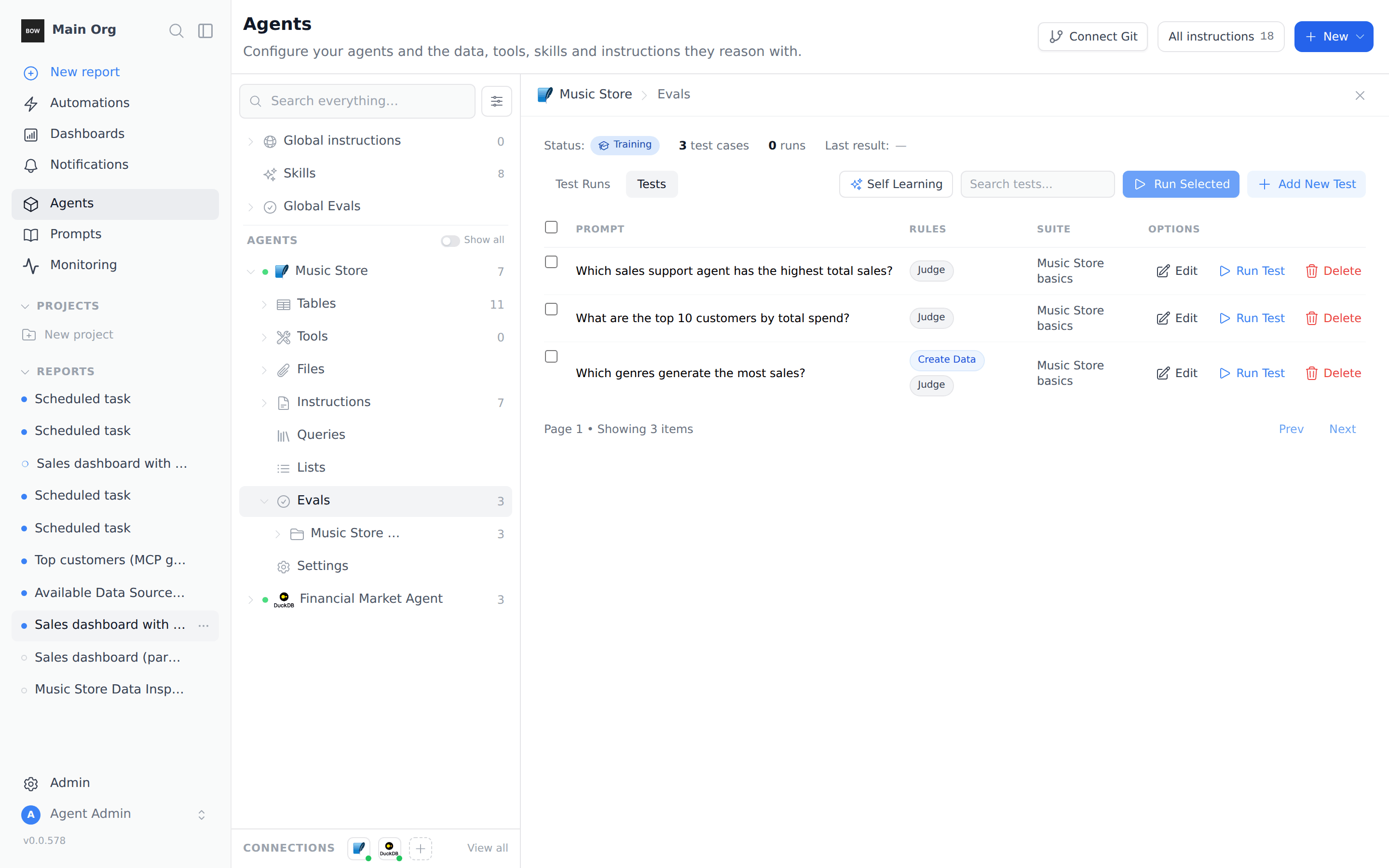
Open the **Tests** tab to see all three. The **Rules** column shows which kinds of rules each case uses.
There is no separate "expected answer" field. Write the expected answer into the judge prompt, and say what should fail. For example: *Must name Jane Peacock as the top sales support agent. Fail if it names Margaret Park or Steve Johnson.*
Add two more cases to the same suite:
| Prompt | Judge prompt |
| - | - |
| *What are the top 10 customers by total spend?* | *Must return exactly 10 customers ranked by total invoice spend (sum of Invoice.Total), highest first. Fail if it counts invoices instead of summing spend.* |
| *Which sales support agent has the highest total sales?* | *Must name Jane Peacock as the sales support agent with the highest total sales (about \$833 across her customers' invoices). Fail if it names Margaret Park or Steve Johnson.* |
Open the **Tests** tab to see all three. The **Rules** column shows which kinds of rules each case uses.
 ## Step 4: Run the suite
Hover the suite in the tree and click the play icon (**Run this suite**). Every case in the suite runs as one test run, and the run opens in the panel.
To run only some cases, open the **Tests** tab, tick them, and click **Run Selected**. To run a single case, click **Run Test** on its row.
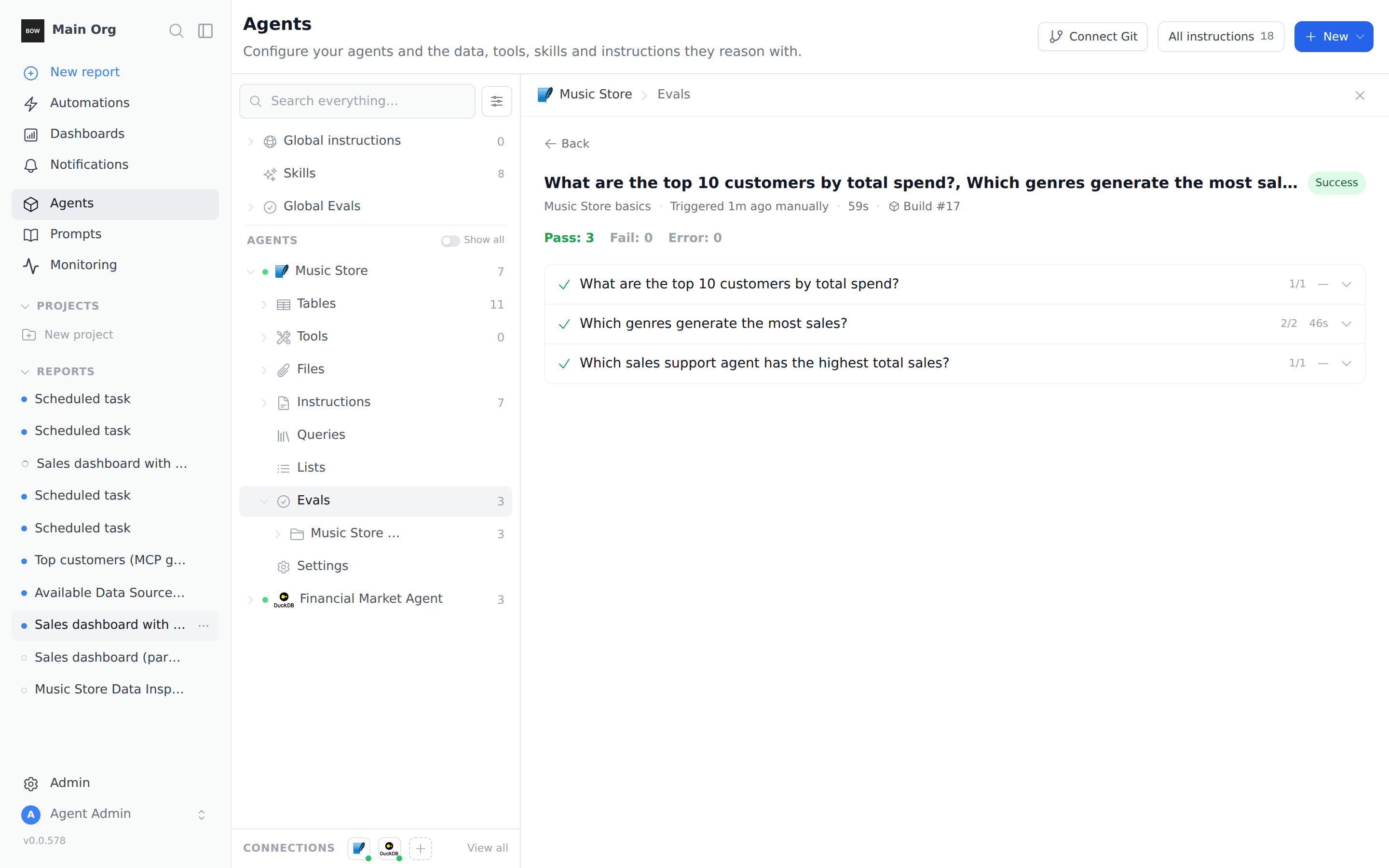
Each case starts a real conversation with the agent, so a run takes about as long as asking the questions yourself. When it finishes you see the run's status and a **Pass**, **Fail**, and **Error** count.
## Step 4: Run the suite
Hover the suite in the tree and click the play icon (**Run this suite**). Every case in the suite runs as one test run, and the run opens in the panel.
To run only some cases, open the **Tests** tab, tick them, and click **Run Selected**. To run a single case, click **Run Test** on its row.
Each case starts a real conversation with the agent, so a run takes about as long as asking the questions yourself. When it finishes you see the run's status and a **Pass**, **Fail**, and **Error** count.
 ## Step 5: Read why a case passed or failed
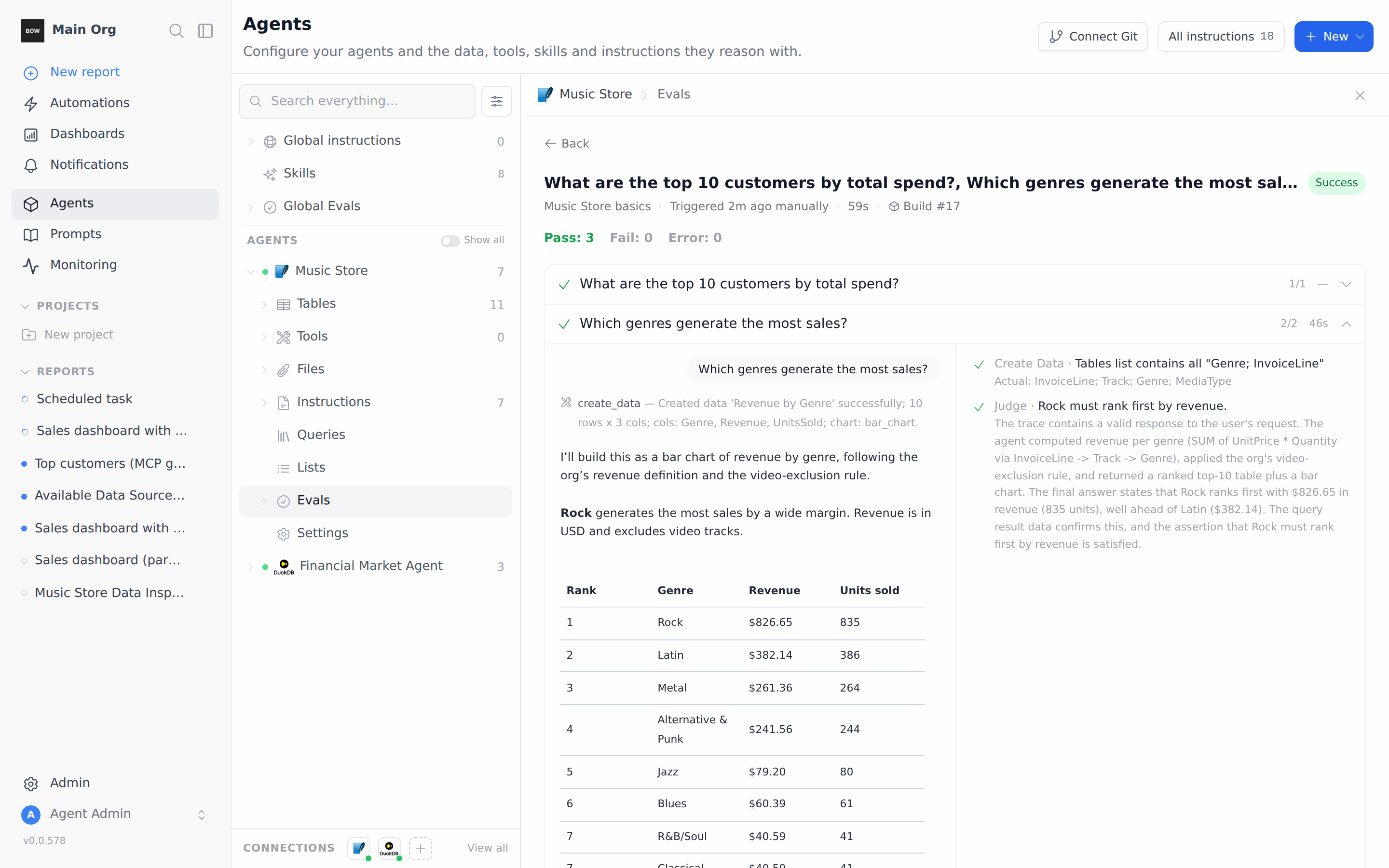
Click a case to expand it. The left side shows the conversation: the question, the tools the agent used, and its answer. The right side lists each rule with a check or a cross:
* A **Create Data** rule shows the expected tables and the **Actual** tables the agent queried.
* A **Judge** rule shows the judge's reasoning, so you can see what it checked and why it decided.
## Step 5: Read why a case passed or failed
Click a case to expand it. The left side shows the conversation: the question, the tools the agent used, and its answer. The right side lists each rule with a check or a cross:
* A **Create Data** rule shows the expected tables and the **Actual** tables the agent queried.
* A **Judge** rule shows the judge's reasoning, so you can see what it checked and why it decided.
 Click **Open report** at the bottom of a case to open the full conversation.
To see every past run, click **Back** and stay on the **Test Runs** tab. Each row shows when the run started, its trigger, its status, and how many cases passed.
## Step 6: Create an eval from a training chat
You can also ask the agent to write and run an eval for you during a training session.
1. Open **Agents**, select the agent, click **⋯** at the top right, and choose **Start a training session**.
2. Ask for the eval and give the expected answer:
> *Create an eval: 'Which country has the most customers?' — the answer must be USA. Run it in the background and tell me the result when it finishes.*
Click **Open report** at the bottom of a case to open the full conversation.
To see every past run, click **Back** and stay on the **Test Runs** tab. Each row shows when the run started, its trigger, its status, and how many cases passed.
## Step 6: Create an eval from a training chat
You can also ask the agent to write and run an eval for you during a training session.
1. Open **Agents**, select the agent, click **⋯** at the top right, and choose **Start a training session**.
2. Ask for the eval and give the expected answer:
> *Create an eval: 'Which country has the most customers?' — the answer must be USA. Run it in the background and tell me the result when it finishes.*
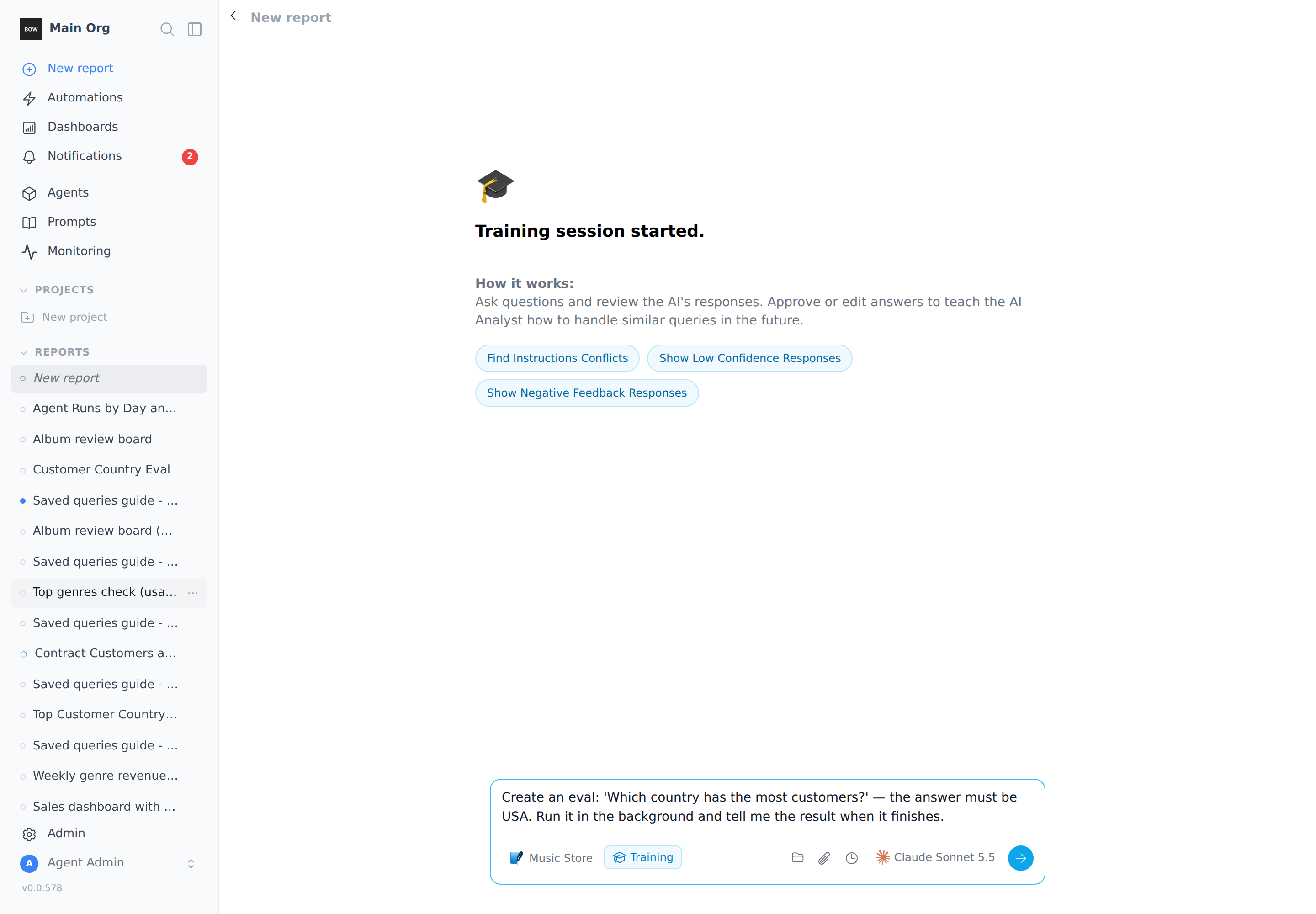 The agent checks for a similar eval, then writes one. The **Created eval** card shows the eval's name, its suite, and its status. The agent then starts a run. When the run finishes, a message posts back to the chat (for example **1/1 passed (success)**), and the agent sums up the result.
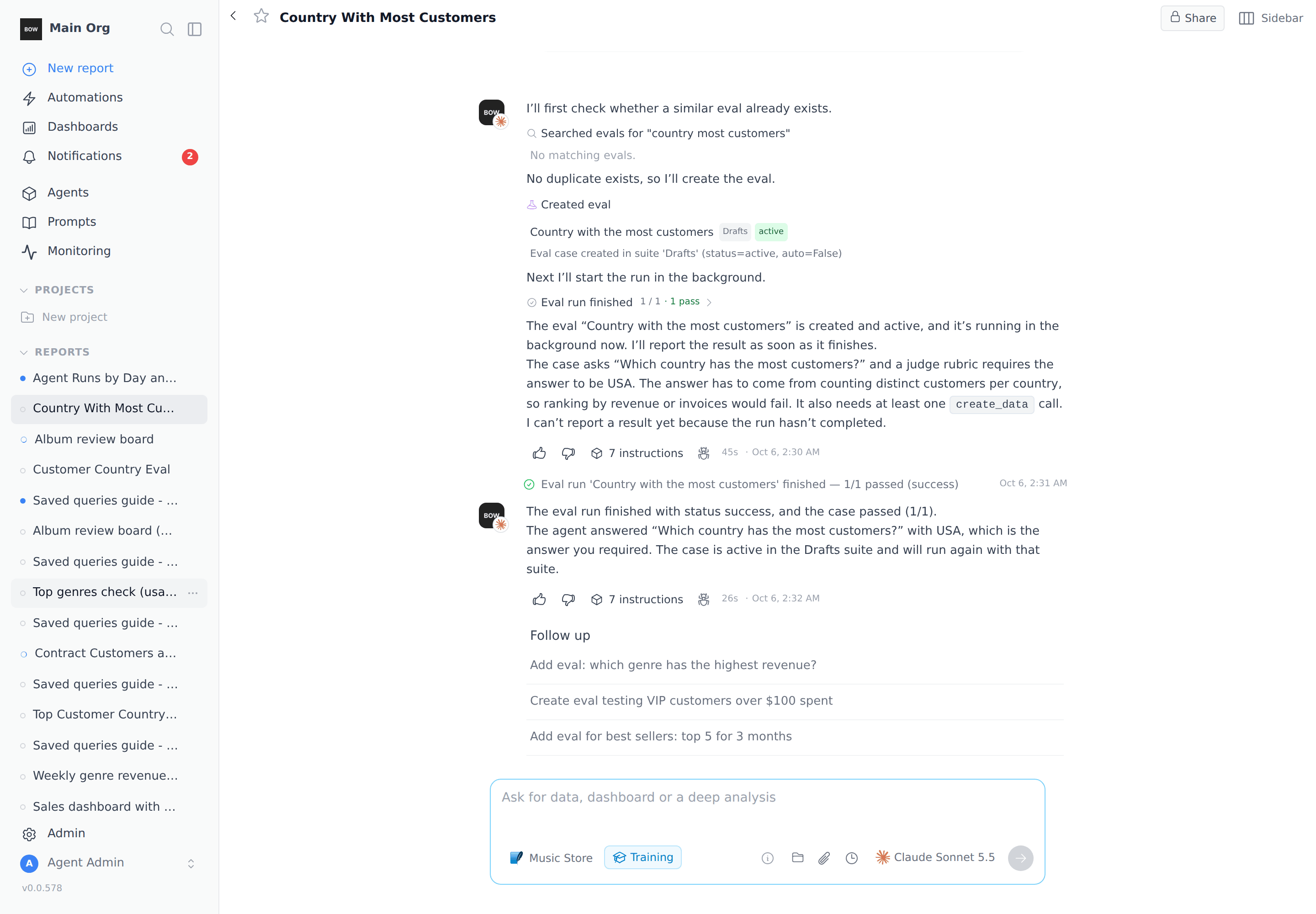 Evals that the agent creates go into a suite named **Drafts** under the agent's **Evals**, even if you name another suite in your message. Run them from there like any other case.
## More prompts to try
| Goal | Prompt |
| - | - |
| Test a business rule | *Add an eval testing that video tracks are excluded from top tracks.* |
| Re-check after a change | *Re-run the 'Country with the most customers' eval in the background.* |
## Tips
* **Pin answers that don't change.** History in the data doesn't move, so "Rock ranks first" makes a stable test. A count of "this month's orders" doesn't.
* **Say what should fail.** A judge prompt that names the wrong answers ("Fail if it names Margaret Park") catches more mistakes than one that only names the right one.
* **Check the method, not just the number.** Add a **Create Data** rule on **Used tables** when the right answer depends on joining the right tables.
* **Run the suite after every instruction change.** A passing suite means the change didn't break an answer that used to be right.
## Troubleshooting
* **A run stays at "In progress".** Runs that ask the agent several questions take a few minutes. If a run is stuck for much longer, click **Stop** in the run and start it again.
* **"eval runs are already in progress".** An organization can only have a few eval runs going at once. Wait for one to finish, or stop it, and try again.
* **A case shows Error instead of Fail.** Error means the agent never finished answering, so nothing was judged. Run the case again.
## Related
* [Evals](/agents/evals)
* [Train an agent](/agents/train-an-agent)
* [Instructions and knowledge](/agents/instructions)
* [Runs and traces](/observe-and-govern/runs-and-traces)
This documentation is built and hosted on [Mintlify](https://mintlify.com), a developer documentation platform.
Evals that the agent creates go into a suite named **Drafts** under the agent's **Evals**, even if you name another suite in your message. Run them from there like any other case.
## More prompts to try
| Goal | Prompt |
| - | - |
| Test a business rule | *Add an eval testing that video tracks are excluded from top tracks.* |
| Re-check after a change | *Re-run the 'Country with the most customers' eval in the background.* |
## Tips
* **Pin answers that don't change.** History in the data doesn't move, so "Rock ranks first" makes a stable test. A count of "this month's orders" doesn't.
* **Say what should fail.** A judge prompt that names the wrong answers ("Fail if it names Margaret Park") catches more mistakes than one that only names the right one.
* **Check the method, not just the number.** Add a **Create Data** rule on **Used tables** when the right answer depends on joining the right tables.
* **Run the suite after every instruction change.** A passing suite means the change didn't break an answer that used to be right.
## Troubleshooting
* **A run stays at "In progress".** Runs that ask the agent several questions take a few minutes. If a run is stuck for much longer, click **Stop** in the run and start it again.
* **"eval runs are already in progress".** An organization can only have a few eval runs going at once. Wait for one to finish, or stop it, and try again.
* **A case shows Error instead of Fail.** Error means the agent never finished answering, so nothing was judged. Run the case again.
## Related
* [Evals](/agents/evals)
* [Train an agent](/agents/train-an-agent)
* [Instructions and knowledge](/agents/instructions)
* [Runs and traces](/observe-and-govern/runs-and-traces)
This documentation is built and hosted on [Mintlify](https://mintlify.com), a developer documentation platform.