> ## Documentation Index
> Fetch the complete documentation index at: https://docs.bagofwords.com/llms.txt
> Use this file to discover all available pages before exploring further.
# Lists
> Let an agent fill a typed table from documents, emails and data, with a source quote for every value.
A list is a table that belongs to an agent and that the agent fills in for you. You define the fields once, such as counterparty, annual value and renewal date. Then you ask the agent to read your contracts, invoices, emails or query results and save what it finds. Each value keeps the quote it came from, so you can check it in seconds.
Use lists for work you would otherwise copy into a spreadsheet by hand: contract terms, invoice details, vendor data, obligations and deadlines, or any record you want to collect the same way every time.
 ## How lists work
1. **Define the fields.** Give the list a name and the fields each row should have. Each field has a type and a short description that tells the agent what to look for.
2. **Ask the agent.** In a report with that agent, say what to extract, for example *“Read every contract and save each customer to the Contracts list.”* The agent reads the sources and saves the rows.
3. **Review.** Every value shows its status and the quote it came from. Fix anything you disagree with; your edits are kept.
4. **Use the data.** Query the list in a report like any other table, or export it as CSV.
Each list lives on one agent. Every agent can have its own lists, and they appear under **Lists** in the agent’s tree.
## Create a list
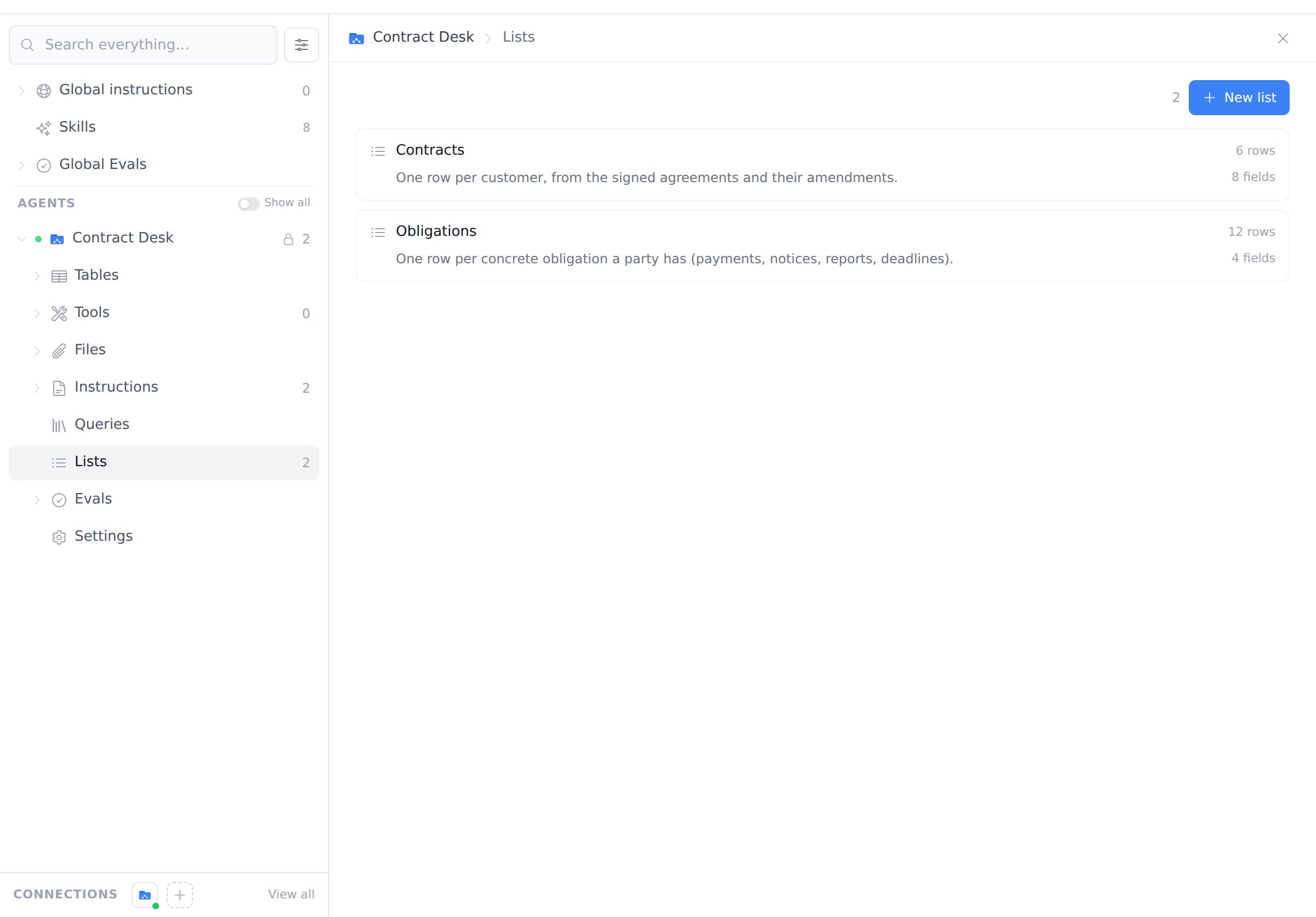
Open **Agents**, select an agent, choose **Lists** in its tree, and click **New list**.
## How lists work
1. **Define the fields.** Give the list a name and the fields each row should have. Each field has a type and a short description that tells the agent what to look for.
2. **Ask the agent.** In a report with that agent, say what to extract, for example *“Read every contract and save each customer to the Contracts list.”* The agent reads the sources and saves the rows.
3. **Review.** Every value shows its status and the quote it came from. Fix anything you disagree with; your edits are kept.
4. **Use the data.** Query the list in a report like any other table, or export it as CSV.
Each list lives on one agent. Every agent can have its own lists, and they appear under **Lists** in the agent’s tree.
## Create a list
Open **Agents**, select an agent, choose **Lists** in its tree, and click **New list**.
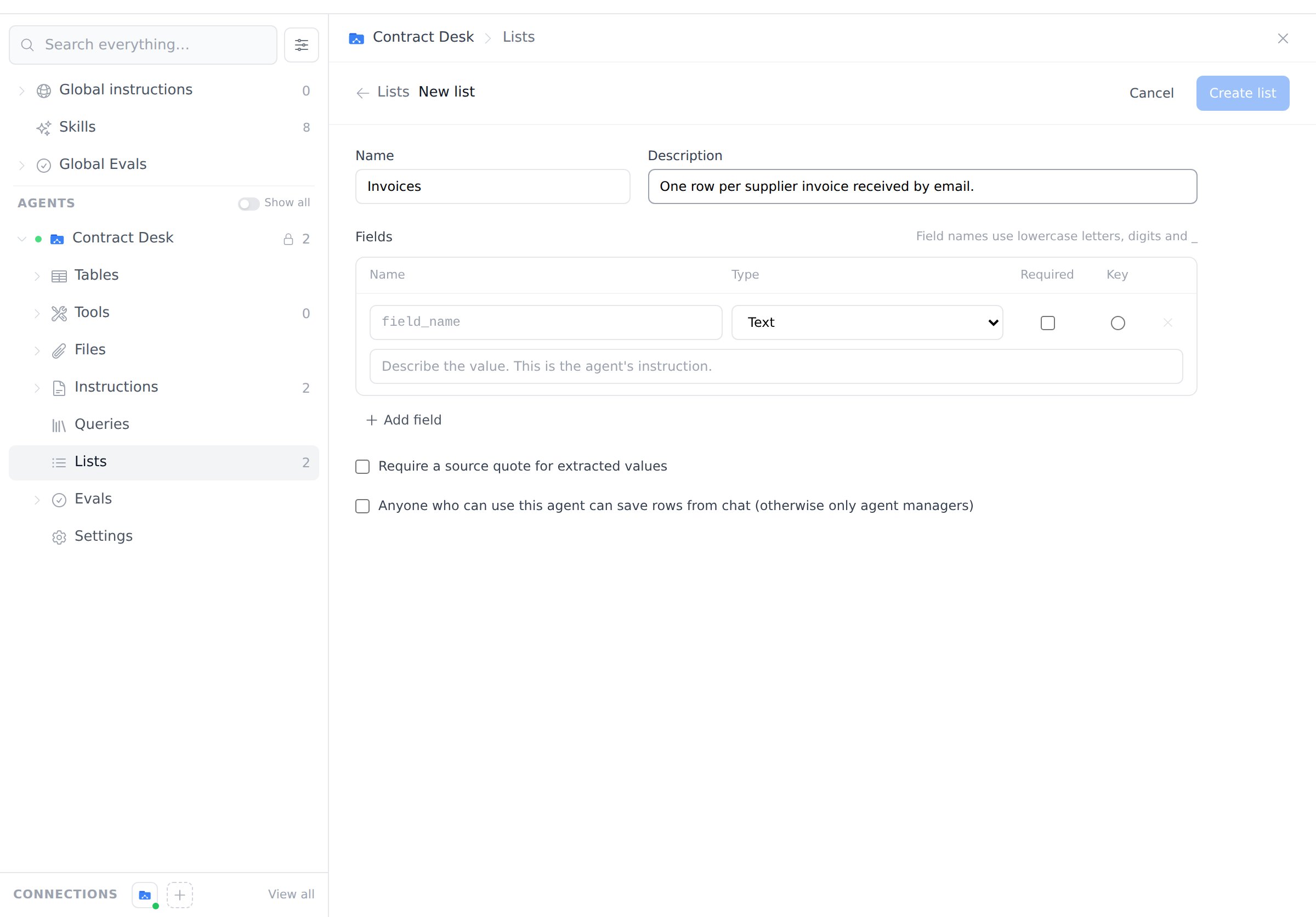 * **Name and description.** The description tells the agent what one row represents, for example “One row per customer, from the signed agreements and their amendments.”
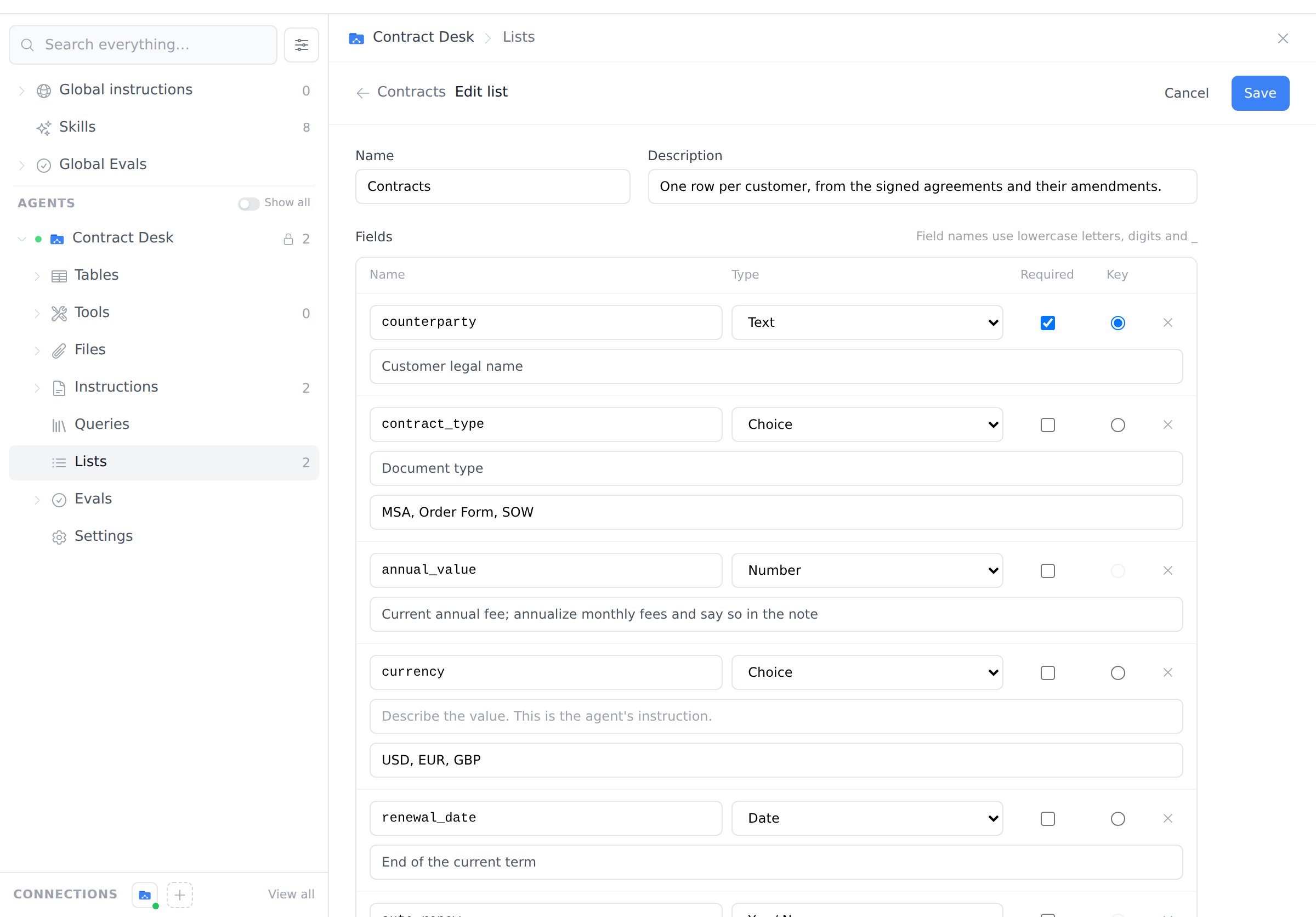
* **Fields.** Add one field per value you want. Field names use lowercase letters, digits and `_`. Each field's description is the agent's instruction for that value. Be specific, for example “Current annual fee; annualize monthly fees and say so in the note.”
* **Required.** A new row can't be saved without a value for this field.
* **Key.** Optional. Choose the field that identifies a row, such as `counterparty`. When the agent sees the same key again, it **updates** that row instead of adding a duplicate. Leave the key empty for lists with many rows per source, such as one row per obligation.
* **Require a source quote for extracted values.** When on, the agent must quote the source for every value it reports as found or inferred.
* **Anyone who can use this agent can save rows from chat.** When off (the default), only people who manage the agent can have it save rows. Everyone with access can still view and export the list.
* **Name and description.** The description tells the agent what one row represents, for example “One row per customer, from the signed agreements and their amendments.”
* **Fields.** Add one field per value you want. Field names use lowercase letters, digits and `_`. Each field's description is the agent's instruction for that value. Be specific, for example “Current annual fee; annualize monthly fees and say so in the note.”
* **Required.** A new row can't be saved without a value for this field.
* **Key.** Optional. Choose the field that identifies a row, such as `counterparty`. When the agent sees the same key again, it **updates** that row instead of adding a duplicate. Leave the key empty for lists with many rows per source, such as one row per obligation.
* **Require a source quote for extracted values.** When on, the agent must quote the source for every value it reports as found or inferred.
* **Anyone who can use this agent can save rows from chat.** When off (the default), only people who manage the agent can have it save rows. Everyone with access can still view and export the list.
 ### Field types
| Type | Use for | Example |
| ------- | ----------------------------- | ------------------------- |
| Text | Names, clauses, free text | `governing_law` |
| Number | Amounts, rates | `annual_value` |
| Integer | Counts, days | `notice_days` |
| Yes/No | Flags | `auto_renew` |
| Date | Dates, saved as `YYYY-MM-DD` | `renewal_date` |
| Choice | One of a fixed set of options | `currency`: USD, EUR, GBP |
An agent can have up to 10 lists, and a list up to 40 fields.
### Change a list later
Open the list, click **⋯** and choose **Edit fields**. Renaming a field, editing descriptions, adding optional fields or adding options is always safe. Changing a field's type, removing a field or an option, making a field required, or changing the key marks existing rows as out of date (a warning icon in the table), so you know to re-run the extraction.
## Fill a list from chat
Start a report with the agent and ask in plain language. The agent reads the sources it has access to, such as files, directories, emails, web pages or query results, and saves the rows to the list you name.
Example requests:
* *“Read every contract in the folder and save each customer to the Contracts list, with the quote for each value.”*
* *“Go through every contract and save each concrete obligation to the Obligations list.”*
* *“A new amendment for Acme Logistics was added. Re-check all contracts and update the Contracts list.”*
While the agent writes, the chat shows where it is saving and how many records it has written so far.
### Field types
| Type | Use for | Example |
| ------- | ----------------------------- | ------------------------- |
| Text | Names, clauses, free text | `governing_law` |
| Number | Amounts, rates | `annual_value` |
| Integer | Counts, days | `notice_days` |
| Yes/No | Flags | `auto_renew` |
| Date | Dates, saved as `YYYY-MM-DD` | `renewal_date` |
| Choice | One of a fixed set of options | `currency`: USD, EUR, GBP |
An agent can have up to 10 lists, and a list up to 40 fields.
### Change a list later
Open the list, click **⋯** and choose **Edit fields**. Renaming a field, editing descriptions, adding optional fields or adding options is always safe. Changing a field's type, removing a field or an option, making a field required, or changing the key marks existing rows as out of date (a warning icon in the table), so you know to re-run the extraction.
## Fill a list from chat
Start a report with the agent and ask in plain language. The agent reads the sources it has access to, such as files, directories, emails, web pages or query results, and saves the rows to the list you name.
Example requests:
* *“Read every contract in the folder and save each customer to the Contracts list, with the quote for each value.”*
* *“Go through every contract and save each concrete obligation to the Obligations list.”*
* *“A new amendment for Acme Logistics was added. Re-check all contracts and update the Contracts list.”*
While the agent writes, the chat shows where it is saving and how many records it has written so far.
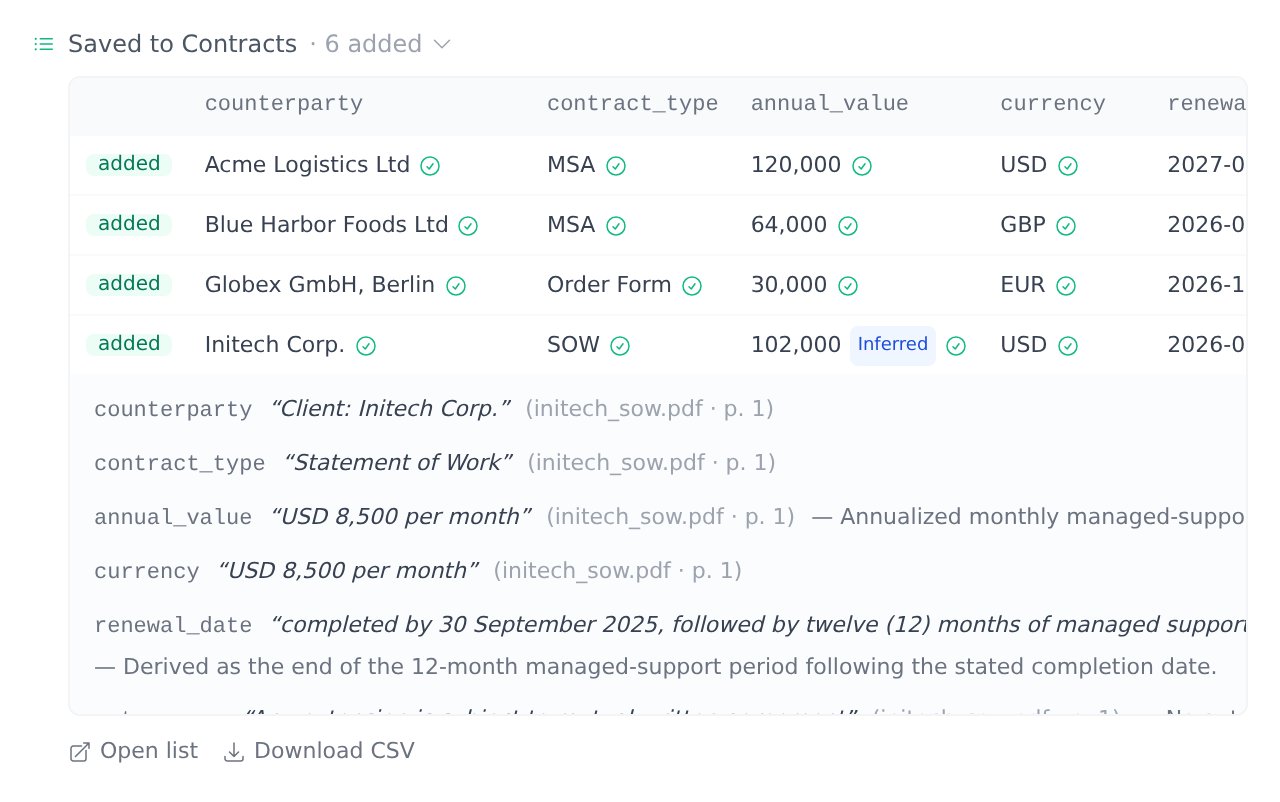
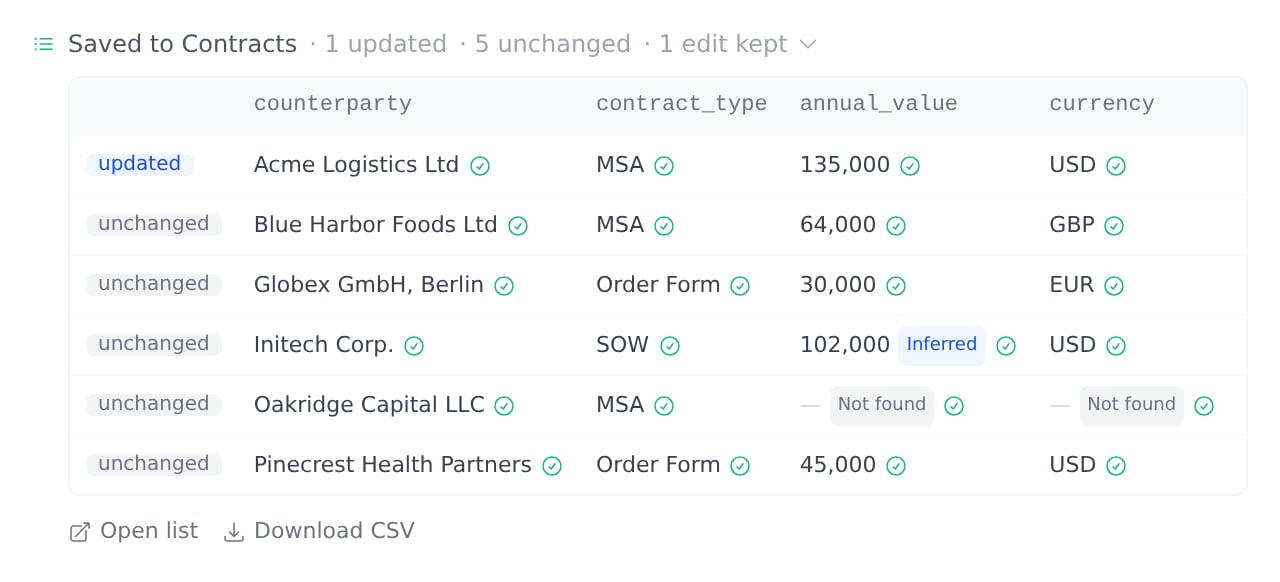
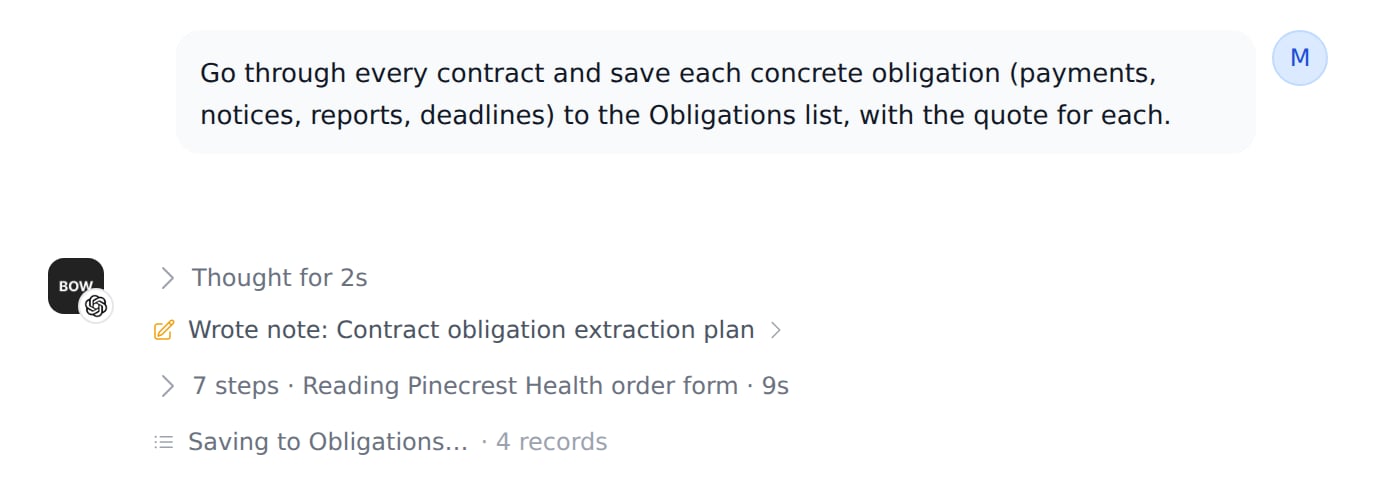 When it finishes, the chat shows what happened: how many rows were **added**, **updated** or **unchanged**. Expand it to see every record, with a status and a source mark for each value. Click a record to read its quotes, and use **Open row** to jump to that row in the list.
 ### Value statuses
Every value carries a status, so a blank is never ambiguous:
| Status | Meaning |
| --------- | ------------------------------------------------------------------------------------------------------- |
| Found | Stated in the source. The quote shows where. |
| Inferred | Derived from the source, for example a monthly fee annualized to a yearly value. The note explains how. |
| Ambiguous | The source supports more than one answer. The note explains why. |
| Not found | The source doesn't state it. The value stays empty. |
### Checked sources
A **✓** next to a value means its quote was found in text the agent actually read in that report, such as a file, an email, a web page or your own message. A **?** means the quote could not be matched, so check that value first. Matching tolerates line breaks, hyphenation and quotation-mark styles, but never a changed number or word.
### Updating rows
With a key field, running the extraction again updates the existing rows. Values that didn't change are left alone. Only a change in a value or its status is recorded in the row's history.
### Value statuses
Every value carries a status, so a blank is never ambiguous:
| Status | Meaning |
| --------- | ------------------------------------------------------------------------------------------------------- |
| Found | Stated in the source. The quote shows where. |
| Inferred | Derived from the source, for example a monthly fee annualized to a yearly value. The note explains how. |
| Ambiguous | The source supports more than one answer. The note explains why. |
| Not found | The source doesn't state it. The value stays empty. |
### Checked sources
A **✓** next to a value means its quote was found in text the agent actually read in that report, such as a file, an email, a web page or your own message. A **?** means the quote could not be matched, so check that value first. Matching tolerates line breaks, hyphenation and quotation-mark styles, but never a changed number or word.
### Updating rows
With a key field, running the extraction again updates the existing rows. Values that didn't change are left alone. Only a change in a value or its status is recorded in the row's history.
 If the agent sends a value that doesn't fit a field, such as a date in the wrong format or an option that isn't in the list, nothing is saved. The chat shows **Not saved** with the invalid cells highlighted, and the agent fixes the values and saves again on its own.
## Review and edit rows
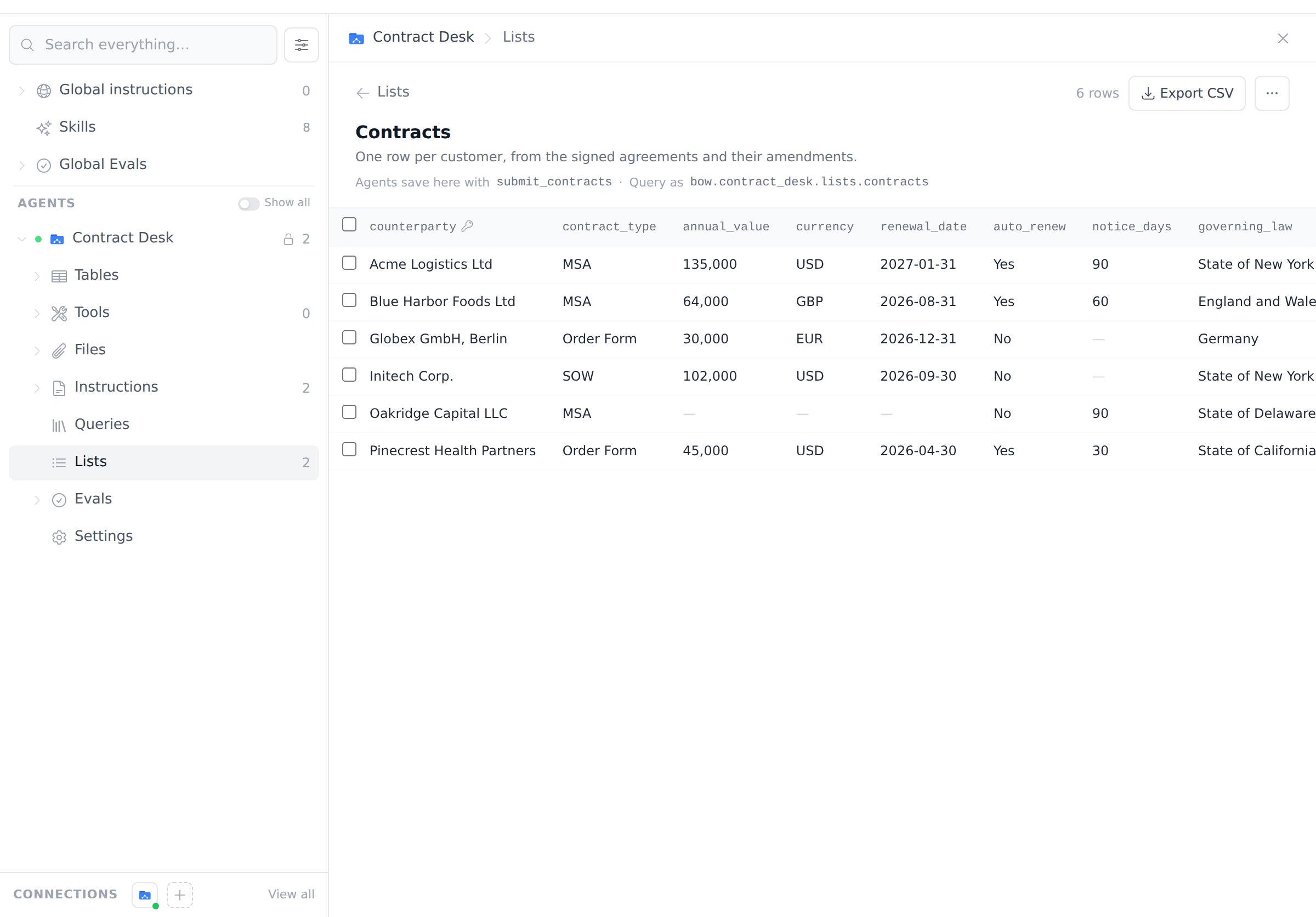
Open the list to see its rows. The key field is marked with a key icon.
If the agent sends a value that doesn't fit a field, such as a date in the wrong format or an option that isn't in the list, nothing is saved. The chat shows **Not saved** with the invalid cells highlighted, and the agent fixes the values and saves again on its own.
## Review and edit rows
Open the list to see its rows. The key field is marked with a key icon.
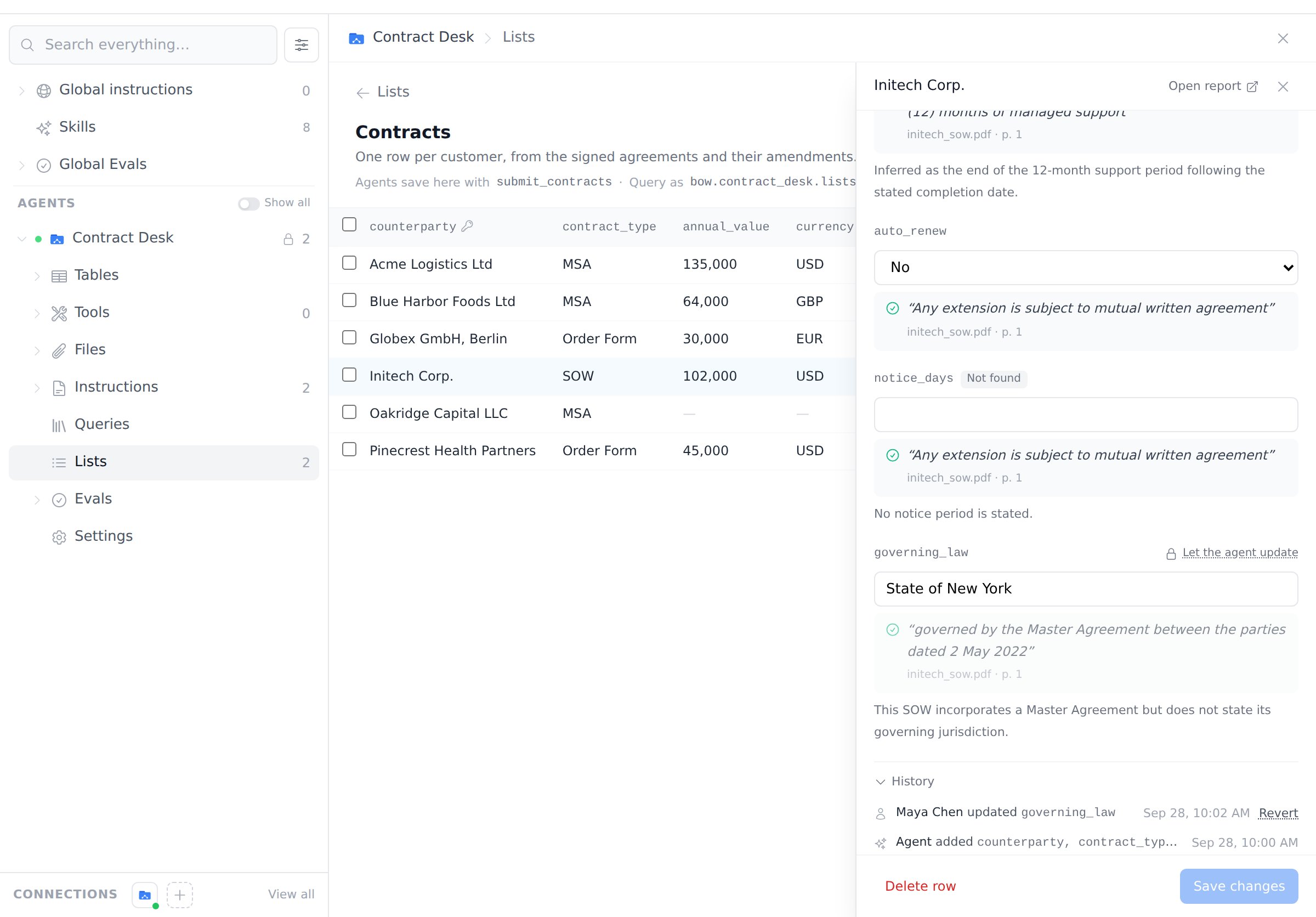
 Click a row to open it. For each field you see the value, its status, the quote with the file and page it came from, and the agent's note. **Open report** takes you to the conversation that saved the row.
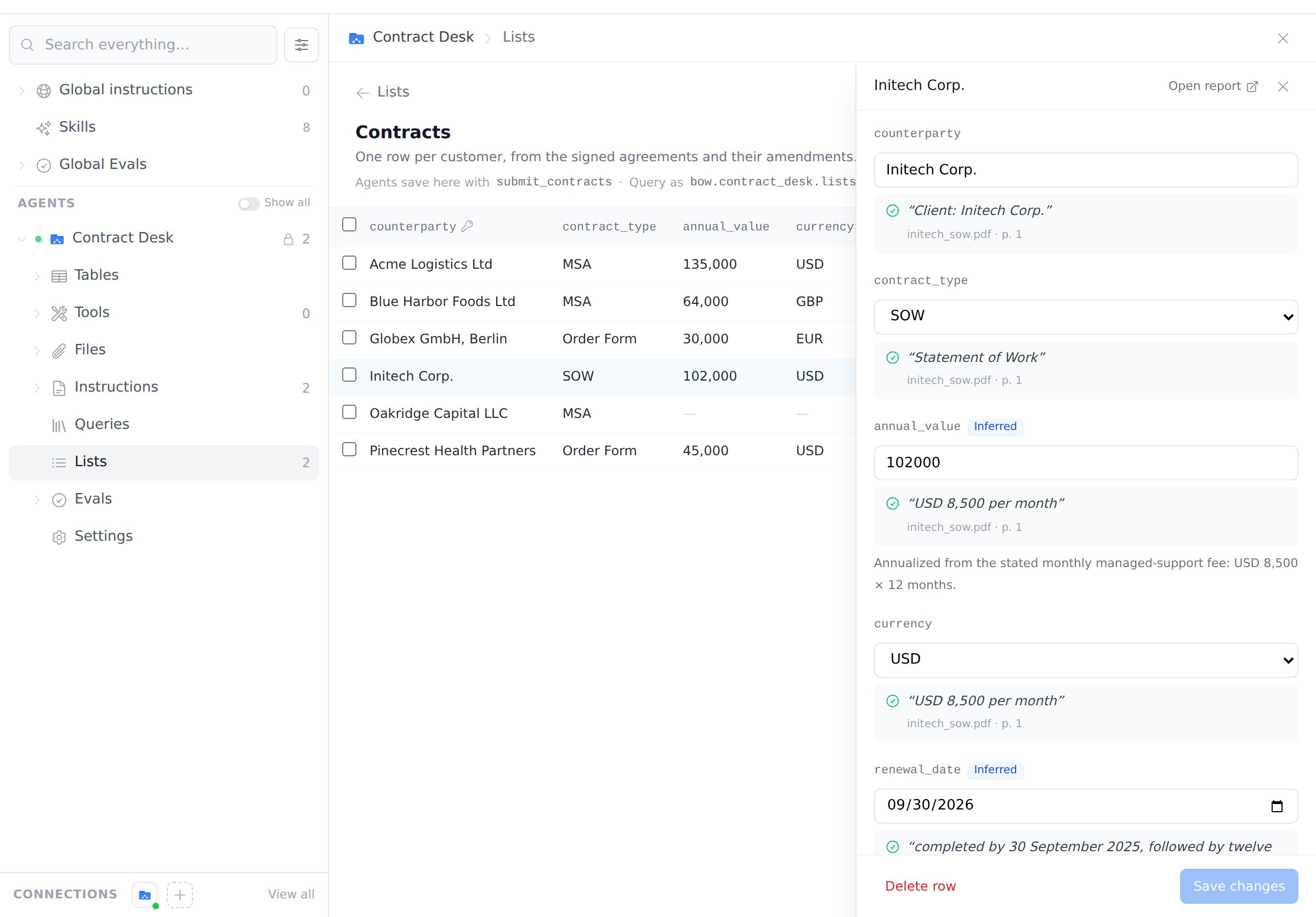 People who manage the agent can edit any value and click **Save changes**. The field is then **locked**: later extractions leave it alone and report it as a kept edit. Click **Let the agent update** on that field to hand it back to the agent.
**History** shows every change, who made it (the agent or a person) and when. Click **Revert** to restore an earlier value.
People who manage the agent can edit any value and click **Save changes**. The field is then **locked**: later extractions leave it alone and report it as a kept edit. Click **Let the agent update** on that field to hand it back to the agent.
**History** shows every change, who made it (the agent or a person) and when. Click **Revert** to restore an earlier value.
 ### Delete rows
* **One row:** open it and click **Delete row**.
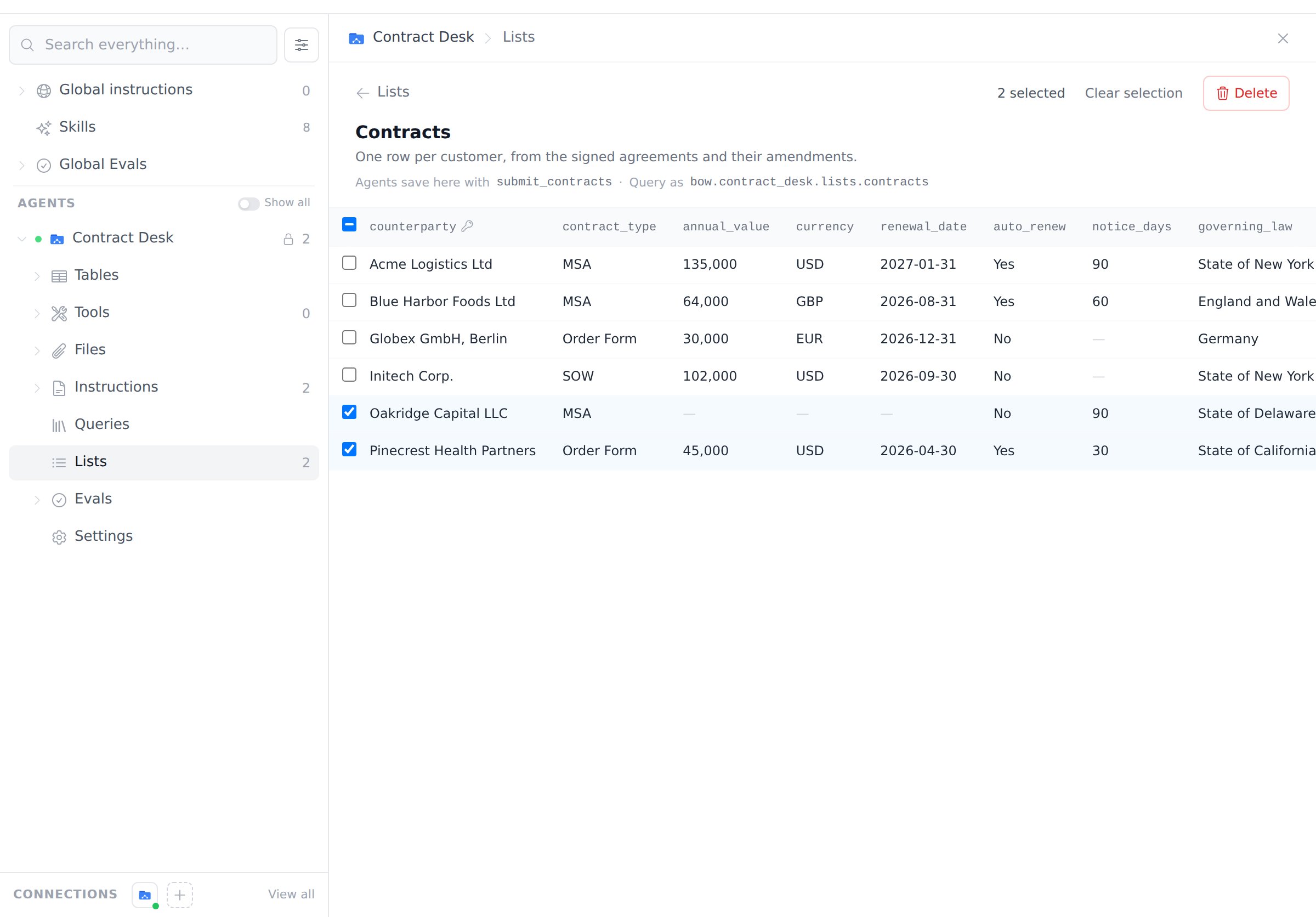
* **Several rows:** tick them in the table, then click **Delete**.
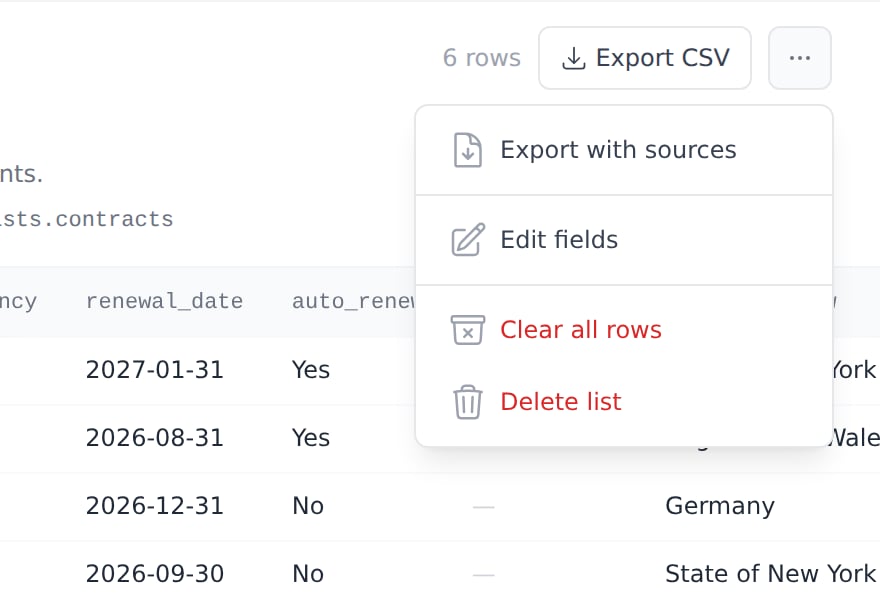
* **All rows:** click **⋯** and choose **Clear all rows**. The list stays, with its fields and its name, so the agent can fill it again.
### Delete rows
* **One row:** open it and click **Delete row**.
* **Several rows:** tick them in the table, then click **Delete**.
* **All rows:** click **⋯** and choose **Clear all rows**. The list stays, with its fields and its name, so the agent can fill it again.
 Deleted rows and their history can't be restored. To remove the list itself, click **⋯** and choose **Delete list**.
 ## Analyze a list
Every list is also a table the agent can query, named `bow..lists.
## Analyze a list
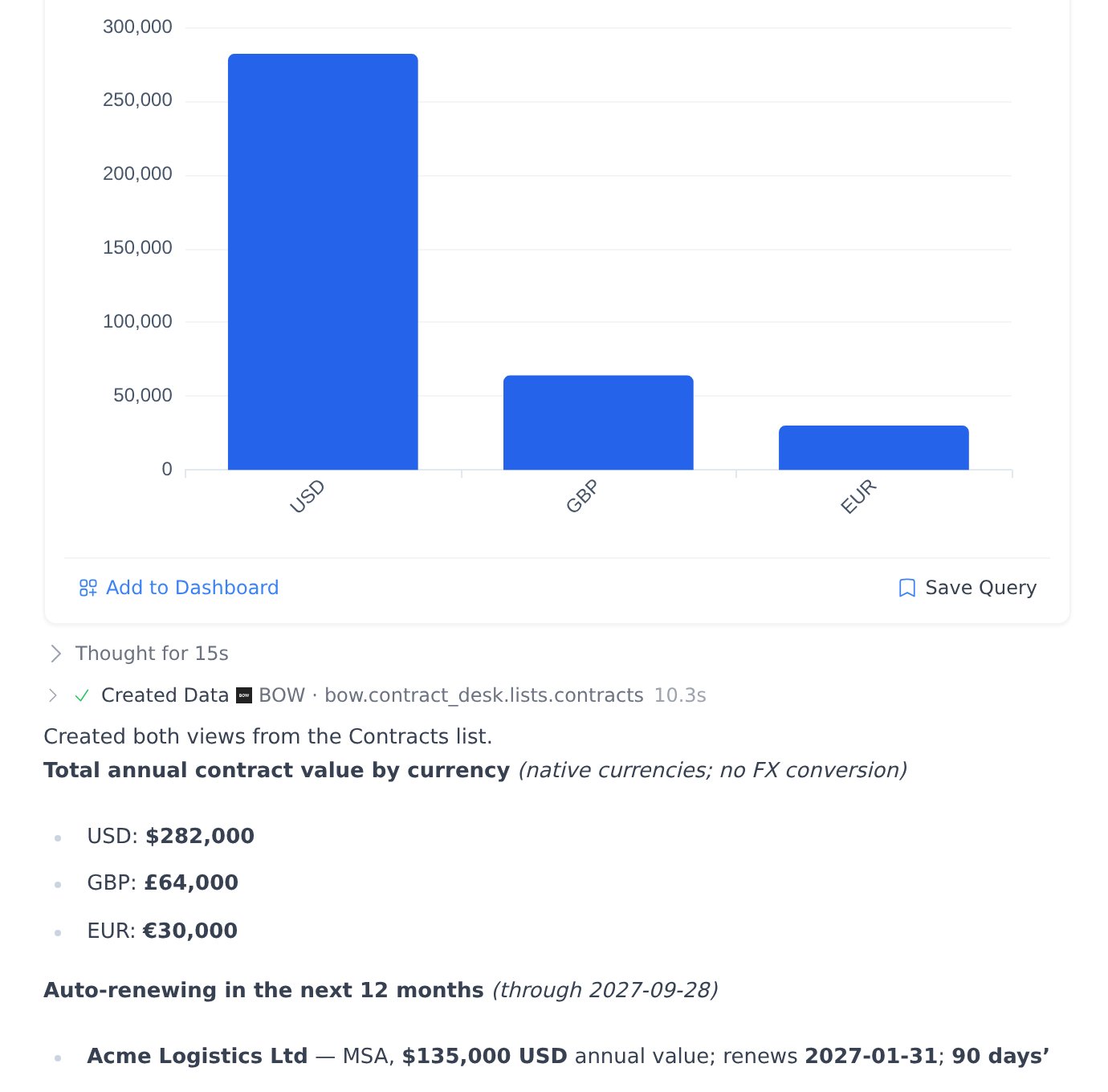
Every list is also a table the agent can query, named `bow..lists.`. For example, the Contracts list above is `bow.contract_desk.lists.contracts`. Ask for totals, filters or charts the same way you would over any other data:
* *“From the Contracts list, show total annual contract value by currency as a bar chart.”*
* *“Which contracts renew automatically in the next 12 months, and what notice do they need?”*
 Analysis reads the current values, including your edits. Each row also has `_row_id`, `_key`, `_report_id`, `_created_at`, `_updated_at` and `_edited_by_human` columns. The agent can include the source quote of a field as `__quote` when you ask for it.
## Export as CSV
* **Export CSV** on a list downloads every row.
* **⋯ → Export with sources** adds each value's status, quote, page and whether the quote was checked, plus the row's report, last update and whether a person edited it.
* **Download CSV** in the chat downloads only the rows saved in that report.
Files open cleanly in Excel and Google Sheets, including non-English text.
## Who can do what
| Action | Who |
| ------------------------------------------------------ | ----------------------------------------------------------------------------- |
| See lists and rows, export CSV, query lists in reports | Anyone who can use the agent |
| Create, edit or delete lists | People who manage the agent |
| Edit, unlock, revert or delete rows | People who manage the agent |
| Have the agent save rows from chat | People who manage the agent, or anyone who can use it when the list allows it |
Conversations on a shared artifact never write to lists.
## Limits
* Up to 10 lists per agent and 40 fields per list.
* Fields hold single values. Repeating groups, such as invoice line items, are not supported yet; use a separate keyless list with one row per item instead.
* Up to 1,000 rows per delete.
Analysis reads the current values, including your edits. Each row also has `_row_id`, `_key`, `_report_id`, `_created_at`, `_updated_at` and `_edited_by_human` columns. The agent can include the source quote of a field as `__quote` when you ask for it.
## Export as CSV
* **Export CSV** on a list downloads every row.
* **⋯ → Export with sources** adds each value's status, quote, page and whether the quote was checked, plus the row's report, last update and whether a person edited it.
* **Download CSV** in the chat downloads only the rows saved in that report.
Files open cleanly in Excel and Google Sheets, including non-English text.
## Who can do what
| Action | Who |
| ------------------------------------------------------ | ----------------------------------------------------------------------------- |
| See lists and rows, export CSV, query lists in reports | Anyone who can use the agent |
| Create, edit or delete lists | People who manage the agent |
| Edit, unlock, revert or delete rows | People who manage the agent |
| Have the agent save rows from chat | People who manage the agent, or anyone who can use it when the list allows it |
Conversations on a shared artifact never write to lists.
## Limits
* Up to 10 lists per agent and 40 fields per list.
* Fields hold single values. Repeating groups, such as invoice line items, are not supported yet; use a separate keyless list with one row per item instead.
* Up to 1,000 rows per delete.